%20(1).svg)
Conversational Ticketing: Benefits, Use Cases & Deployment
We break down conversational ticketing, how it works, key benefits, common use cases, deployment timelines, and how teams expand it beyond IT.


Conversational ticketing is what our whole product thesis was built around.
As we discussed in our founding story, when our co-founder Alex led IT engineering at Dropbox and Gusto, a major problem he faced was that employees had to leave their current workflow and navigate to an external portal to submit a ticket. This was inefficient. Meanwhile, employees were already asking questions in Slack and Teams anyway. Ticketing needed to evolve to meet them where they were.
That's why we created Risotto: a Slack-native AI agent that auto-resolves 20–60% of tier-1 IT requests (see customer stories) and deploys in hours, not weeks or months. It's designed to integrate with existing ticketing systems — we're not asking IT teams to abandon their current infrastructure, just adding an AI ticket resolution layer on top of it.
In this article, we'll discuss:
- What is conversational ticketing & how does it work?
- Key benefits of conversational ticketing
- Common use cases & applications of conversational ticketing
- How long does it take to deploy a conversational ticketing system?
- Implementing conversational ticketing for multiple departments beyond IT
Note: Schedule a demo call to see Risotto in action.
What Is Conversational Ticketing & How Does It Work?
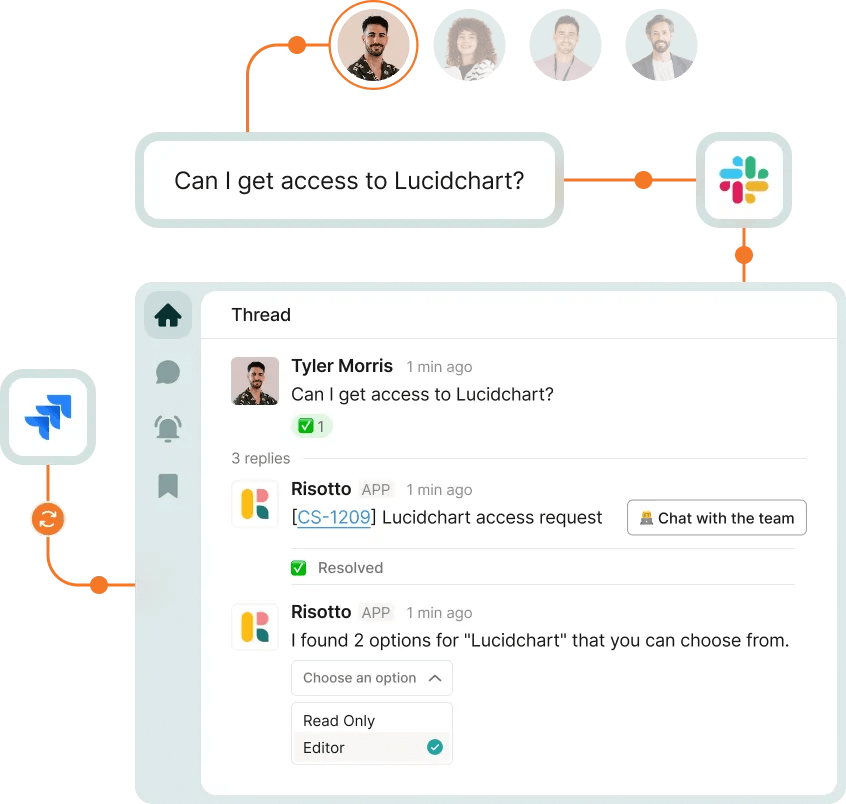
Instead of forcing employees to fill out rigid forms and check separate portals for updates, conversational ticketing lets them:
- Ask questions in plain language within tools they already use, like Slack or Microsoft Teams.
- Have an AI agent that doesn't just deflect tickets, but actively tries to solve them. The best conversational AI IT ticketing platforms engage in back-and-forth dialogue with employees — asking clarifying triage questions, performing multi-step troubleshooting, and even executing actions like granting software access or resetting passwords.
- Seamlessly escalate tickets in Slack when needed. If a human is required, the ticket routes to an IT agent in Slack (with full ticket context intact), and the agent can respond directly in the thread.
- Integrate with existing workflows & ticketing systems. All of this happens while a formal ticket is created, tracked, and managed behind the scenes. Risotto integrates with existing ticketing systems like Jira, Freshservice, Zendesk, ServiceNow, and others.
As several of our customers shared:
“We want AI to seamlessly fit into our team’s daily operations, meeting our users where they already work… Risotto’s minimal operational overhead and integration into Slack has enabled us to achieve exactly that.”
– Phillip Rickett, VP of IT at Fundrise
“We wanted to implement more standardization and automation in our help desk, but there wasn’t an easy way in Slack without clunky custom work. Risotto helped us do that.”
– Vergil Smith, IT Manager at Vidyard
“Risotto became the orchestration layer for Jira Service Management and gives us instant automation with AI… We always wanted to require a reason for application access, but it was really difficult to integrate that into JSM. Risotto adds that functionality to JSM and so much more.”
– Tom Grinberg, IT Manager at Trust & Will
“Getting Risotto integrated with Jira, Slack, and Okta was so seamless and fast… Risotto is one of the easiest tools I’ve implemented. We were up and running in less than a week and already seeing our first autosolves...”
– Jason Huey, Senior IT Systems Administrator at ThoughtSpot
Key Benefits of Conversational Ticketing

❇️ Better employee experience and adoption
Slack and Teams are already where employees ask questions and get work done — so meeting them there makes support feel seamless rather than like a separate system to learn. When the experience is natural, adoption follows.
As Toby Stewart, IT Engineering Manager at Ironclad, shared:
"We include Risotto in all our onboarding material now, and once people see how useful it is they keep coming back to use it more, which is a really good sign."
❇️ Scale IT support without adding headcount
As companies grow, every new employee adds to IT ticket volume — but IT teams rarely grow proportionally.
As we shared in a recent case study, Jobber experienced this firsthand: in 2025, rapid company growth triggered a surge in support requests, leaving their five-person IT team triaging tickets for hours at a time with little bandwidth for strategic work.
As Mike Smith, IT Operations Manager, put it:
"Historically, ticket work overshadowed strategic project work. We were spending our days trying to keep the wheels on."
After implementing Risotto’s conversational ticketing system, Jobber achieved a 38% IT ticket automation rate, 3-hour AI TTR (down from 35-hour human TTR), and over 2,747 hours saved for employees waiting for ticket resolution.
Risotto freed their IT team to focus on high-value projects instead of fielding repetitive tier-1 tickets. All while giving employees a faster, improved support experience.
❇️ Faster response times and improved SLA metrics
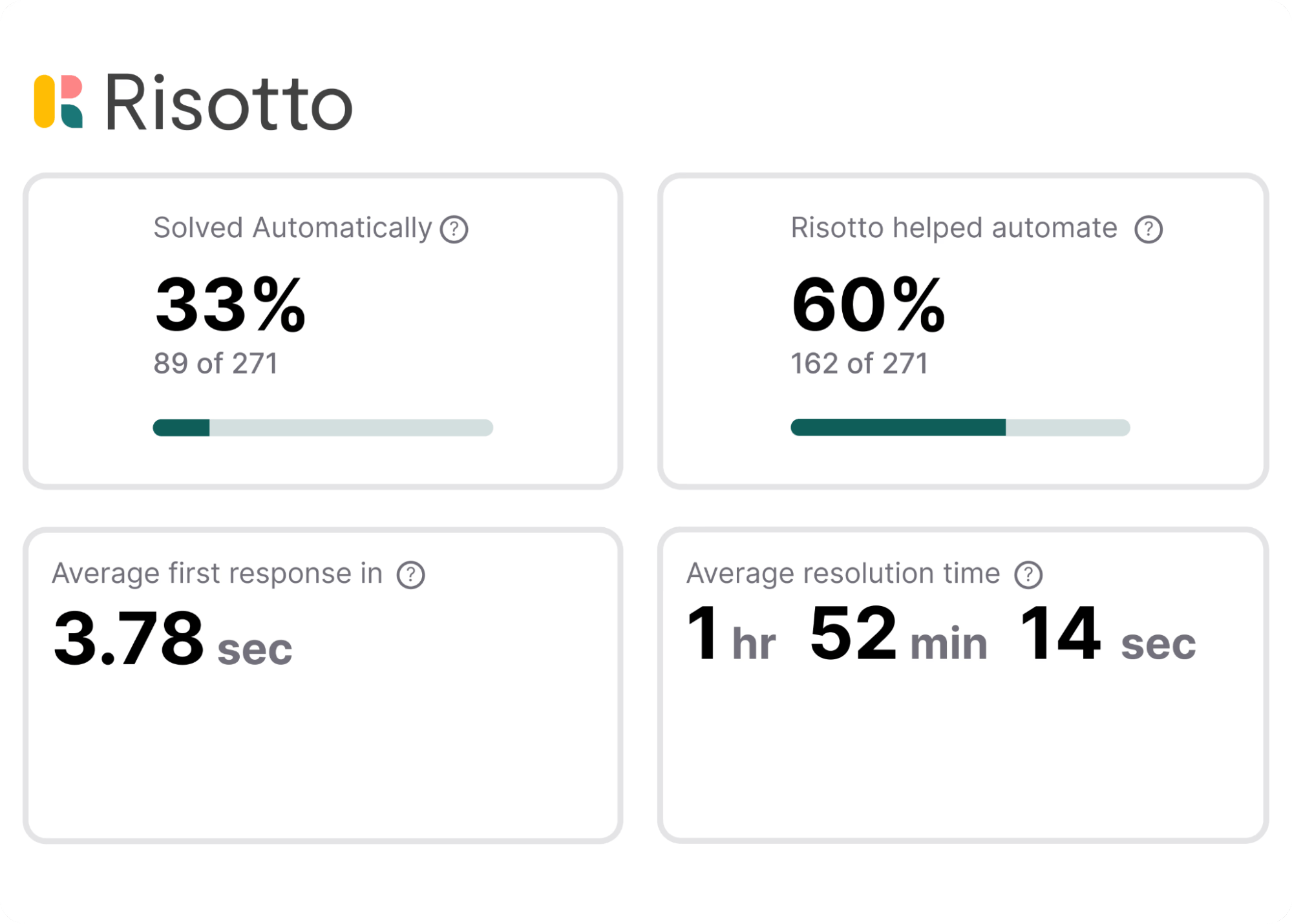
AI-powered ticket resolution naturally improves various key SLA metrics. As Charlie Verrey, IT Manager at Retool, shared in our case study:
- “Our target SLA was 2 days and we’re now beating that, averaging only 1 day to ticket close using Risotto. So we’re meeting that SLA very well and Risotto is a big part of that.”
- “Time-to-first-response is a really important metric and you can see that it’s literally seconds with Risotto, which is awesome.”
- “Risotto’s metrics dashboard is really nice and well done. I like how you streamline the metrics and show the important things that we need. All the metrics work really well together.”
But speed isn't the only improvement. With traditional ticketing systems, requests made in Slack or Teams can slip through the cracks, and high-priority issues often get buried under routine requests. Conversational ticketing automatically captures every request and intelligently routes tickets, so critical problems don't get lost in the noise.
❇️ Reducing SaaS sprawl through IGA automation

Most people know AI agents can handle knowledge requests — but access requests are an underutilized opportunity.
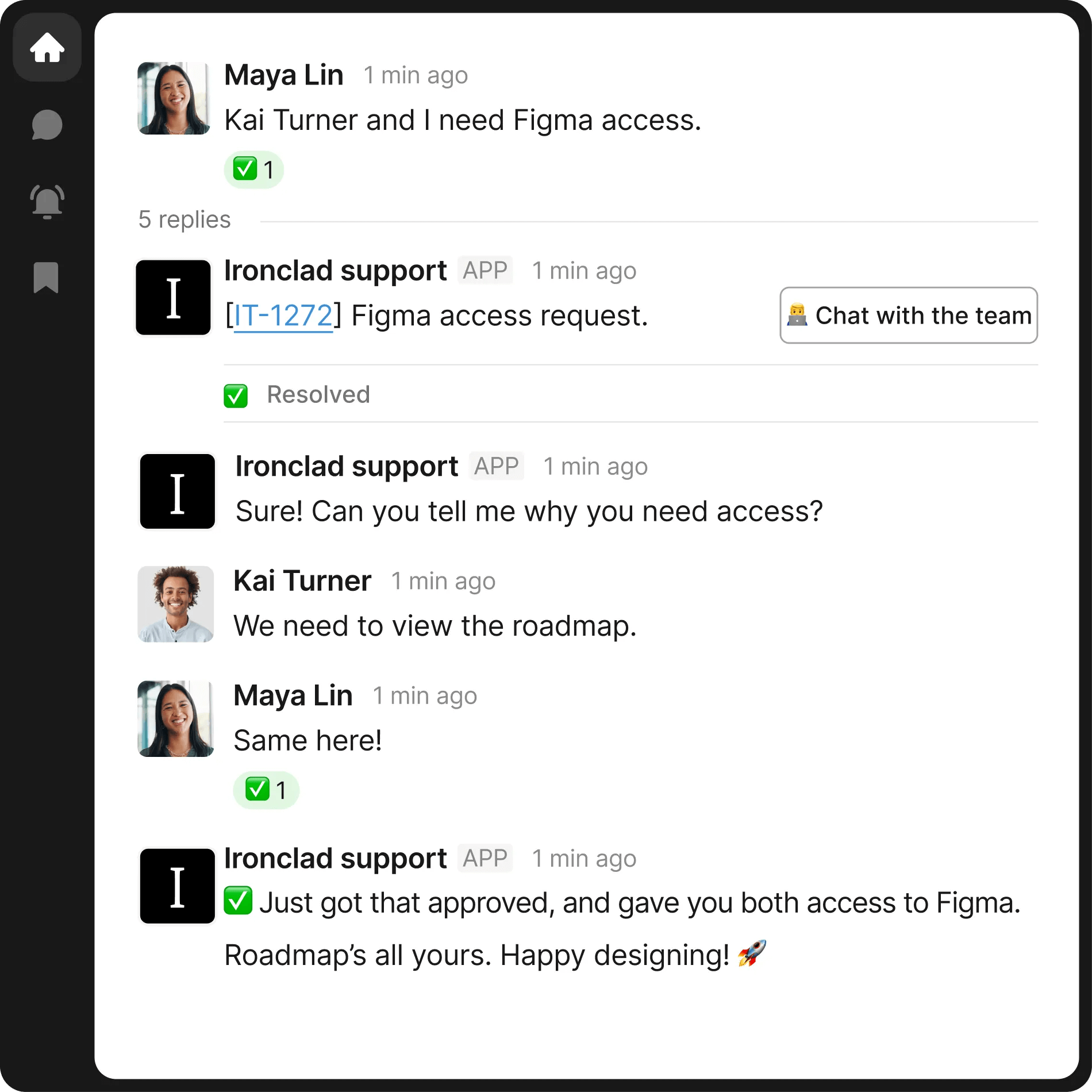
As we share in our Ironclad case study, their help desk was processing 100–150 tickets weekly — with the volume steadily increasing toward 1,000 monthly requests — and 60–70% of those support tickets were access-related.
After integrating Risotto, they achieved 90% automation rate across Ironclad’s access-related IT requests, with 40–50 applications fully integrated into intelligent access workflows.
Notably, as Toby Stewart, IT Engineering Manager at Ironclad, shared:
"Other IGA solutions felt clunky to set up and maintain. There was a lot of overhead to maintain them and they weren't embedded in the help desk, so you're solving one problem but creating another.”
That's the magic of Risotto: access management lives inside Slack, which employees are already accustomed to using — no separate portals, no context switching, no extra friction.
Common Use Cases for Conversational Ticketing
Conversational ticketing excels across the full spectrum of tier-1 IT support tickets:
- Fundrise: Automated nearly 60% of IT support tickets
- Superhuman: Automated nearly 20% of IT support tickets
- ThoughtSpot: Automated nearly 48% of IT support tickets
- Trust & Will: Automated nearly 35% of IT support tickets
- Jobber: Automated nearly 38% of IT support tickets
- Hazel Health: Improved deflection rates from 3–5% to over 20%
- Shakepay: Automated nearly 40% of IT support tickets
- Ironclad: Automated nearly 90% of access-related IT requests
- Retool: Reduced SLA resolution time from an average of 2 days to under 1 day
- Vidyard: Automated nearly 56% of IT support tickets
Here's how Risotto automates different types of IT requests:
❇️ Knowledge Questions
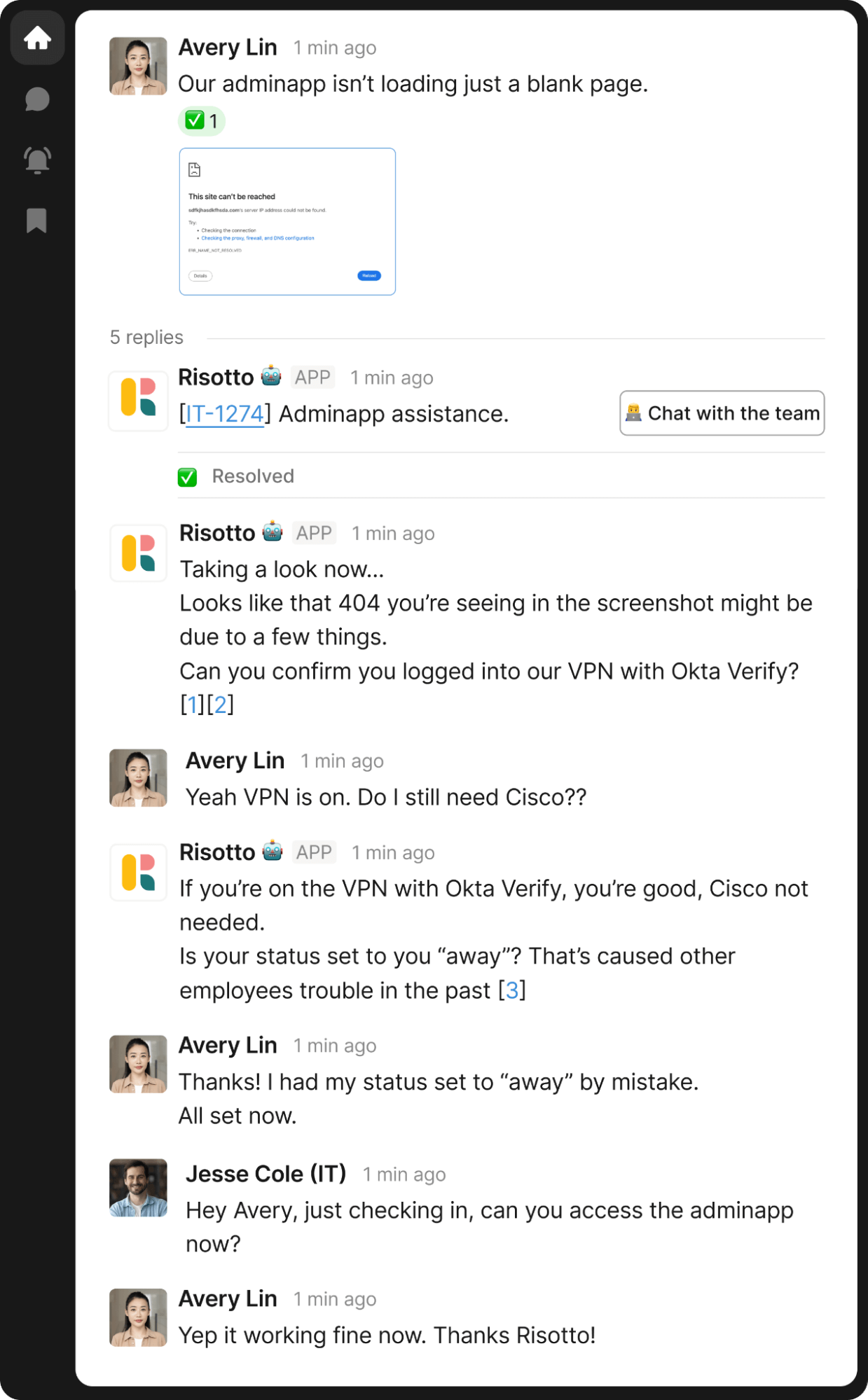
When employees ask "How does a guest connect to the Wi-Fi?" or "How do I set up my VPN?", Risotto searches multiple sources at once — not just your knowledge base, but also Slack conversations and past tickets where your team solved similar issues.
Risotto’s conversational AI agent also excels at initial triage, multi-step troubleshooting, and has multimodal capabilities (it can analyze screenshots to diagnose issues).
All of this translates to actually solving a high portion of knowledge tickets, not just deflecting to a KB article (which is the typical experience with many legacy providers).
❇️ Software Access Requests
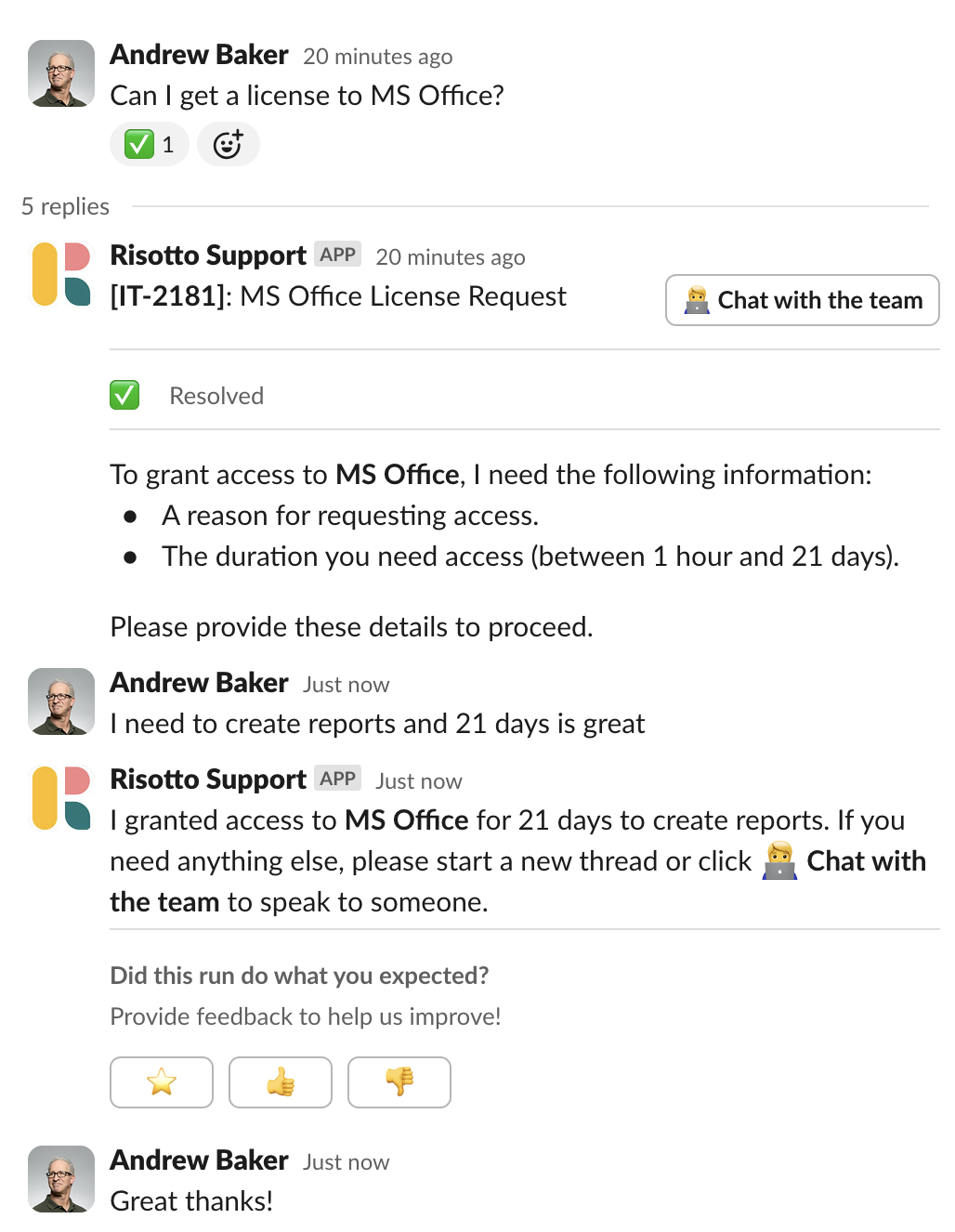
Employees request software access in Slack using natural language, and Risotto handles the entire workflow automatically — from collecting business justifications and routing approval requests to managers, to provisioning access.
It can also handle time-based access that automatically revokes when the period expires.
On the backend, via an intuitive self-serve dashboard, you can add applications in minutes (we offer integrations with Okta groups, Google Groups, and other IDPs), create dynamic multi-step approval flows, configure role-based and time-based controls, and more. We dive deeper into this feature in our article on the best IGA software.
❇️ Password Resets
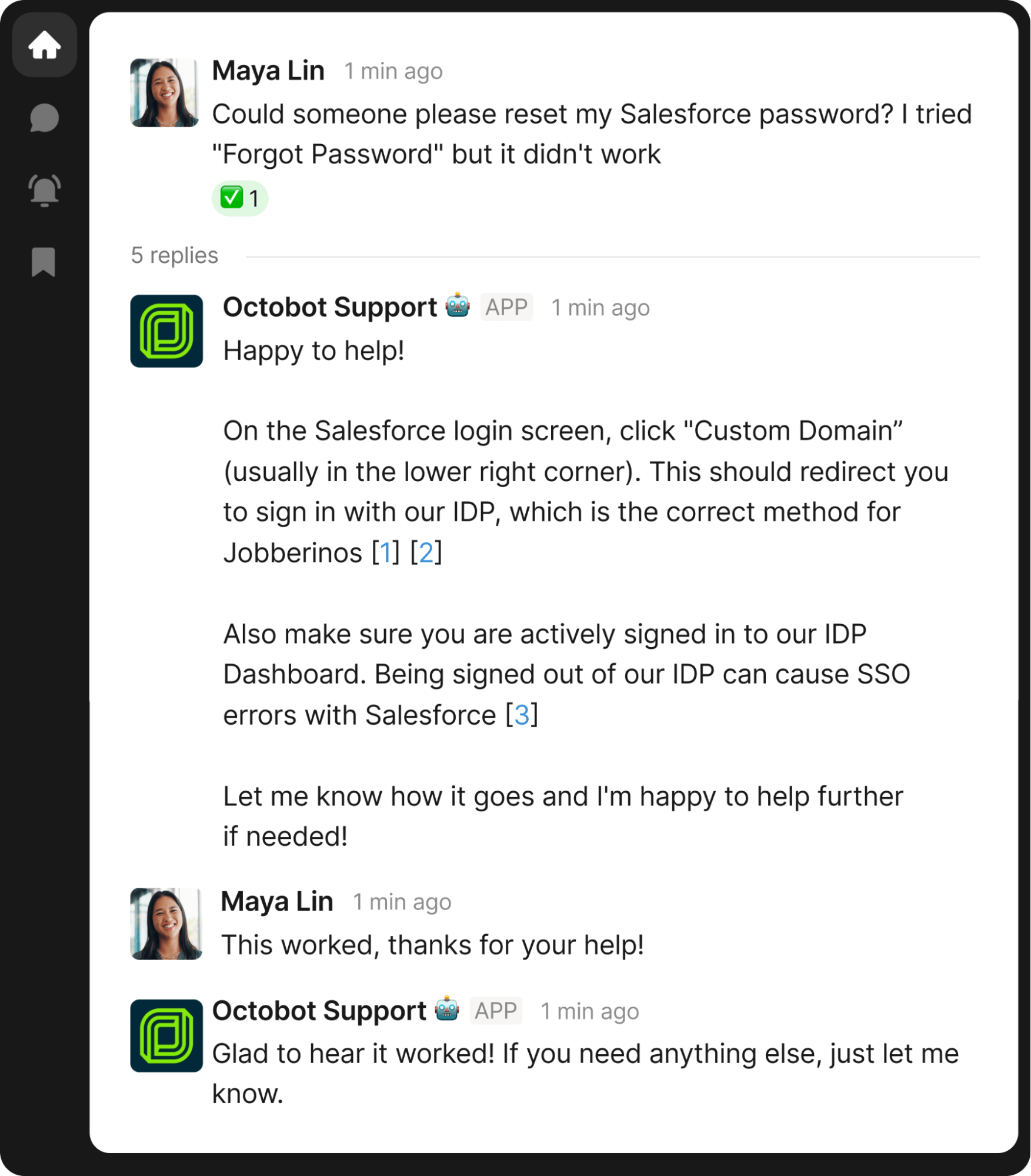
Password resets are the classic IT time-sink. Risotto handles them conversationally, guiding employees through self-service options or escalating appropriately when needed.
In the example below from our Jobber case study, you can see their custom-branded Slack avatar — a small touch that makes Risotto feel like a natural part of the team.
❇️ Device Management
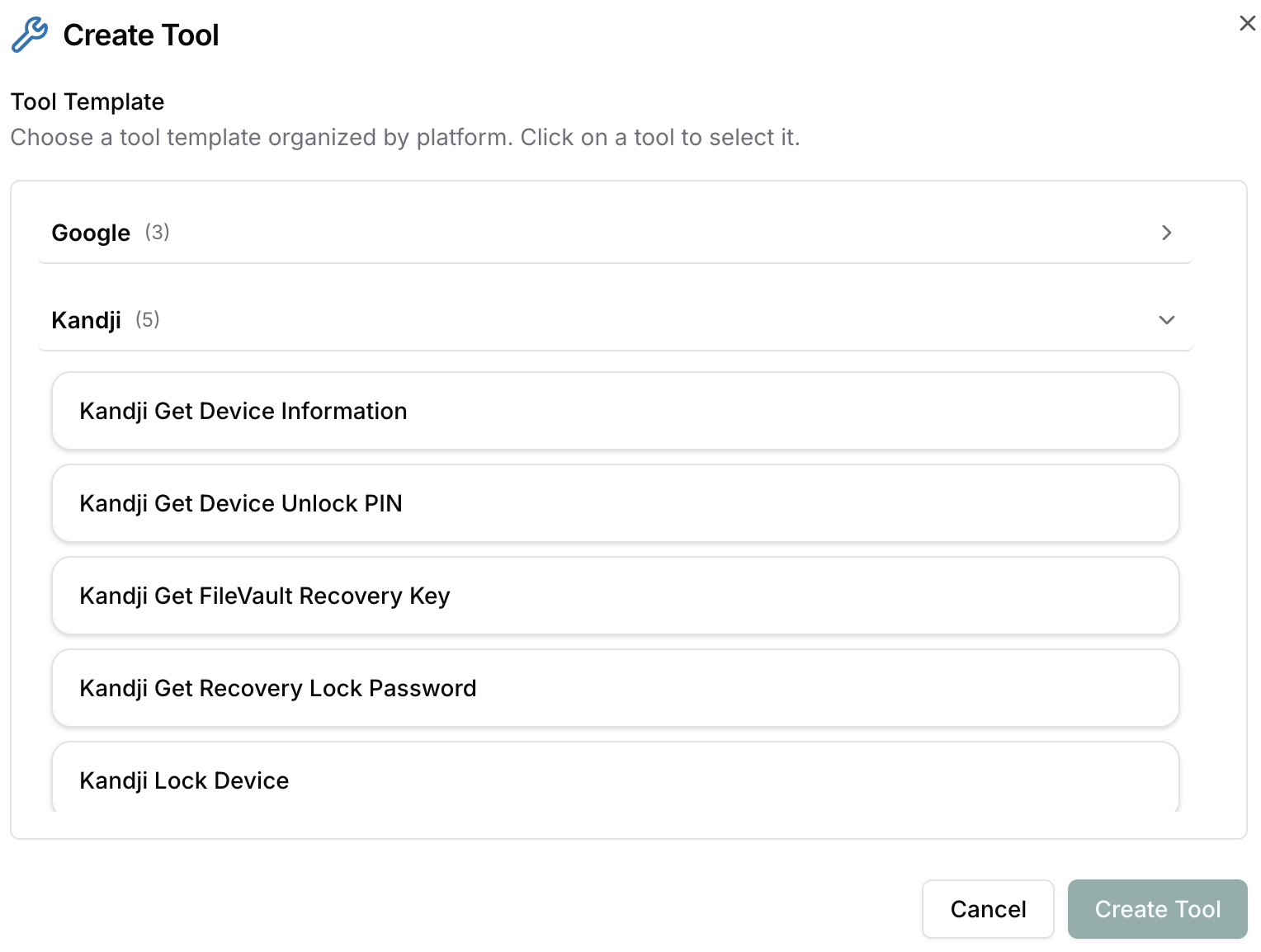
Risotto integrates with MDM tools such as Kandji to retrieve device information, access unlock PINs, pull FileVault recovery keys, obtain recovery lock passwords, and handle other common device management tasks — all from within Slack.
Implementing a Conversational Ticketing System: How Long Does It Take to Deploy?
Implementation timelines vary dramatically depending on which AI IT support platform you choose, and understanding why can save you months of frustration.
The Challenge with Legacy Providers
Many legacy platforms now offer conversational ticketing capabilities, but there's an important caveat: most weren't built for this purpose from the ground up. They started as traditional ticketing systems and later bolted on AI to keep pace with market demand.
This approach creates two common issues.
First, deployment timelines stretch into weeks or months. Legacy platforms come with legacy complexity — extensive configuration requirements, custom workflow building, and integration work that demands significant IT resources before you see any ticket automation benefits.
Second, ongoing management often requires external help. Many organizations find themselves hiring consultants or dedicating headcount just to maintain and optimize these systems. What started as a solution to reduce IT burden can end up adding to it.
Risotto Offers a Different Approach: Purpose-Built from Day One
Risotto was designed specifically for conversational AI IT ticket resolution from the start — it's not a feature we added later, it's our entire product thesis. That focus translates to a fundamentally different implementation experience:
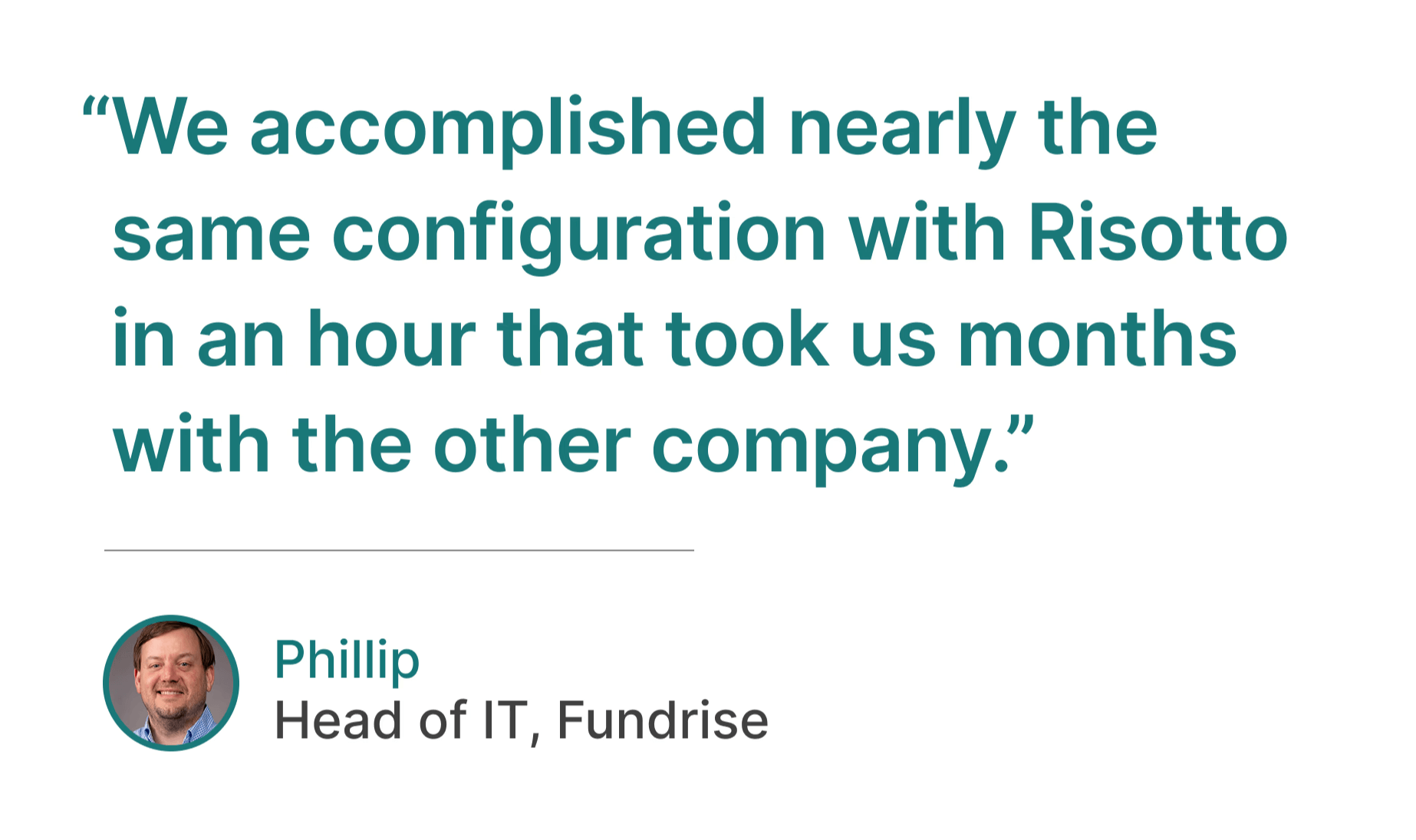
- Deploy in hours, not weeks or months. Because Risotto is built for a single core use case, our integrations with Slack, Okta, existing ticketing systems (e.g., Jira, Freshservice, Zendesk, ServiceNow), and other tools are designed to work out of the box.
- Optional guided onboarding from people who've been in your shoes. For teams that want hands-on support, we offer guided onboarding led by former IT practitioners, including our co-founder Alex Confer, who previously led IT engineering at Gusto and Dropbox. We understand IT challenges firsthand — the pressure to do more with less, the complexity of managing access at scale, the need for solutions that actually work without creating new problems. We’ll partner with you to configure Risotto for your specific environment, integrate with your existing tools, and ensure you're seeing automation results quickly.
As several of our customers have noted:
“Risotto is one of the easiest tools I’ve implemented. We were up and running in less than a week and already seeing our first autosolves... getting Risotto integrated with Jira, Slack, and Okta was so seamless and fast.”
– Jason Huey, Senior IT Systems Administrator at ThoughtSpot
“Ease of deployment was huge. We didn’t need a consultant or months of configuration. Risotto just worked."
– Peter Hadjisavas, Head of IT at Hazel Health
“Risotto’s AI-powered support system had a massive impact straight out of the box and with very little setup. Employees now get fast, efficient answers with the same precision as one of our professionals.”
– Mike Smith, IT Operations Manager at Jobber
"Risotto had the most thorough onboarding experience I've ever been a part of. Alex was great — he met with us weekly and made it very easy to quickly get up and running."
– Collin Clifford, Legal & Compliance Manager at Superhuman
“With our old chatbot, every new application required a cumbersome onboarding process through the vendor. Now, adding an application to Risotto takes just a few minutes.”
– Phillip Rickett, VP of IT at Fundrise
Implementing Conversational Ticketing for Multiple Departments Beyond IT
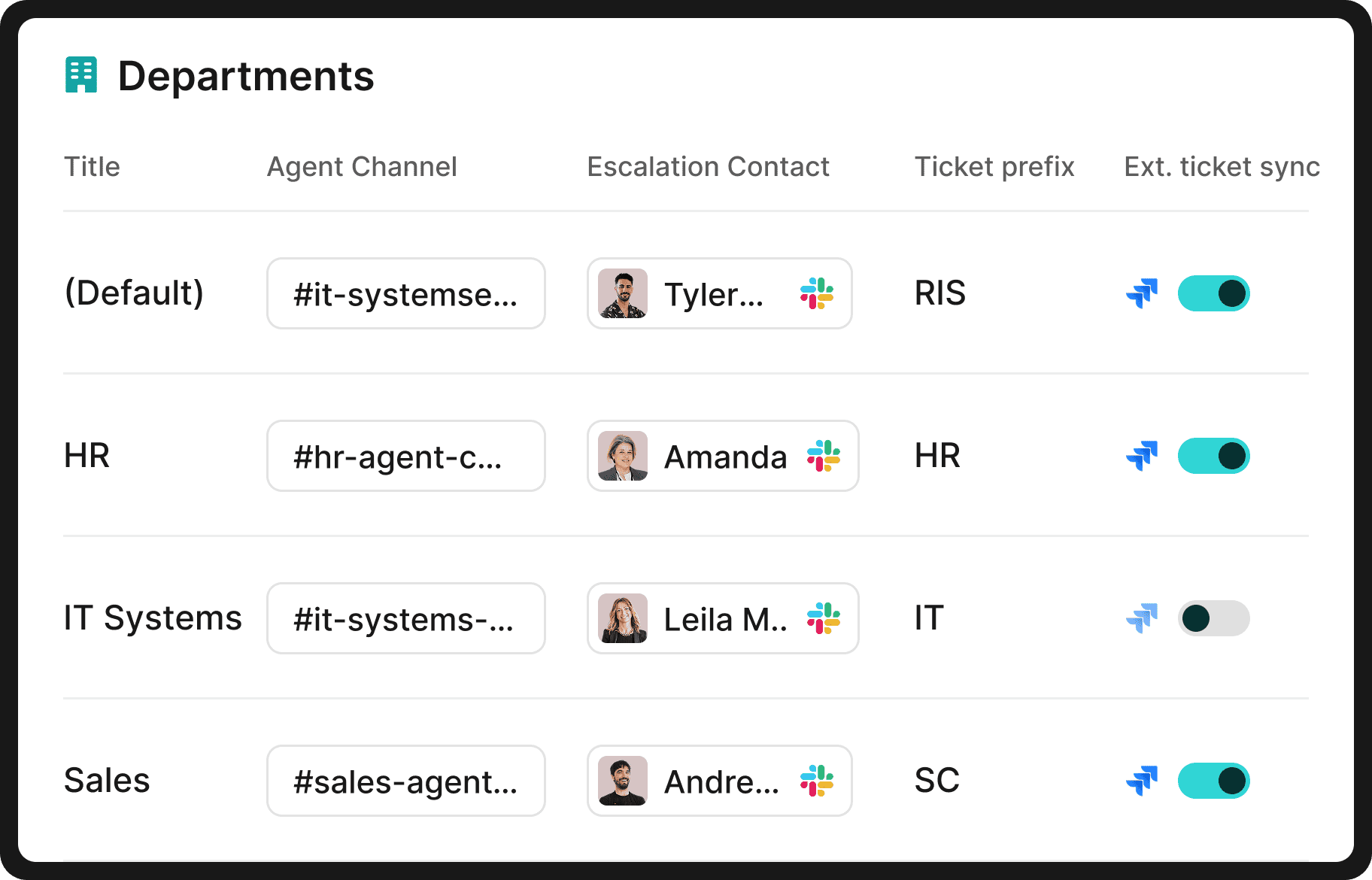
We originally built Risotto for IT departments, and they're typically the first to adopt it.
But once IT is up and running, other teams quickly take notice. HR is usually the second department to come on board, followed by Sales, Legal, Finance, and any team that deals with repetitive requests.
As we share in our Jobber case study, Risotto is now used by 12 different departments within their organization:
"Risotto started autosolving tickets immediately. Within the first few weeks, we saw departments that had never tracked ticket requests before, like our Cloud team, asking to get on the platform and streamline their support function.”
– Erik Van Dijk, Senior IT Manager at Jobber
As we shared in our ThoughtSpot case study, they've expanded Risotto beyond IT to other departments. Their accounting team saw an 80% auto-solve rate for transactional queries, and HR achieved a 94% solve rate during testing. They plan to roll out to six departments in total in the near future, including security, engineering, and marketing.
Interested in Learning More About Risotto?
Our conversational ticketing platform seamlessly integrates with Slack, Teams, and existing ticketing systems — including Jira, Freshservice, Zendesk, ServiceNow, and more.
It deploys in hours, not weeks or months, unlike traditional legacy providers.
See how teams are using Risotto to automate IT at scale:
- Fundrise: Automated nearly 60% of IT support tickets
- Superhuman: Automated nearly 20% of IT support tickets
- ThoughtSpot: Automated nearly 48% of IT support tickets
- Trust & Will: Automated nearly 35% of IT support tickets
- Jobber: Automated nearly 38% of IT support tickets
- Hazel Health: Improved deflection rates from 3–5% to over 20%
- Shakepay: Automated nearly 40% of IT support tickets
- Ironclad: Automated nearly 90% of access-related IT requests
- Retool: Reduced SLA resolution time from an average of 2 days to under 1 day
- Vidyard: Automated nearly 56% of IT support tickets
To learn more, we invite you to:
Liked the article? Share on:
On this page
Try Risotto for free for 30 days. Commit only when you see the value.


See more recent articles



Want faster solutions and happier employees?
Ensure Legal never answers another "do we need an NDA for this?"
Every policy question is stealing time from the work Finance was hired to do.
Turn Slack requests into action items instead of engineering interruptions.
The biggest deal risk might be an unanswered internal question.
Run a united support system that your employees can depend on.
Build the automations you’ve been planning on for months.
The bottleneck isn't your team. It's the groundwork before they can actually help.
Get support data that your team can talk to.
Jump on a call to understand:
Risotto handles repetitive support requests across tools and teams, so IT gets back to solving real problems, not rerunning the same ones.
.svg)
%20(1).webp)
See what makes the Iru integration a 10/10 for our clients.