%20(1).svg)
IT Support Automation: Benefits, Use Cases & Case Studies
A practical guide to IT support automation, including benefits, real use cases, case studies, and how to choose the right tool.


IT support automation is essential for several reasons: it frees agents to focus on high-value work, scales your support capacity without adding headcount, improves SLA metrics, and creates a better experience for employees.
We know this firsthand. As we discuss in our origin story, our co-founder Alex previously led IT engineering at Gusto and Dropbox. His teams were overwhelmed by SaaS sprawl and repetitive knowledge tickets — problems that only intensified at scale.
When existing tools failed to solve it, we built Risotto: an AI IT agent that lives in Slack and seamlessly integrates with existing ticketing systems.
Based on our experience, we’ve created this guide to IT support automation, where we’ll cover:
- Key benefits of IT support automation (backed up by case studies)
- Free IT agents for higher-value strategic work
- Serve more employees without increasing IT headcount
- Improve time-to-resolution and increase employee satisfaction
- Prevent tickets from falling through the cracks
- Deploy more easily than most IT leaders expect
- Key use cases of IT support automation
- Auto-solving knowledge-based questions
- Automatic ticket routing and escalation
- Automating access requests (time-based, approval-based, and self-service access)
- Streamlining password resets
- Automating device management
- Automated analysis of key ticket patterns & common issues
- Auto-solving knowledge-based questions
- Key questions to ask when choosing an IT support automation tool ⤵
- Does it integrate seamlessly with my existing ticketing systems (e.g., Jira, Freshservice, ServiceNow, Zendesk), or does it require a major overhaul to get the benefits of IT support automation?
- Does it work seamlessly with existing communication tools like Slack or MS Teams, where your employees are already accustomed to asking questions? Or are employees forced to navigate to external portals to submit tickets?
- Is it easy to use and set up? Or does it require months of configuration and external consulting?
- Is onboarding going to be guided by IT folks who’ve been in your shoes before? Or will it be guided by an account rep who doesn’t understand the details important to IT teams when implementing a new solution?
- Can the AI agent auto-learn from past tickets and resolutions and get smarter over time? Or does the AI agent struggle to improve over time and require constant manual knowledge base updates?
- Can you easily expand to additional departments at no extra cost? Can the AI agent intelligently route tickets to the right person and department? Is it intuitive enough for non-technical departments (e.g., HR, Sales, Finance) to use?
- Does it integrate seamlessly with my existing ticketing systems (e.g., Jira, Freshservice, ServiceNow, Zendesk), or does it require a major overhaul to get the benefits of IT support automation?
Let’s dive in.
Key Benefits of IT Support Automation (Backed by Case Studies)
In this section, we’ll explore the key benefits of IT support automation through case studies from Risotto customers.
Risotto is our AI IT agent that integrates seamlessly with your existing ticketing systems (e.g., Jira, ServiceNow, Freshservice, Zendesk) to automate tier-1 requests, including knowledge questions, access requests, password resets, and more. Risotto can typically automate 20–60%+ of tickets, as confirmed by these success stories:
- Fundrise: Automated nearly 60% of IT support tickets
- Gusto: Automated nearly 55% of IT support tickets
- Superhuman: Automated nearly 20% of IT support tickets
- Ironclad: Automated nearly 90% of access-related IT requests
- ThoughtSpot: Automated nearly 48% of IT support tickets
- Trust & Will: Automated nearly 35% of IT support tickets
- Jobber: Automated nearly 38% of IT support tickets
- Hazel Health: Improved deflection rates from 3–5% to over 20%
- Shakepay: Automated nearly 40% of IT support tickets
- Retool: Reduced SLA resolution time from an average of 2 days to under 1 day
- Vidyard: Automated nearly 56% of IT support tickets
Let’s dive in.
Benefit #1: Free IT Agents for Higher-Value Strategic Work
One of the most immediate benefits of IT support automation is reclaiming your team’s time. When you automate repetitive, high-volume tickets, IT agents can shift their focus to strategic initiatives that actually move the business forward.
Most IT tickets fall into a handful of predictable categories:
- Knowledge-based questions like password resets or policy lookups (20–30%)
- Access requests such as provisioning Figma or Salesforce (30–40%)
- MDM actions in tools like Jamf or Kandji (10–15%)
- HRIS connect flows for HR (10–15%)
By automating these core ticket drivers with AI IT support tools like Risotto, IT teams can typically auto-solve 20–60+% of their total ticket volume and free up significant time.
Jobber Case Study: 38% IT Ticket Automation + More Time for Strategic Work
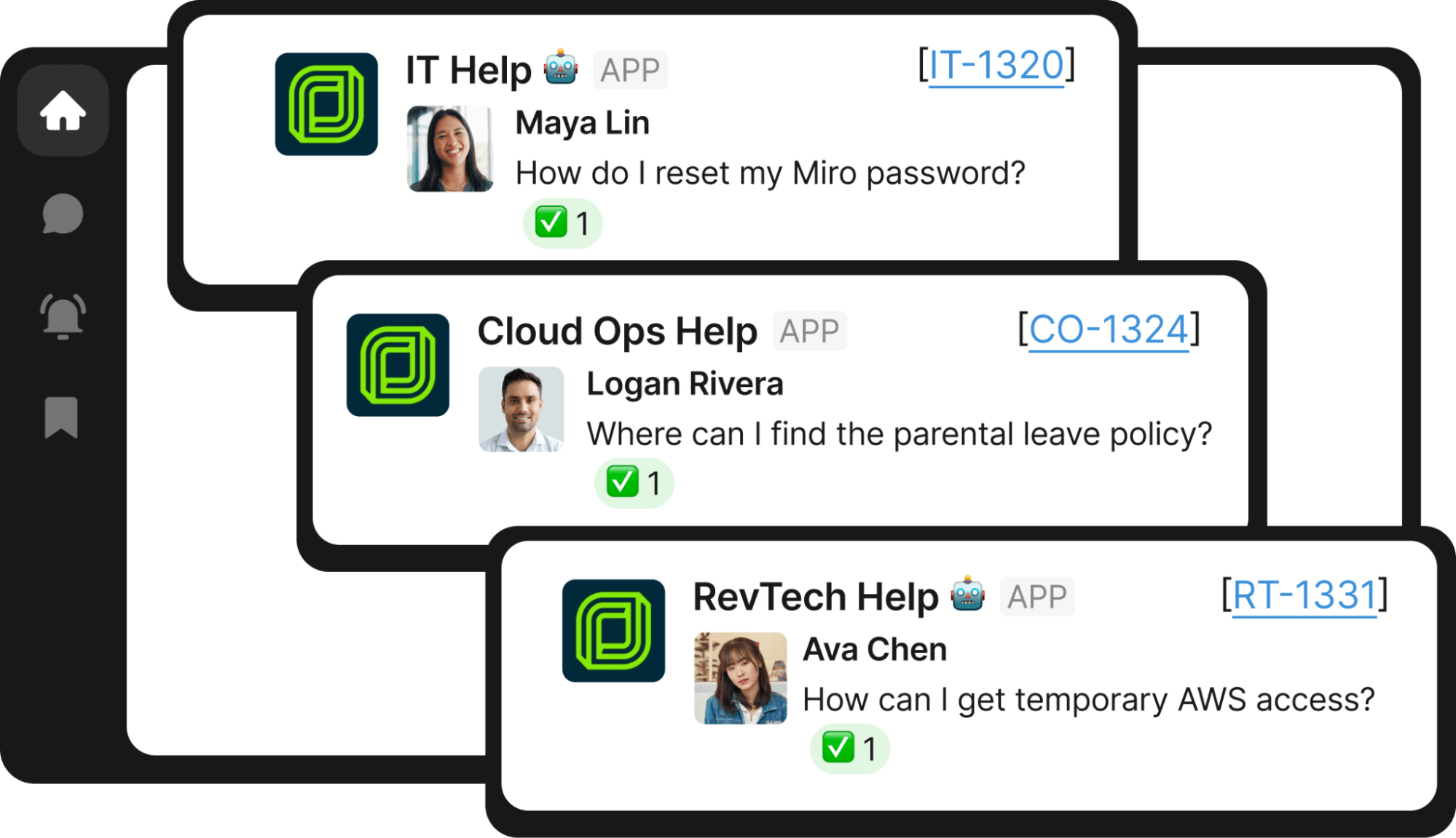
The challenge: As Jobber scaled, its five-person IT team was overwhelmed with tickets that dominated their days, leaving little time left for strategic work. Employees were waiting an average of 35 hours for simple issues like password resets.
As two of Jobber’s IT team members explained:
“Between managing daily support requests and backlogged tickets, we had little bandwidth for strategic work.”
– Erik Van Dijk, Senior IT Manager at Jobber
“Historically, ticket work overshadowed strategic project work. We were spending our days trying to keep the wheels on.”
– Mike Smith, IT Operations Manager at Jobber
Before Risotto: The team piloted another platform designed to streamline ticketing directly within Jira Service Management. But the setup effort outweighed the gains, and the IT team was still spending most of its time triaging high-volume, repetitive tickets.
The solution: Through Risotto, Jobber deployed AI-powered IT support automation directly in Slack. The Al agent automatically resolved knowledge questions, provisioned access based on pre-approved rules, and guided employees through troubleshooting steps conversationally.

The impact was immediate:
- 38% IT ticket automation
- 41% Revenue Technology ticket automation
- Average resolution time dropped from 35 hours to 3 hours
Fast time-to-value is a key area where Risotto stands out. Pre-built workflows mean minimal setup and immediate impact. As Mike Smith, IT Operations Manager at Jobber, experienced firsthand:
“Risotto’s AI-powered support system had a massive impact straight out of the box and with very little setup. Employees now get fast, efficient answers with the same precision as one of our professionals.”
For more details, read the full Jobber case study.
Benefit #2: Serve More Employees Without Increasing IT Headcount
As companies grow, every new employee adds to IT ticket volume — but IT teams rarely grow proportionally. The result is more ticket requests with the same (or similar) headcount, and the question becomes how to serve that growing volume without necessarily hiring additional staff.
ThoughtSpot Case Study: Serving 1,000 Employees with a Lean IT Team
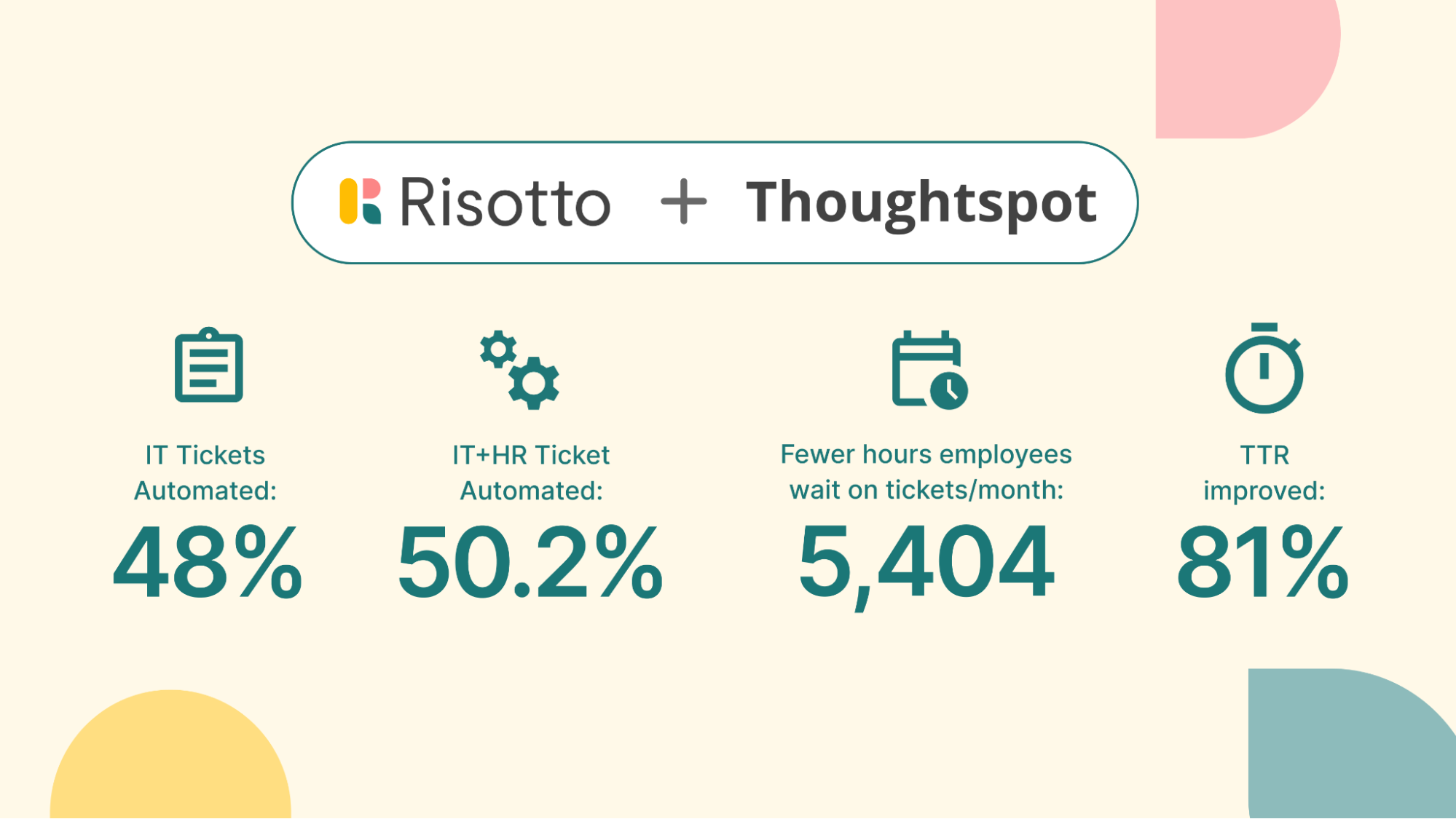
The challenge: At ThoughtSpot, a lean IT team of just a handful of people supported nearly 1,000 employees across the US and India, handling roughly 50–60 support requests per day. The team was stretched beyond capacity, with tickets often getting buried in threads and employees having to bump requests to get attention.

Before Risotto: Jason’s team evaluated several IT automation options, but each required significant configuration overhead and delivered limited immediate value. For a small team already overloaded, those tools would have created more work than they saved.
The solution: Risotto automatically resolved 20% of ThoughtSpot's tickets and assisted with another 30% through smart routing and knowledge base integration. Resolution time dropped from 31 hours to 6.5 hours, allowing a small IT team to support 1,000+ employees without expanding headcount.

Risotto also streamlined multi-step access workflows (which comprised the majority of ThoughtSpot's tickets), so that access requests now complete within 24 hours without manual follow-ups:

Another major advantage of Risotto is that the same AI support automation model can scale across departments, without requiring separate tools or duplicate implementations.
At ThoughtSpot, adoption quickly expanded beyond IT. Accounting began using Risotto and achieved an 80% auto-solve rate for transactional queries. HR followed, achieving a 94% solve rate during testing.
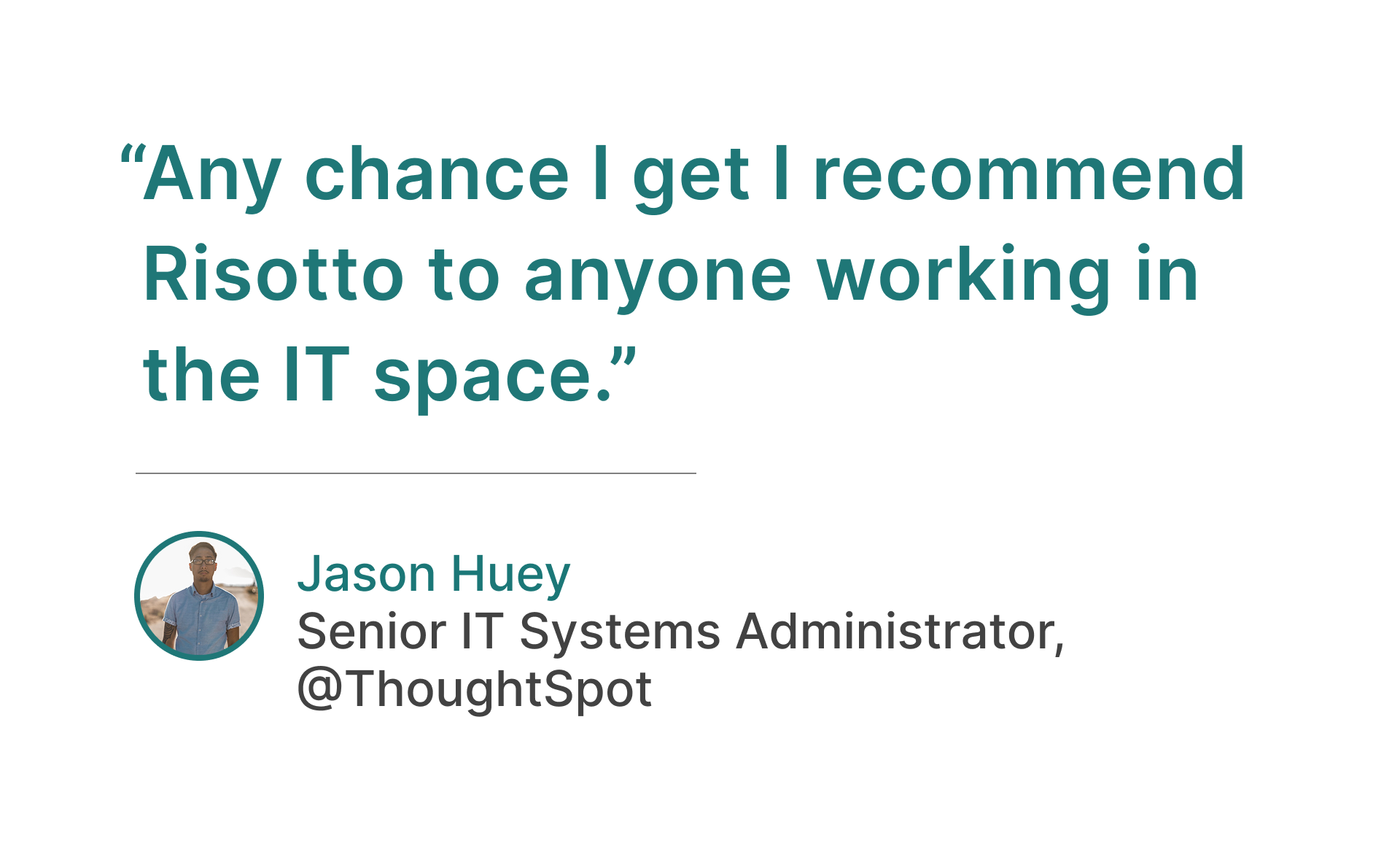
For more details, read the full ThoughtSpot case study.
Benefit #3: Reduce Time-to-Resolution and Improve Employee Satisfaction
The problem: Traditional IT support creates delays. Employees wait hours or days for password resets, access approvals, or troubleshooting help, creating frustration and harming productivity.
The solution: IT support automation meets employees where they work and resolves issues in real-time. Instead of navigating ticketing portals and waiting in queues, employees get instant answers and automated resolutions directly in Slack or Teams, turning multi-day waits into minutes.
Retool Case Study: Cutting SLA From 2 Days to 1 Day
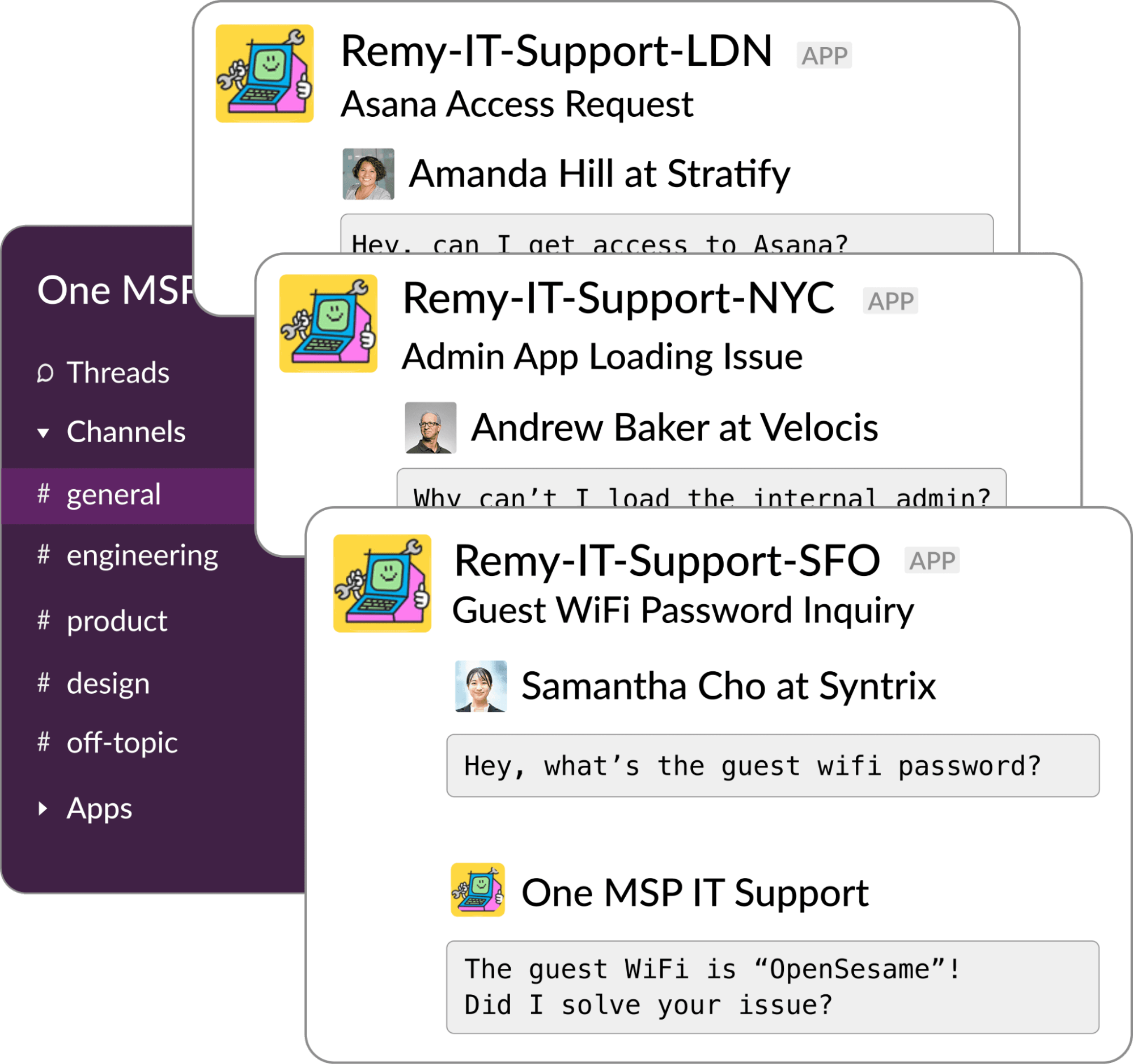
The challenge: Retool’s IT team relied heavily on Slack for support, but their ticketing system didn’t integrate well with it. There was a proliferation of informal Slack messages, requests weren’t consistently captured, and resolution times lagged. Their target SLA was two days, and even hitting that was challenging.
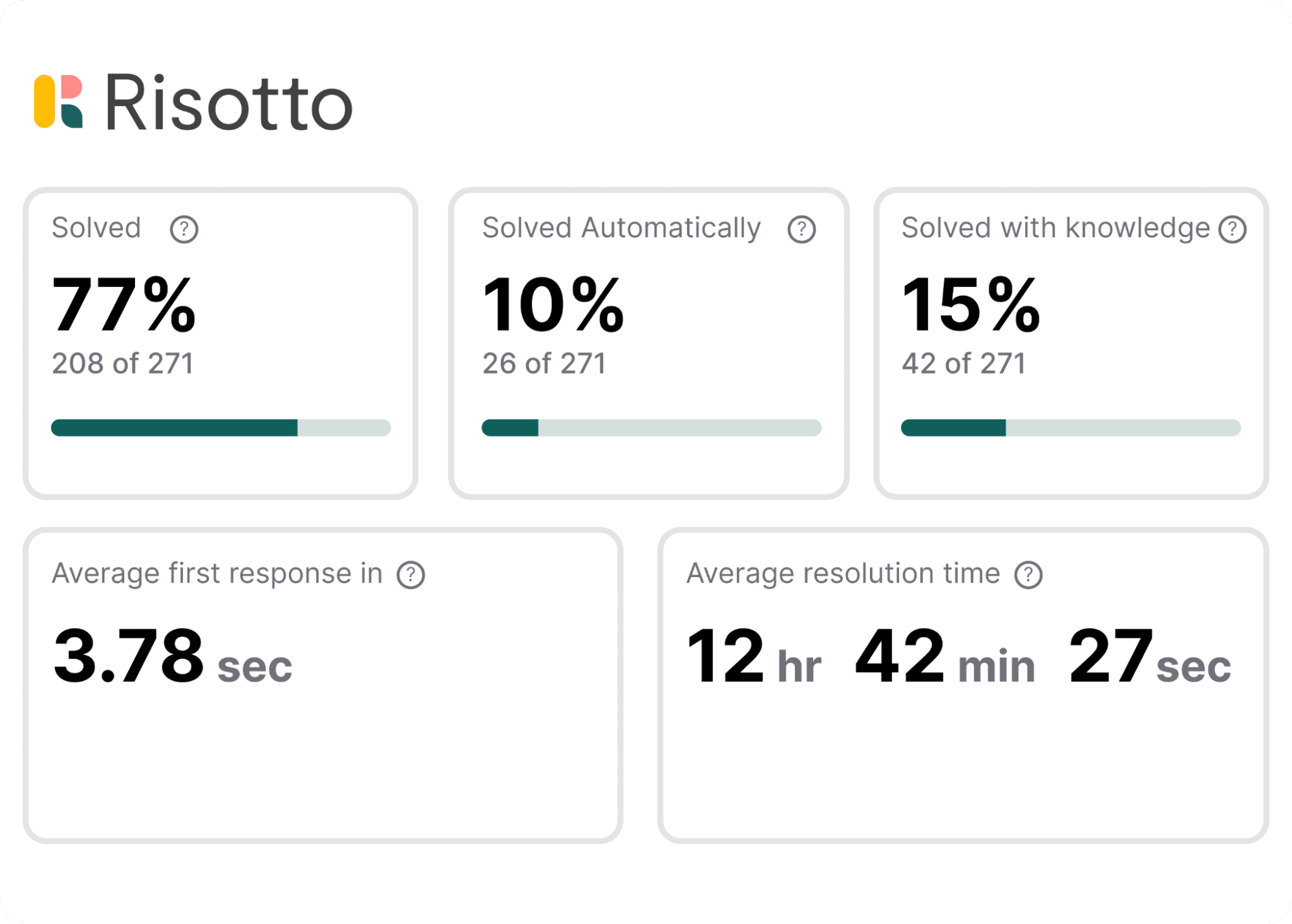
The solution: Retool implemented Risotto to bring structured automation directly into Slack, ensuring every request was properly logged, routed, and tracked. SLA quickly improved from 2 days to an average of 1 day to ticket close, and average first response time dropped to seconds.
Another key advantage of Risotto is the metrics dashboard, offering clear insight into SLA adherence, ticket patterns, and response times:
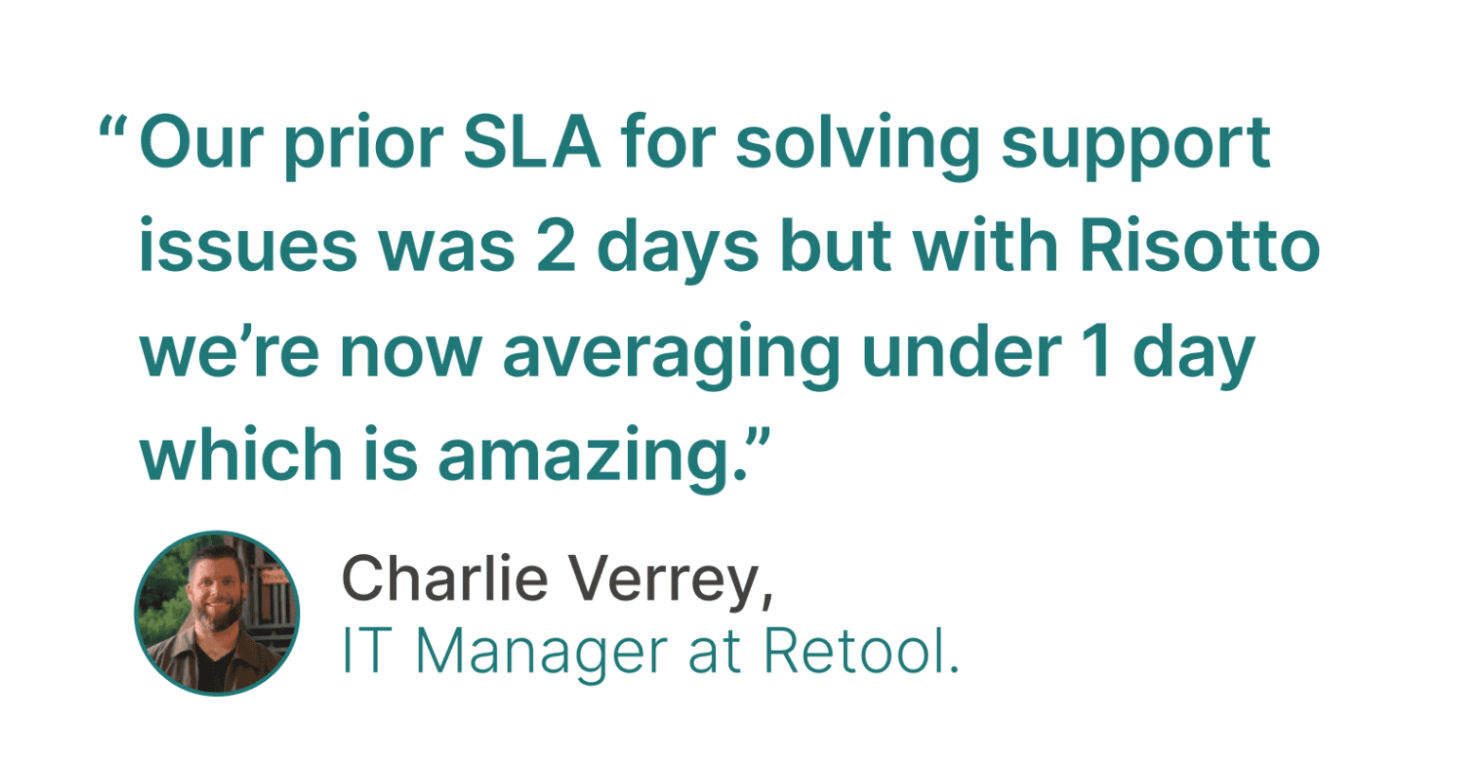
As Charlie Verrey, IT Manager at Retool, shared:
“Risotto’s metrics dashboard is really nice and well done. I like how you streamline the metrics and show the important things that we need. All the metrics work really well together… Time-to-first-response is a really important metric and you can see that it’s literally seconds with Risotto, which is awesome.”
For more details, read the full Retool case study.
Benefit #4: Prevent Tickets from Falling Through the Cracks
The problem: Growing companies often end up with fragmented support: Slack DMs, regional channels, multiple ticketing systems, and siloed workflows. Employees don't know where to go for help, IT can't track what's coming in, and tickets get lost.
The solution: Automation centralizes all requests through one intelligent AI layer that routes, tracks, and resolves issues. IT gains full visibility, and employees gain confidence that their requests will be handled quickly.
Superhuman Case Study: From Slack Chaos to Structured, Automated Support
The challenge: As Superhuman grew from 100 to over 140 employees in 18 months, support requests increased dramatically. Most requests came through Slack, but without proper tracking or routing, messages would disappear into threads and not get answered.

Before Risotto: Superhuman had a makeshift Slack bot from their IT provider, but it was cumbersome and required heavy manual intervention. They needed something easy to implement and use.
The solution: Superhuman implemented Risotto to automate IT support in Slack and prevent tickets from falling through the cracks. Risotto consolidated requests from multiple channels into a single agent view with automated triage and resolution. Every request was now tracked, and Risotto automatically resolved 20% of tickets with an average first response time of seconds.
Automated access provisioning saved their team significant time. As Collin Clifford, Legal & Compliance Manager at Superhuman, stated: “Within minutes people get the access they need with everything tracked, approved, and no additional overhead needed.”
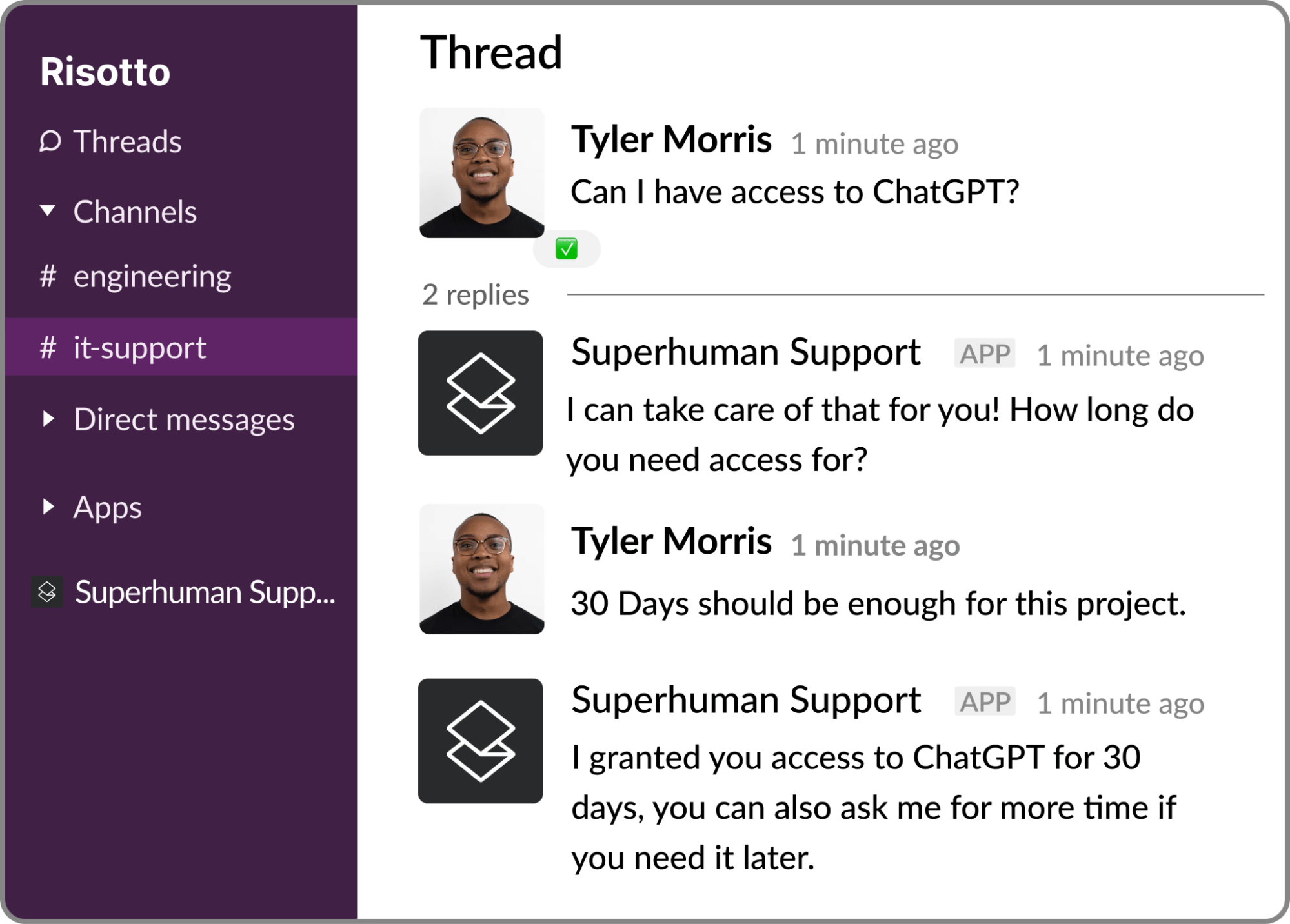
Another key benefit: Risotto gets smarter over time. Our AI agent automatically learns from past ticket resolutions and updates in approved Slack channels. You don’t have to waste time answering the same question twice, and Risotto provides more accurate, up-to-date answers:
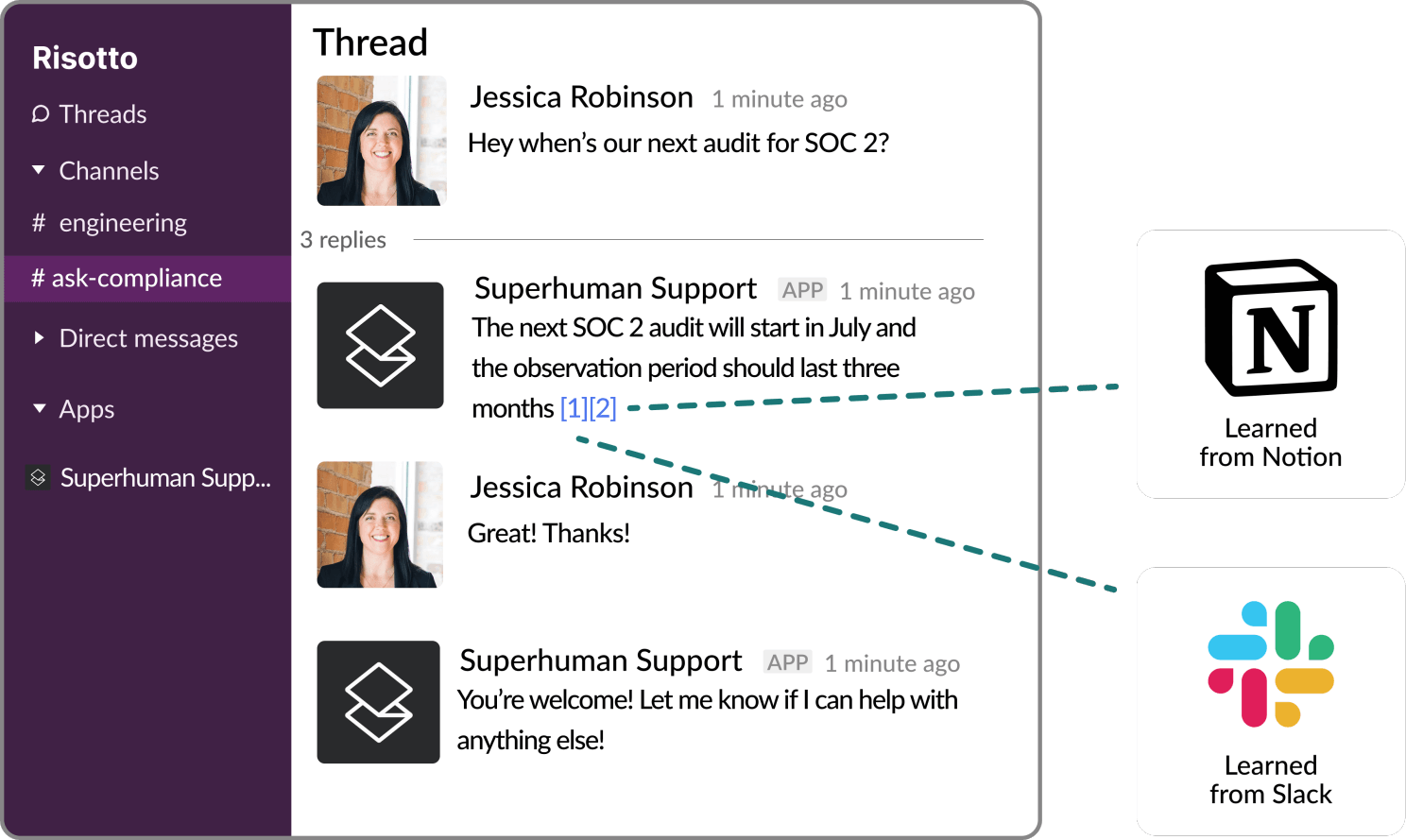
As Collin, Legal & Compliance Manager at Superhuman, noted, “Our auto-solve rate continues to get better over time automatically which is so cool to see.”
For more details, read the full Superhuman case study.
Benefit #5: Deploy More Easily Than Most IT Leaders Expect
The misconception: Many IT leaders assume rolling out AI automation will require months of configuration, external consultants, and painful change management.
The reality: With an AI-native platform like Risotto, built from day one for internal support, deployment is dramatically faster and more predictable than legacy tools.
Gusto Case Study: 55% Auto-Resolution, Live in Two Weeks
The challenge: As Gusto moved toward becoming AI-native in 2024, their existing tools fell short. They needed a more flexible solution that could learn over time and offer deeper integrations with better control.
As Jose Izquierdo, Head of AIT Operations at Gusto, shared, “Our team was moving quickly, and we needed a platform that could evolve at the same pace. That meant shorter turnaround times and more flexibility than we had before.”
Before Risotto: Gusto used a chatbot that still left the team of 8 handling 3,000 requests per month. They lost hours to troubleshooting and access provisioning, and had little time to standardize AI workflows and test additional AI agents.
The solution: Risotto worked side by side with Gusto’s team to integrate with Jira, Slack, Confluence, and Okta. The platform was fully deployed across IT in two weeks, with zero downtime.

Within hours of going live, Risotto’s AI agent began securely fielding tier-1 support tickets, achieving a 53% resolution rate on day one.
As Jose shared, “We came to Risotto hoping to hold the line - but the results blew away our expectations. We doubled our resolution rate on day one, and it hasn't dropped since."
Today, Gusto supports twice the ticket volume with the same lean team.
For more details, read the full Gusto case study.
Key Use Cases of IT Support Automation
Next, let’s take a look at several key use cases for IT support automation.
Auto-Solving Knowledge-Based Questions
Most AI IT help desk tools don't actually resolve tickets — they link to KB articles and call it "automation," leaving employees to figure it out themselves. And when these tools do attempt a direct answer, the response quality is often inconsistent, and your IT team still has to follow up.
Risotto is built differently. Instead of deflecting employees to documentation, it aims to resolve issues end-to-end — triaging the problem, troubleshooting conversationally, and closing the ticket with minimal IT intervention.
Here is an example of Risotto intelligently auto-solving a knowledge-based question:
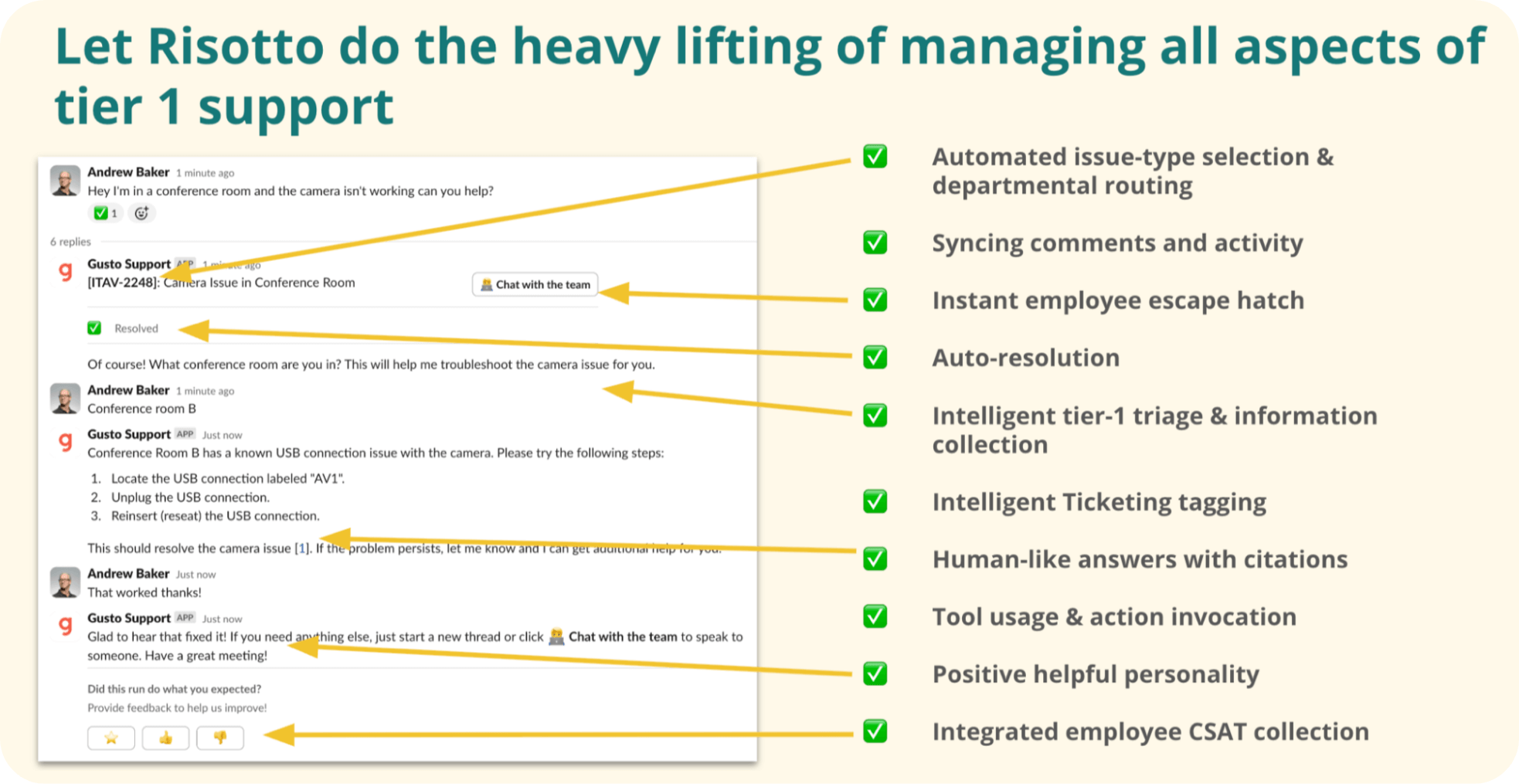
In this example:
- An employee reports an issue: “Hey I’m in a conference room and the camera isn’t working can you help?”
- Risotto performs intelligent tier-1 triage and information collection: “Of course! What conference room are you in? This will help me troubleshoot the camera issue for you.”
- The employee provides the detail: “Conference room B”
- Risotto provides step-by-step instructions (specific to conference room B) in natural language with citations to the sources.
- The employee confirms resolution: “That worked, thanks!”
This is just one example. We share more examples of Risotto’s ability to auto-solve knowledge questions in our article on 9 IT Service Desk Automation Ideas (& Real-World Examples).
Automatic Ticket Routing and Escalation
When Risotto can’t resolve an issue, our AI agent intelligently escalates it to the right person and department based on ticket history and your preconfigured settings.
The entire workflow happens within Slack, with all prior troubleshooting steps included in the ticket so agents don’t have to ask repeat questions. Everything syncs with your ticketing system, and Risotto documents each exchange for complete audit trails.
Here is an example of Risotto escalating to an agent:

In this example:
- An employee reports an issue with a conference room camera.
- Risotto delivers targeted steps, ending with: “Let me know if you need further assistance or if these steps don’t resolve the issue.”
- The employee confirms the issue persists: “I tried that and it’s still not working, what next?”
- Risotto intelligently escalates to the right IT agent (@Amanda Hill) based on her prior ticket history.
- Amanda can see all of Risotto's previous troubleshooting steps in the ticket, so she doesn't have to start from scratch. She realizes the issue requires in-person help and replies directly within Slack: "Hey Andrew, I'll be right there!"
Automating Access Requests
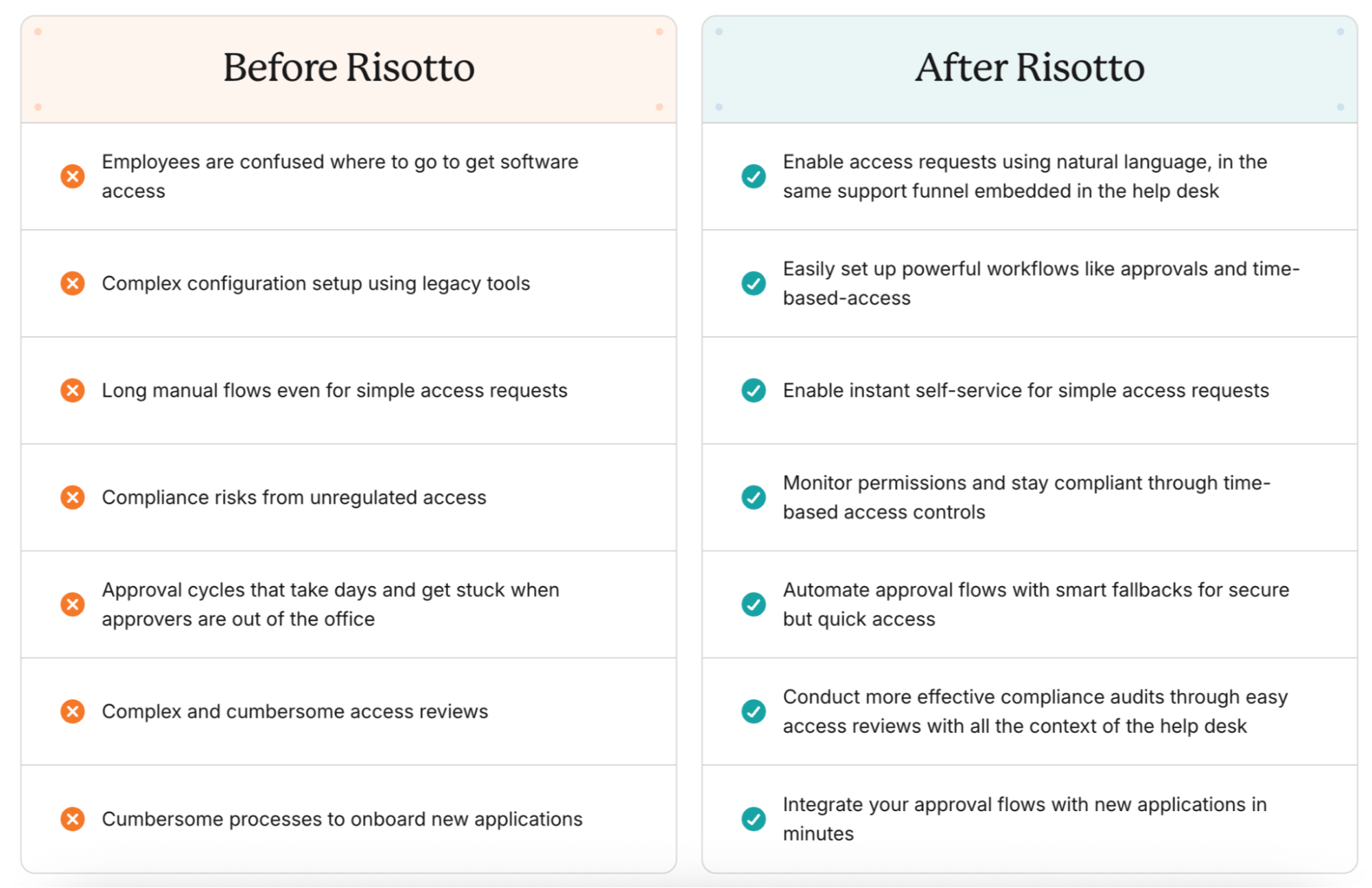
Risotto lets IT teams manage identities and access in Slack using simple, natural language.
In a nutshell:
- Employees request software access conversationally in Slack
- Risotto handles the entire workflow, including:
- Provisioning and de-provisioning
- When approval is required, checking the policy, notifying the approver in Slack (with the employee’s reasoning), and automatically provisioning access upon approval
- Granting time-based access with auto-expiration and sending a reminder before access expires
- Risotto logs every request as a trackable ticket via seamless two-way sync with your ticketing system (e.g., Jira, Freshservice, Zendesk, ServiceNow)
- Risotto maintains a full audit trail for compliance
- You can use Risotto’s advanced approval engine to leverage segregation of duties, set dynamic RBAC rules, and more
Here is an example of Risotto automating a time-based access request:
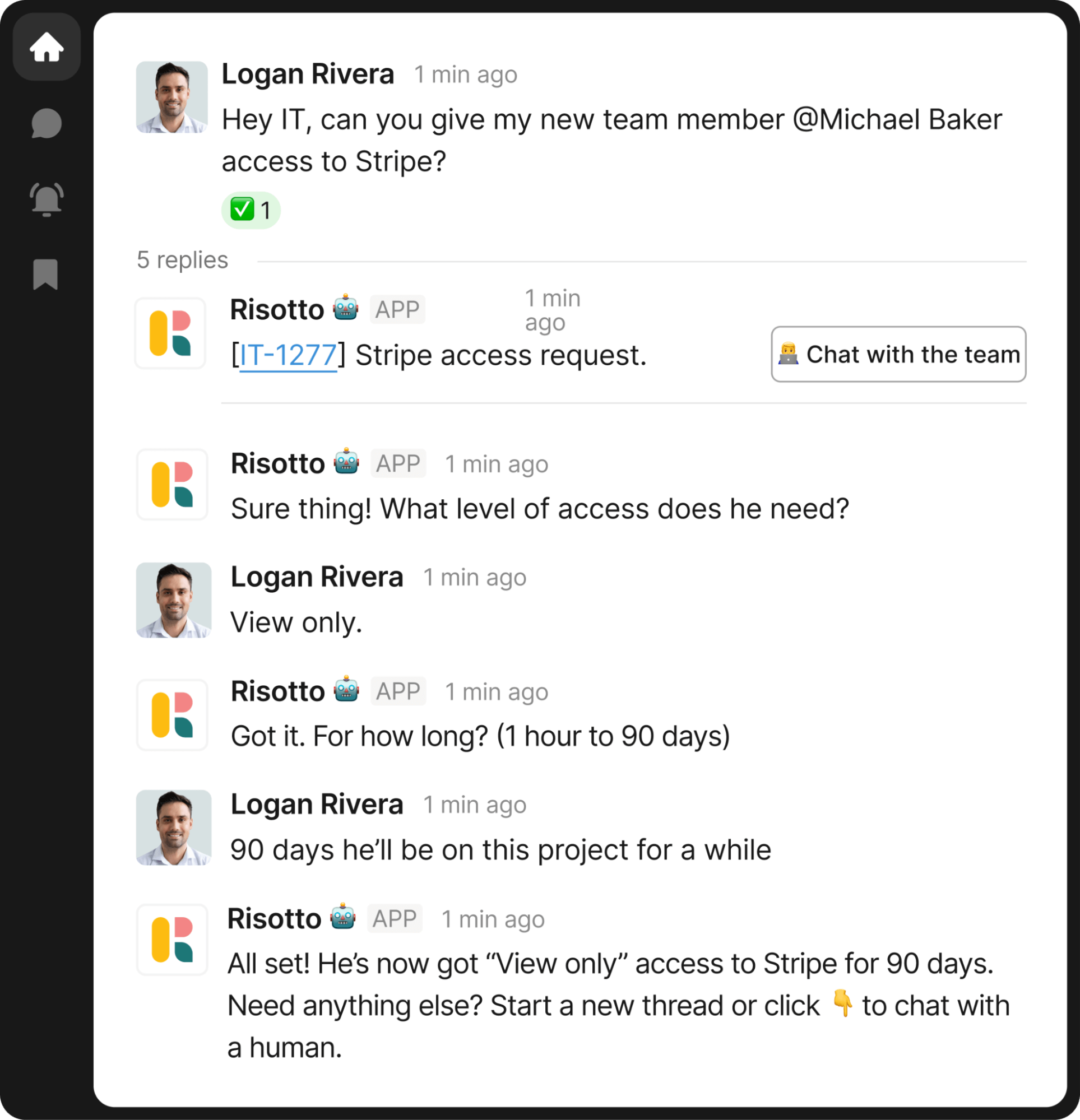
In this example:
- An employee asks, “Hey IT, can you give my new team member @Michael Baker access to Stripe?”
- Risotto responds: “What level of access does he need?”
- Logan replies: “View only.”
- Risotto clarifies duration: “For how long? (1 hour to 90 days)”
- Logan answers: “90 days he’ll be on this project for a while.”
- Upon a manager’s approval, Risotto automatically provisions access and de-provisions it once the time expires.
We share more examples of how Risotto automates time-based, approval-based, and self-service software access in our article on the Best Identity Governance & Administration (IGA) Tools.
If you’re comparing broader options, our guide to choosing an IAM solution covers both full governance platforms and automation layers that work with your existing stack.
Streamlining Password Resets
Password resets are a very common repetitive employee question, making them an ideal candidate to optimize for IT support automation.
Here is an example of Risotto automating password resets:
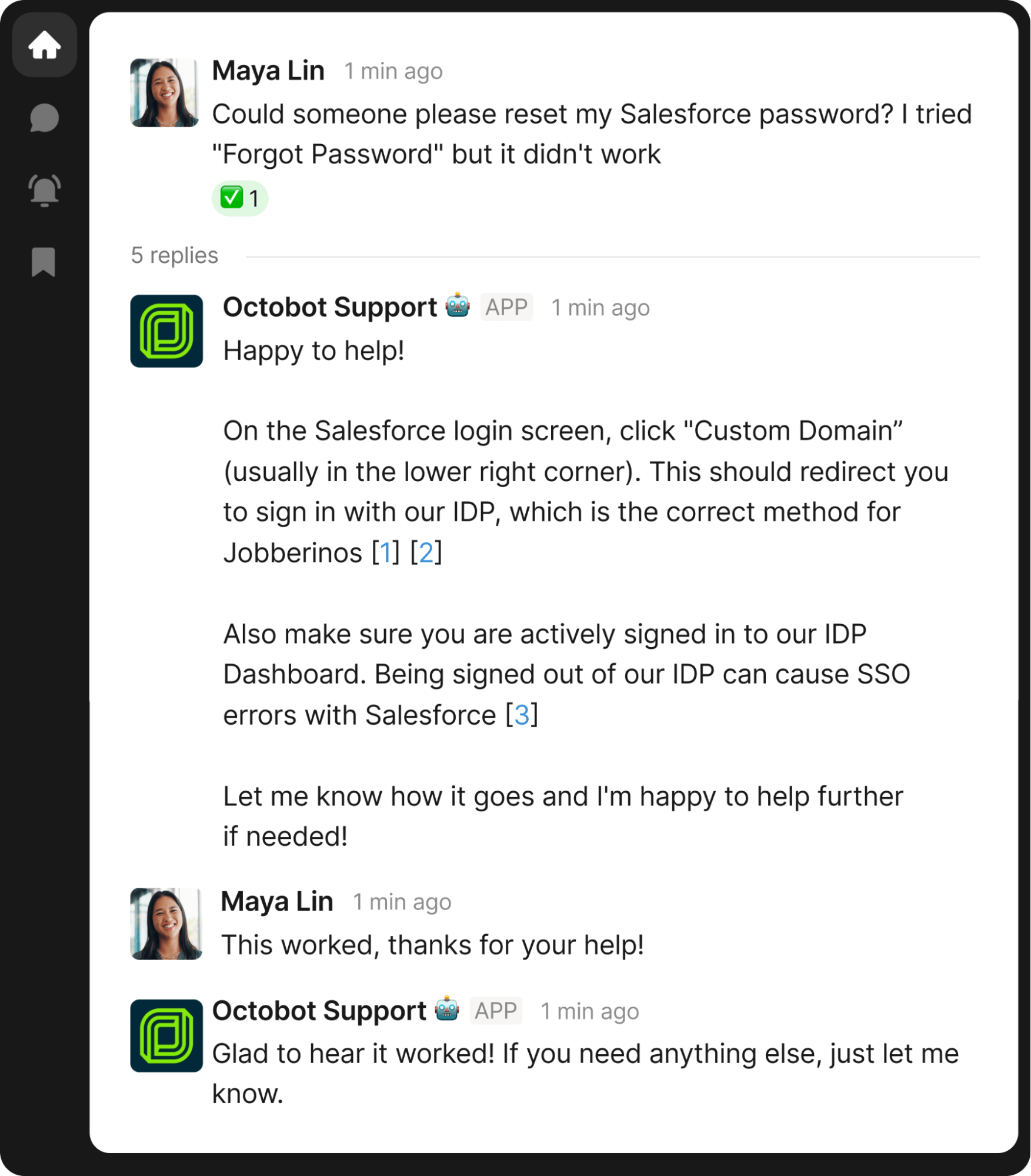
In this example:
- Maya Lin asks Risotto to reset her Salesforce password
- Risotto responds with password reset instructions, including citations linking to the sources of its information
- Maya confirms the solution was successful: “This worked, thanks for your help!”
The entire process is completed in Slack with no manual IT agent intervention required. This takes a major burden off your internal support team, freeing them up for higher-value work.
Automating Device Management
Risotto seamlessly integrates with a variety of MDM tools, including Kandji, automating routine device management tasks with minimal IT intervention.
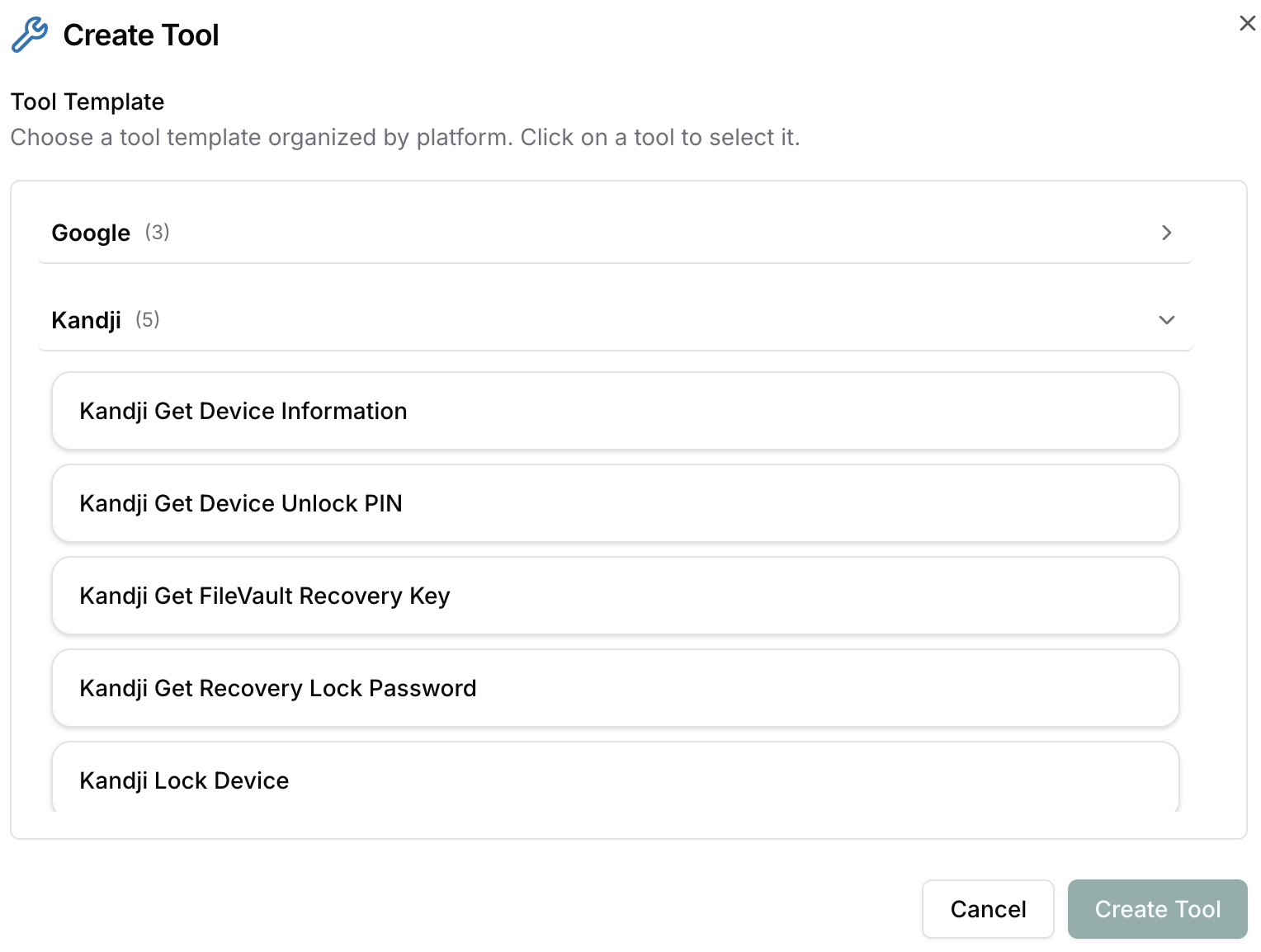
Here are some of the automated workflows Risotto can do seamlessly within Slack:
- Retrieve device information
- Access unlock PINs
- Pull FileVault recovery keys
- Obtain recovery lock passwords
- Execute remote lock commands
Automated Analysis of Key Ticket Patterns & Common Issues
Rather than digging through dashboards, Risotto’s Analytics Assistant makes it seamless to analyze key ticket patterns and issues:
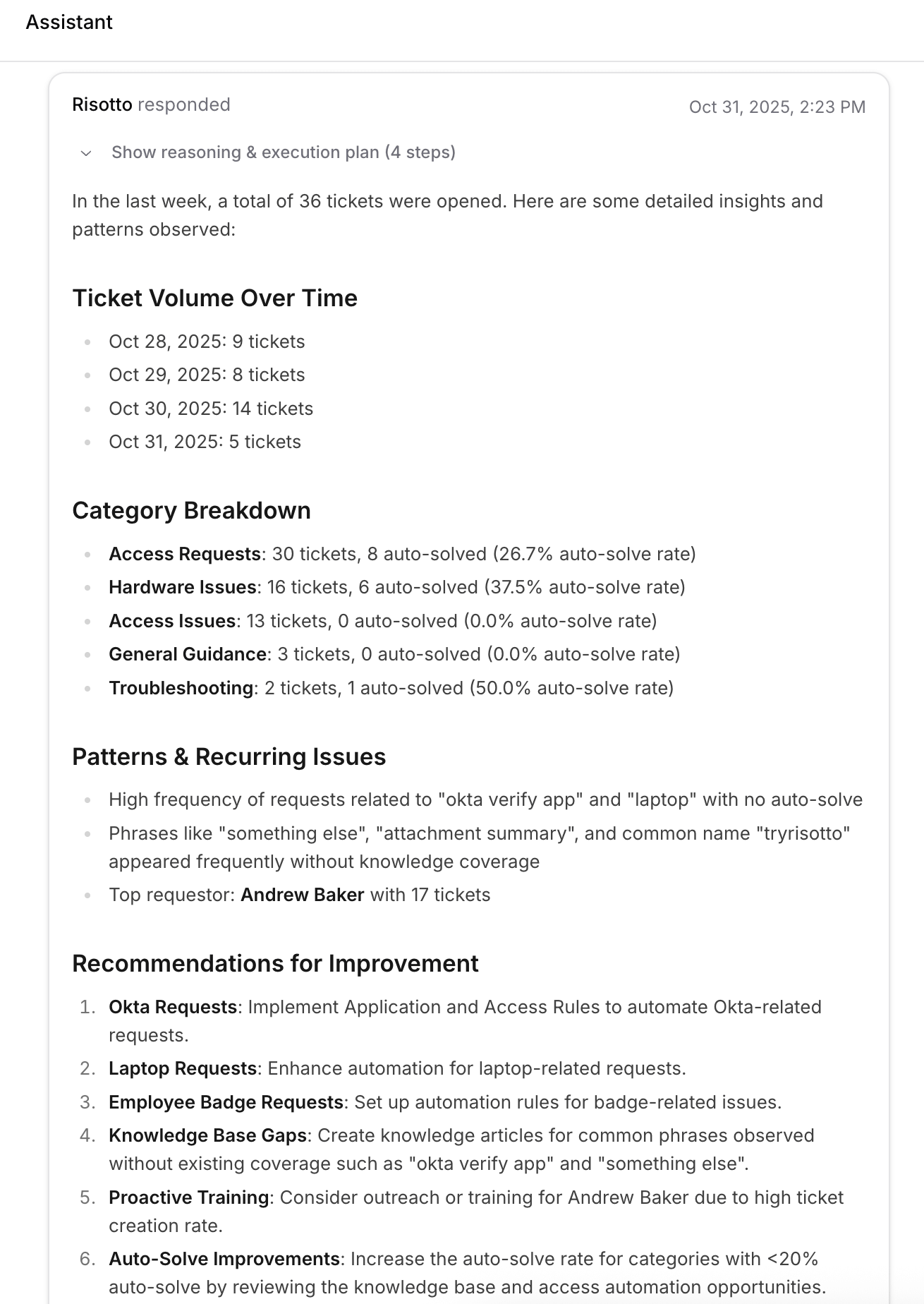
Just ask our AI agent what you want to know, such as:
- What were last week's top ticket drivers?
- Which KB articles need updating?
- What access automations would boost my auto-solve rate?
Also, not only does Risotto surface common patterns and issues, but it also recommends actionable solutions.
Key Questions You Should Ask When Choosing an IT Support Automation Tool
To help you pick the best IT support automation platform, we’ve put together this list of questions we recommend asking during the selection process.
For our picks for the best IT support automation tools, see our article on the 10 Best IT Automation Software.
Does It Integrate Seamlessly with My Existing Ticketing Systems?
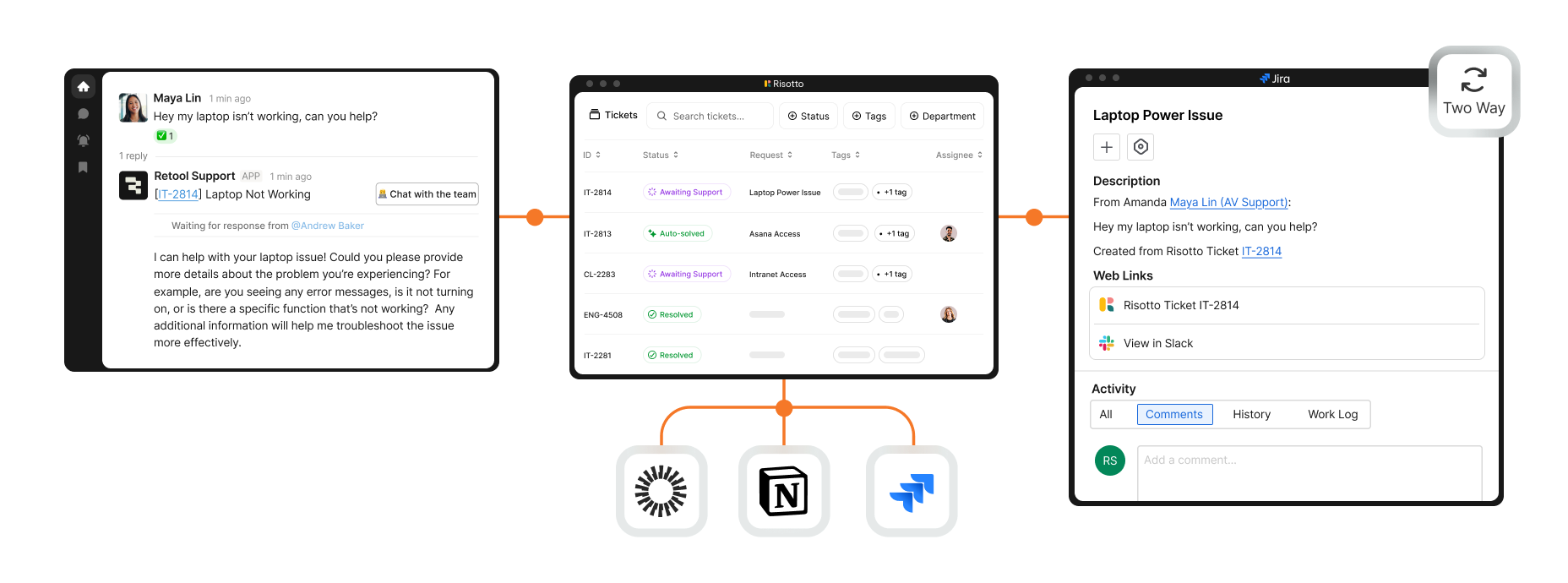
Risotto doesn't replace your ticketing system — it makes it smarter. Our AI agent syncs bi-directionally with Jira, Freshservice, Zendesk, ServiceNow, and others, automatically resolving tickets in Slack while keeping everything logged and up to date in your existing system of record.
Risotto manages the complete ticket lifecycle, including:
- Ticket creation
- Titling
- Tagging
- Categorizing
- Routing
- Initial triage
As one of our customers shared:
“Risotto became the orchestration layer for Jira Service Management and gives us instant automation with AI… We always wanted to require a reason for application access, but it was really difficult to integrate that into JSM. Risotto adds that functionality to JSM and so much more.”
– Tom Grinberg, IT Manager at Trust & Will
Does It Work Seamlessly with Existing Communication Tools?
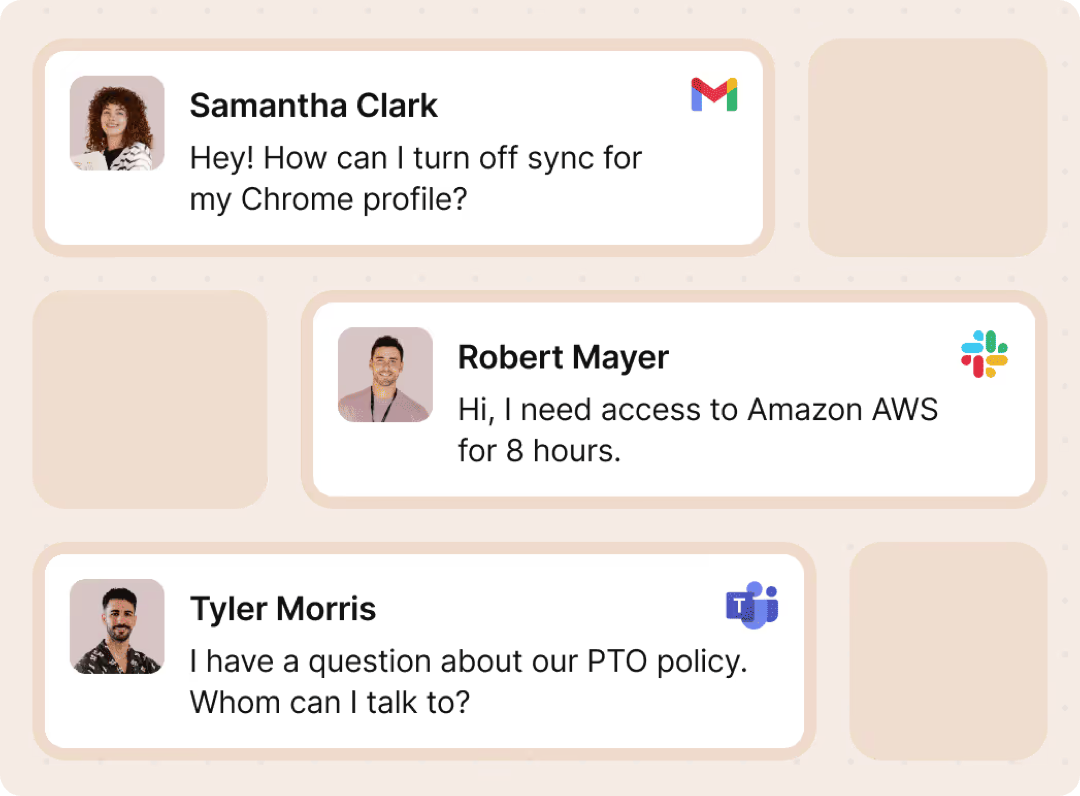
Risotto lives directly within the communication tools your employees already work in — Slack, Teams, email, etc. They don’t have to learn new portals or log in to yet another tool. This eliminates friction and context switching, driving higher adoption.
As several of our customers shared:
“We want AI to seamlessly fit into our team’s daily operations, meeting our users where they already work… Risotto’s minimal operational overhead and integration into Slack has enabled us to achieve exactly that.”
– Phillip Rickett, VP of IT at Fundrise
“We wanted to implement more standardization and automation in our help desk, but there wasn’t an easy way in Slack without clunky custom work. Risotto helped us do that.”
– Vergil Smith, IT Manager at Vidyard
“Risotto has been super popular internally, it’s a much improved experience for employees to get answers and problems solved immediately.”
– Tom Grinberg, IT Manager at Trust & Will
Is It Easy to Use and Set Up?
Unlike legacy tools that try to cover every use case, Risotto was laser-built for one purpose: automating repetitive tier-1 IT tickets. We offer prebuilt workflows, making Risotto deployable in hours, not weeks or months.
As several of our customers shared:
“Risotto is one of the easiest tools I’ve implemented. We were up and running in less than a week and already seeing our first autosolves... getting Risotto integrated with Jira, Slack, and Okta was so seamless and fast.”
– Jason Huey, Senior IT Systems Administrator at ThoughtSpot
“With our old chatbot, every new application required a cumbersome onboarding process through the vendor. Now, adding an application to Risotto takes just a few minutes.”
– Phillip Rickett, VP of IT at Fundrise
“Ease of deployment was huge. We didn’t need a consultant or months of configuration. Risotto just worked.”
– Peter Hadjisavas, Head of IT at Hazel Health
“Risotto’s AI-powered support system had a massive impact straight out of the box and with very little setup. Employees now get fast, efficient answers with the same precision as one of our professionals.”
– Mike Smith, IT Operations Manager at Jobber
Is Onboarding Guided by IT Folks Who Have Been in Your Shoes?
Risotto was built by IT for IT. We offer optional hands-on onboarding guided by our founding team of former IT practitioners to ensure seamless implementation.

As several of our customers shared:
"Risotto had the most thorough onboarding experience I've ever been a part of. Alex was great — he met with us weekly and made it very easy to quickly get up and running."
– Collin Clifford, Legal & Compliance Manager at Superhuman
“Working with the Risotto team was awesome from day one. They all have IT backgrounds and really cared about making us successful.”
– Tom Grinberg, IT Manager at Trust & Will
Does the AI Agent Auto-Learn From Past Ticket Resolutions and Get Smarter Over Time?
At Risotto, our motto is that you should “Never answer the same question twice.” We designed our AI agent to continuously learn from ticket resolutions and Slack conversations in approved channels. This ensures Risotto’s answers are up to date and saves you significant time manually updating and maintaining your KB.
As some of our customers shared:
“The killer feature for us was that it could effortlessly learn and capture knowledge that our team creates every day in Slack… with Risotto, instead of constantly writing new documentation, our team can simply answer questions, and Risotto learns as we go.”
– Phillip Rickett, VP of IT at Fundrise
“The more we use Risotto, the smarter it gets, that’s what makes it different from every other tool we’ve tried.”
– Peter Hadjisavas, Head of IT at Hazel Health
Can You Seamlessly Expand to Other Departments?
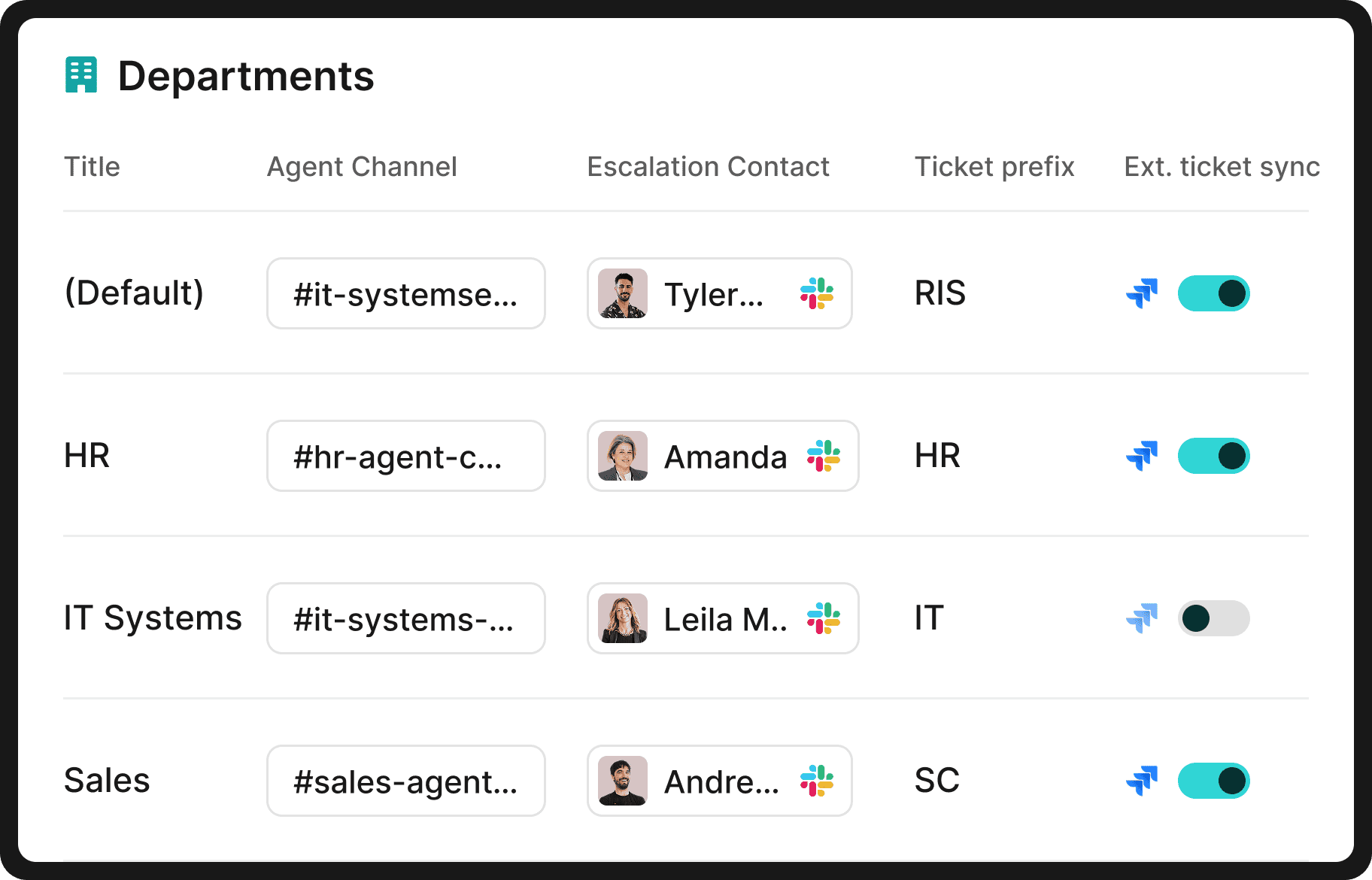
While IT is often the first adopter, other departments (e.g., HR, Finance, Legal, Engineering, Sales) also use Risotto to automate their own repetitive tasks & requests once they see IT's ticket automation rates.
Risotto’s benefits for multi-department use include:
- Unlimited departments covered under one license
- Intelligent ticket routing to the right person and department
- A built-in ticketing system that’s intuitive and easy to use for non-technical teams
- Department-level customization for workflows, permissions, knowledge bases, and more
As several of our customers shared:
"Once you add in HR our combined automation rate is even higher at 50.2%.”
– Jason Huey, Senior IT Systems Administrator at ThoughtSpot
"The multi-department capabilities are awesome. Our engineering and RevOps teams now also want to use Risotto as they also get lots of the same questions over and over again.”
– Collin Clifford, Legal & Compliance Manager at Superhuman
"Risotto started autosolving tickets immediately. Within the first few weeks, we saw departments that had never tracked ticket requests before, like our Cloud team, asking to get on the platform and streamline their support function."
– Erik Van Dijk, Senior IT Manager at Jobber
Interested in Learning More About Risotto’s IT Support Automation Capabilities?
Risotto was built by IT for IT, based on our co-founder Alex’s firsthand experience leading IT engineering at enterprise companies like Gusto and Dropbox.
Our AI agent is purpose-built for automating 20–60+% of repetitive tier-1 tickets and can be up and running in hours, not weeks or months.
We invite you to:
Liked the article? Share on:
On this page
Try Risotto for free for 30 days. Commit only when you see the value.





Want faster solutions and happier employees?
Access that's easy to ask for and impossible to get wrong.
Ensure Legal never answers another "do we need an NDA for this?"
Every policy question is stealing time from the work Finance was hired to do.
Turn Slack requests into action items instead of engineering interruptions.
The biggest deal risk might be an unanswered internal question.
Run a united support system that your employees can depend on.
Build the automations you’ve been planning on for months.
The bottleneck isn't your team. It's the groundwork before they can actually help.
Get support data that your team can talk to.
Jump on a call to understand:
Risotto handles repetitive support requests across tools and teams, so IT gets back to solving real problems, not rerunning the same ones.
.svg)
%20(1).webp)
See what makes the Iru integration a 10/10 for our clients.