%20(1).svg)
9 IT Service Desk Automation Ideas (& Real-World Examples)
We break down 9 IT service desk automation ideas with real-world examples and metrics from teams automating tier-1 support.


IT service desk automation is something we have firsthand experience with. As we share in our origin story, our co-founder Alex led IT engineering teams at Gusto and Dropbox, where they dealt with SaaS sprawl and constant repetitive tickets that pulled agents away from higher-value work.
To solve this problem, we built Risotto, an AI IT agent that lives in Slack, automates 20–60% of tier-1 tickets, and integrates seamlessly with existing ticketing systems. You can explore the results in our customer success stories.
In this article, we'll cover 9 IT service desk automation ideas, including some directly related to Risotto and others that apply even if you're not using our tool or looking to automate ticket resolution specifically.
1. Auto-Solving Knowledge-Based Tickets
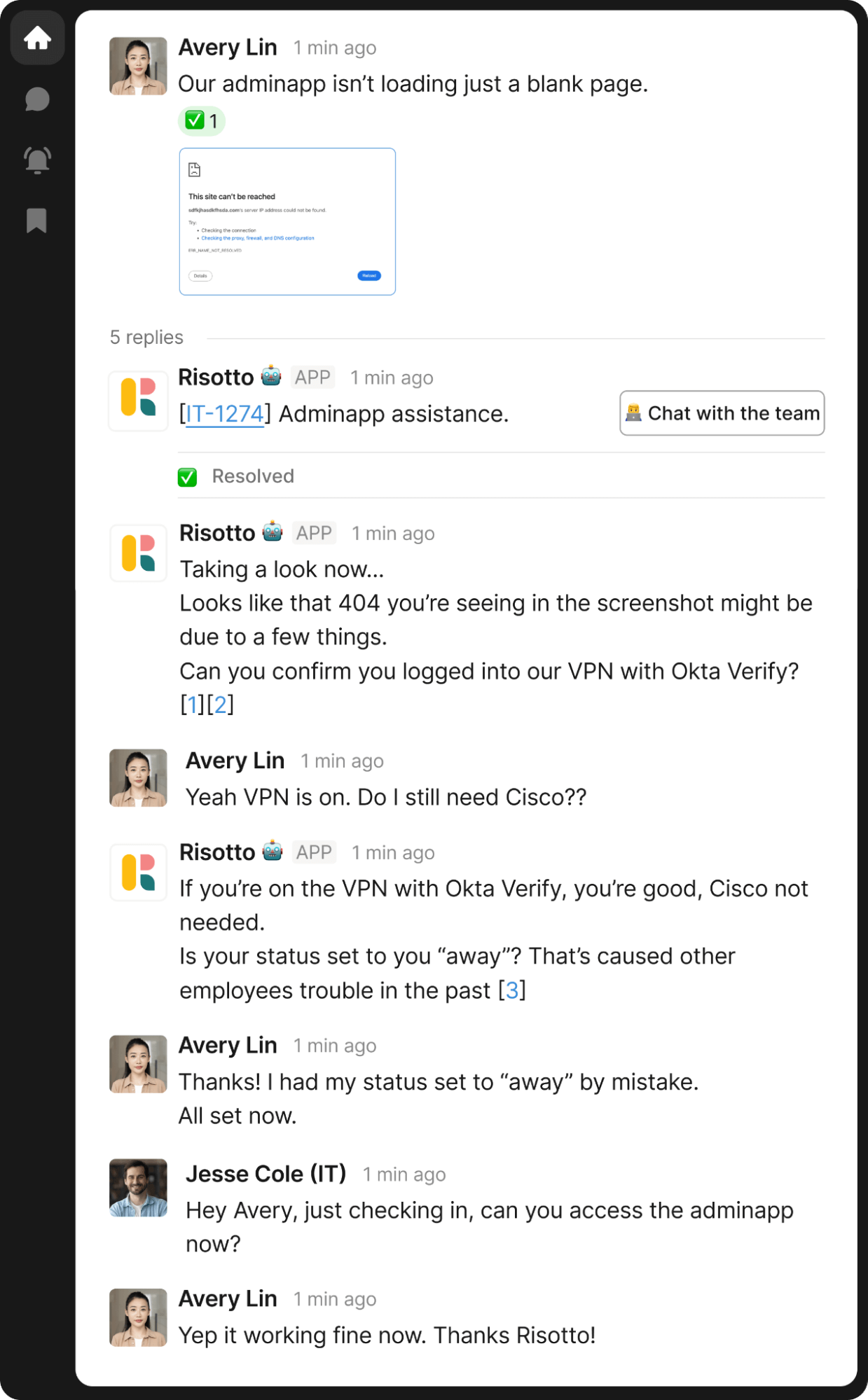
While many AI IT help desk tools claim to auto-resolve knowledge tickets, the reality is that most simply link to KB articles, leaving employees to find the answer themselves. And even when the AI chatbot does attempt a direct response, answer quality is often inconsistent, requiring significant manual IT intervention.
Risotto is different. Purpose-built for true ticket resolution, it doesn't just point employees to KB articles — it solves their issues directly, delivering industry-leading tier-1 ticket automation rates:
- Fundrise: Automated nearly 60% of IT support tickets
- Superhuman: Automated nearly 20% of IT support tickets
- ThoughtSpot: Automated nearly 48% of IT support tickets
- Trust & Will: Automated nearly 35% of IT support tickets
- Jobber: Automated nearly 38% of IT support tickets
- Hazel Health: Improved deflection rates from 3–5% to over 20%
- Shakepay: Automated nearly 40% of IT support tickets
- Ironclad: Automated nearly 90% of access-related IT requests
- Retool: Reduced SLA resolution time from an average of 2 days to under 1 day
- Vidyard: Automated nearly 56% of IT support tickets
Here’s why Risotto's AI agent excels at auto-solving knowledge tickets:
- Intelligent triage: Risotto asks targeted triage questions before responding, ensuring answers are contextually accurate from the start.
- Multi-step troubleshooting: If an initial solution doesn't work, Risotto continues the conversation, iterating through alternatives just like a human IT agent would.
- Multi-modal understanding: If an employee uploads a screenshot (e.g., an error message), Risotto can interpret it and provide a resolution without requiring manual IT involvement.
- Multiple knowledge sources: Risotto draws from your KB, past resolved tickets, and Slack conversations to deliver more accurate, up-to-date answers.
- Continuous learning: Every time Risotto escalates a ticket, it learns from the agent's resolution — so you never answer the same question twice and spend less time on KB maintenance.
Now, let's look at three examples of Risotto auto-solving knowledge tickets, demonstrating our AI agent’s capabilities in action.
Example #1: Intelligent Triage
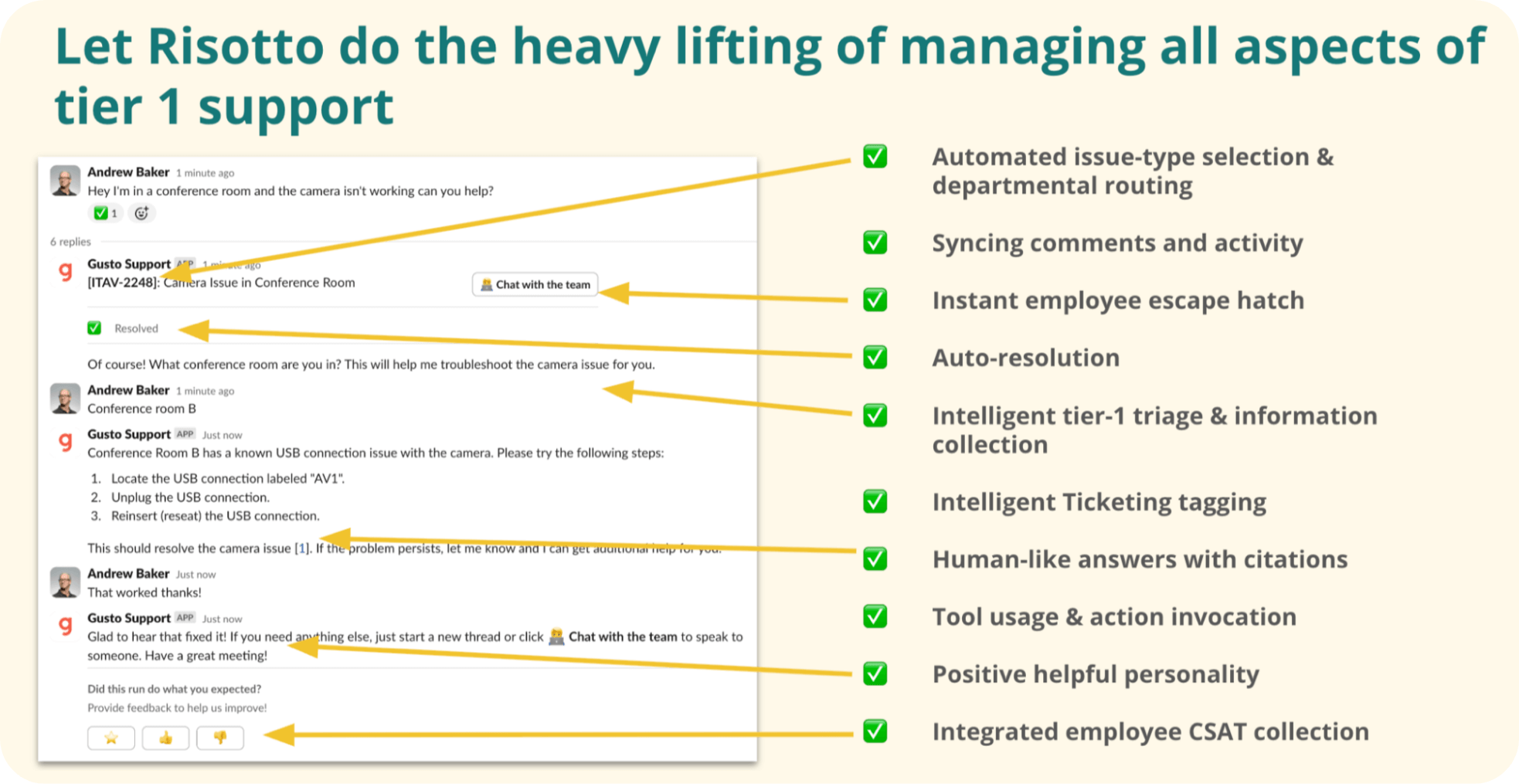
In the example above:
- An employee reports an issue: “Hey I’m in a conference room and the camera isn’t working can you help?”
- Risotto performs intelligent tier-1 triage and information collection: “Of course! What conference room are you in? This will help me troubleshoot the camera issue for you.”
- The employee provides the detail: “Conference room B”
- Risotto provides step-by-step instructions tailored to conference room B — not generic guidance that could apply to any room.
- The employee confirms resolution: “That worked, thanks!”
Example #2: Handling Curveballs

In this example:
- An employee messages Risotto asking, “How can I get an employee badge?”
- Risotto responds with the employee badge process.
- The employee clarifies, “I actually just need a temporary one, I left mine at home.”
- While most AI agents would get stumped here, Risotto intelligently adapts to the new context: "If you forgot your badge, visit the reception desk for a temporary one."
- The employee confirms the issue is resolved!
Example #3: Multi-Modal Inputs
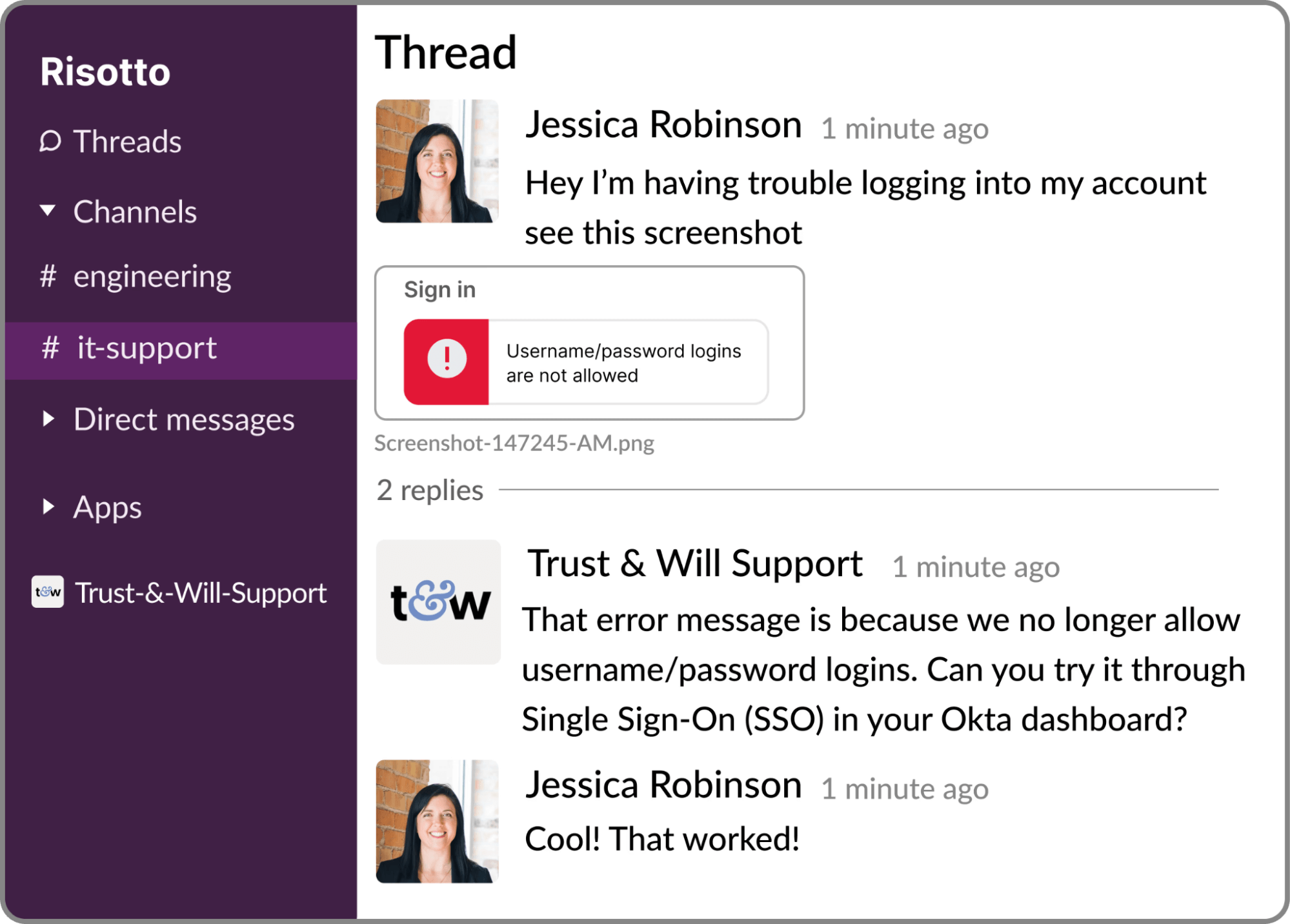
In the above example, taken from the Trust & Will case study:
- An employee reports an issue and includes a screenshot for context: “Hey I’m having trouble logging into my account, see this screenshot”
- Risotto analyzes the attached image and responds with a solution: “That error message is because we no longer allow username/password logins. Can you try it through Single Sign-On (SSO) in your Okta dashboard?”
- The employee confirms the resolution worked!
Example #4: Combining Knowledge Sources
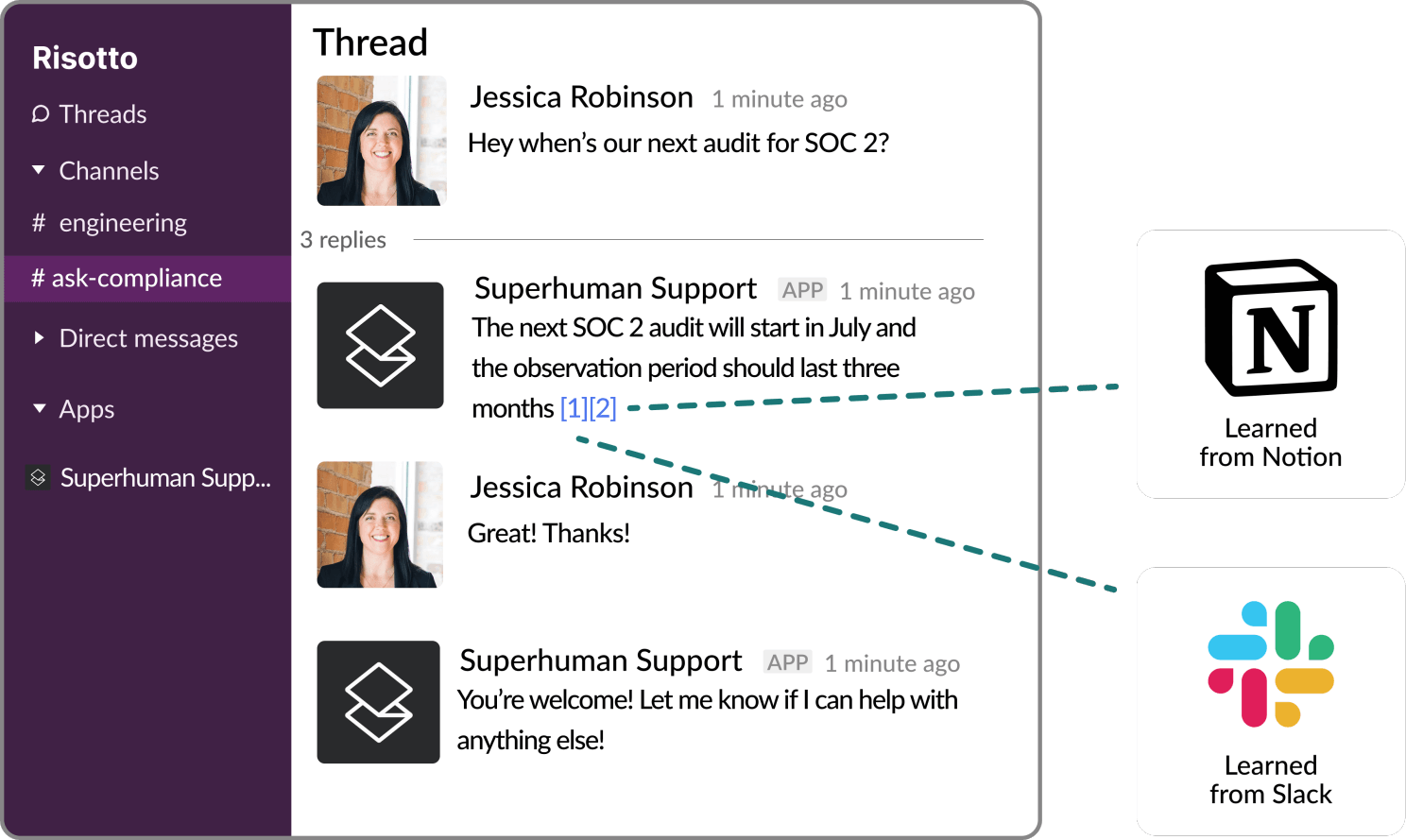
In the above example, taken from the Superhuman case study:
- An employee asks: “When’s our next audit for SOC 2?”
- Risotto doesn't just search your KB — it also draws on information from previous Slack conversations to deliver the most current answer: “The next SOC 2 audit will start in July and the observation period should last three months”.
- The employee confirms that the answer fully resolved their question.
As several of our customers have shared:
“The more we use Risotto, the smarter it gets, that’s what makes it different from every other tool we’ve tried.”
– Peter Hadjisavas, Head of IT at Hazel Health
“Our previous tool summarized whatever it pulled from wiki articles, it didn’t supplement responses with broader LLM knowledge or reasoning. This approach fell short because it lacked the capability to fully understand user intent or supplement answers with external knowledge… Risotto, however, synthesizes information from multiple inputs to provide context-aware, accurate, and actionable responses.”
– Phillip Rickett, VP of IT at Fundrise
“Risotto was able to combine knowledge from different sources and give me an instant answer to a complex question, which was awesome to watch."
– Jason Huey, Senior IT Systems Administrator at ThoughtSpot
2. Software Access Automation
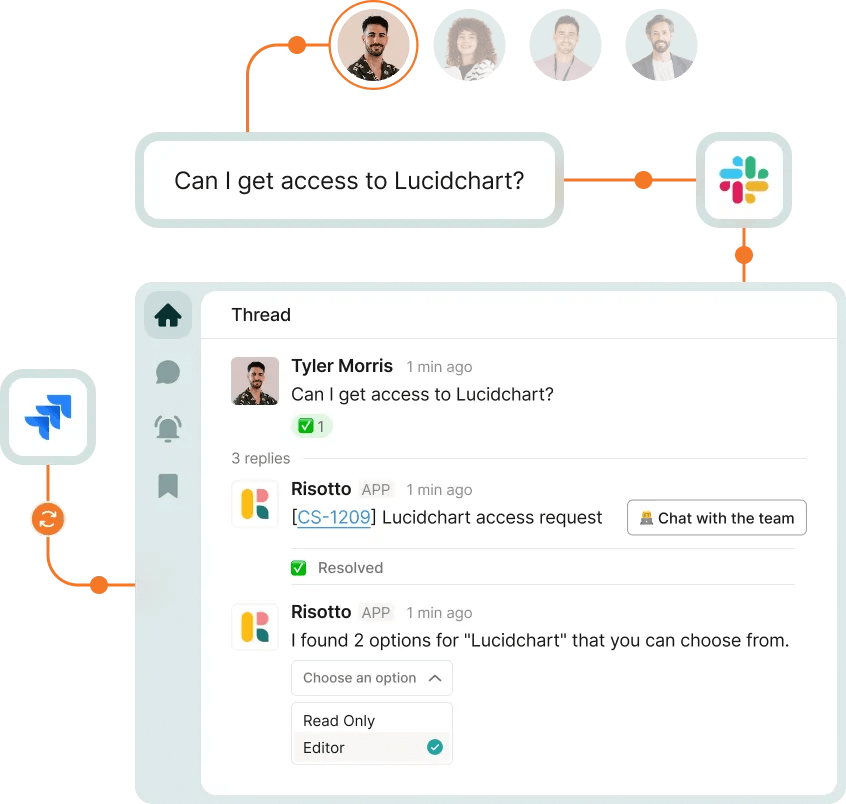
Risotto brings identity and access management directly into Slack, where your employees already work. If you’re comparing the best IAM tools for managing access requests, consider whether you need a full governance platform or an automation layer that works with your existing stack.
Employees request access using natural language in Slack. From there, Risotto handles everything behind the scenes, including:
- Prompting employees to provide a reason for their request
- Routing approval requests to the right manager(s) based on preconfigured rules and workflows
- Automatically granting application access upon approval
- Revoking just-in-time (JIT) access at expiration, with optional Slack reminders so employees can request extensions in advance
Every action in Slack is bidirectionally synced with your ticketing system — including Jira, Freshservice, Zendesk, and ServiceNow — while Risotto maintains detailed access records to keep you audit-ready.
On the backend, through an easy-to-use self-serve dashboard, you can:
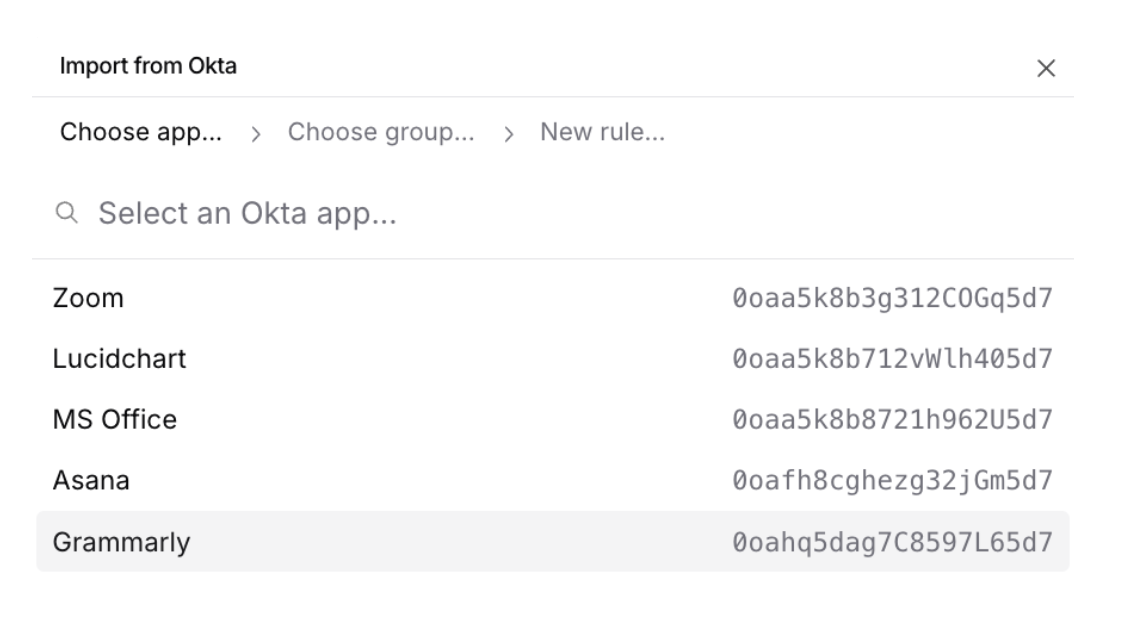
- Add existing applications and rules in minutes, with integrations for Okta groups, Google Groups, and other IDPs
- Customize dynamic, multi-step approval workflows
- Define role-based and time-based access controls
Let’s take a look at 3 examples of how Risotto streamlines time-based, approval-based, and self-service access requests.
Example #1:Time-Based Access
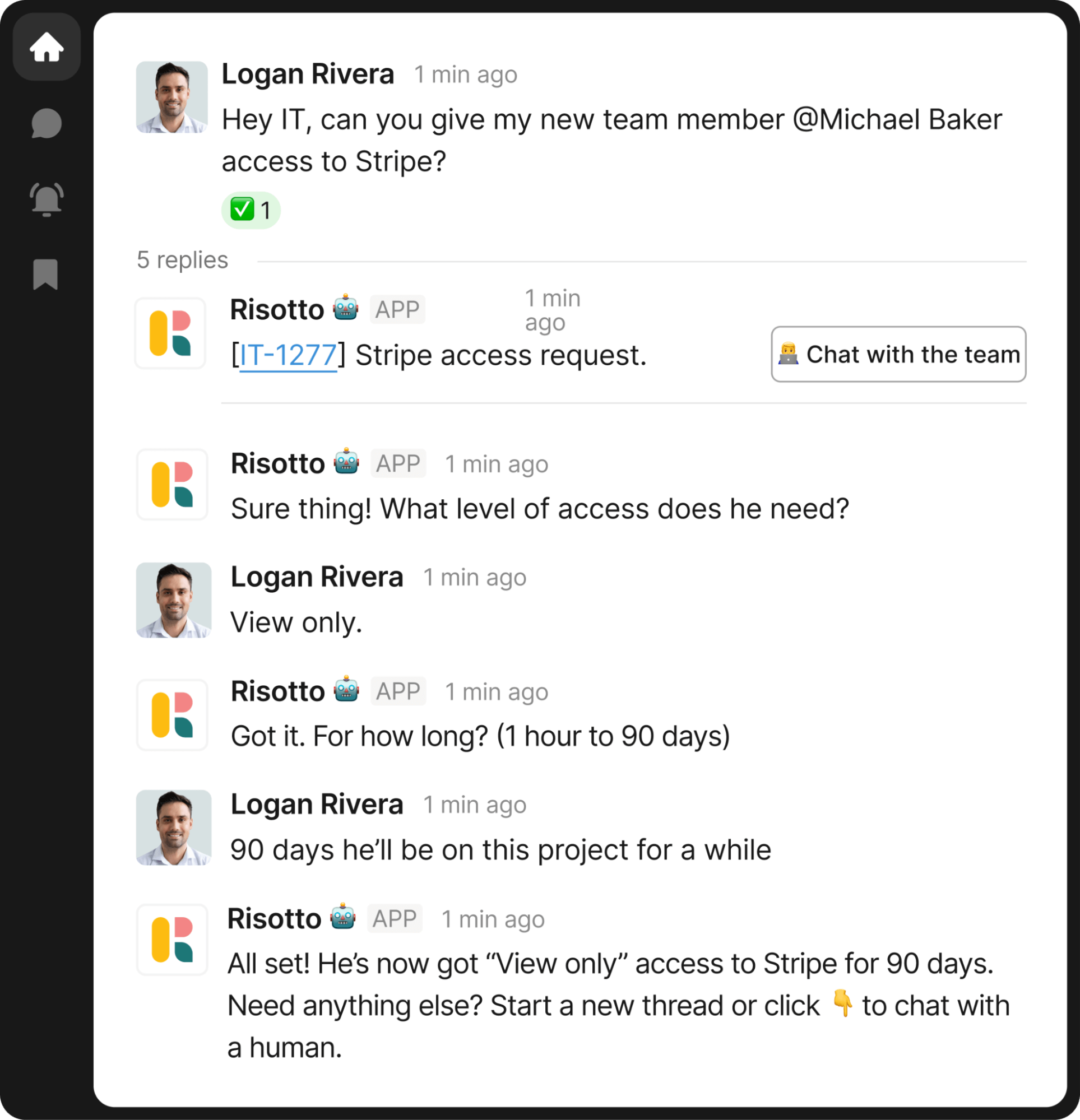
In this example:
- An employee makes a software access request: “Hey IT, can you give my new team member @Michael Baker access to Stripe?”
- Risotto asks: “What level of access does he need?”
- The employee responds with the access scope: “View only.”
- Risotto follows up: “For how long? (1 hour to 90 days)”
- The employee provides the duration: “90 days, he’ll be on this project for a while”
- Upon a manager’s approval, Risotto provides temporary access: “He’s now got ‘View only’ access to Stripe for 90 days.”
Risotto can also be configured to send automated reminders to employees when time-based access is set to expire, asking if they’d like to extend:
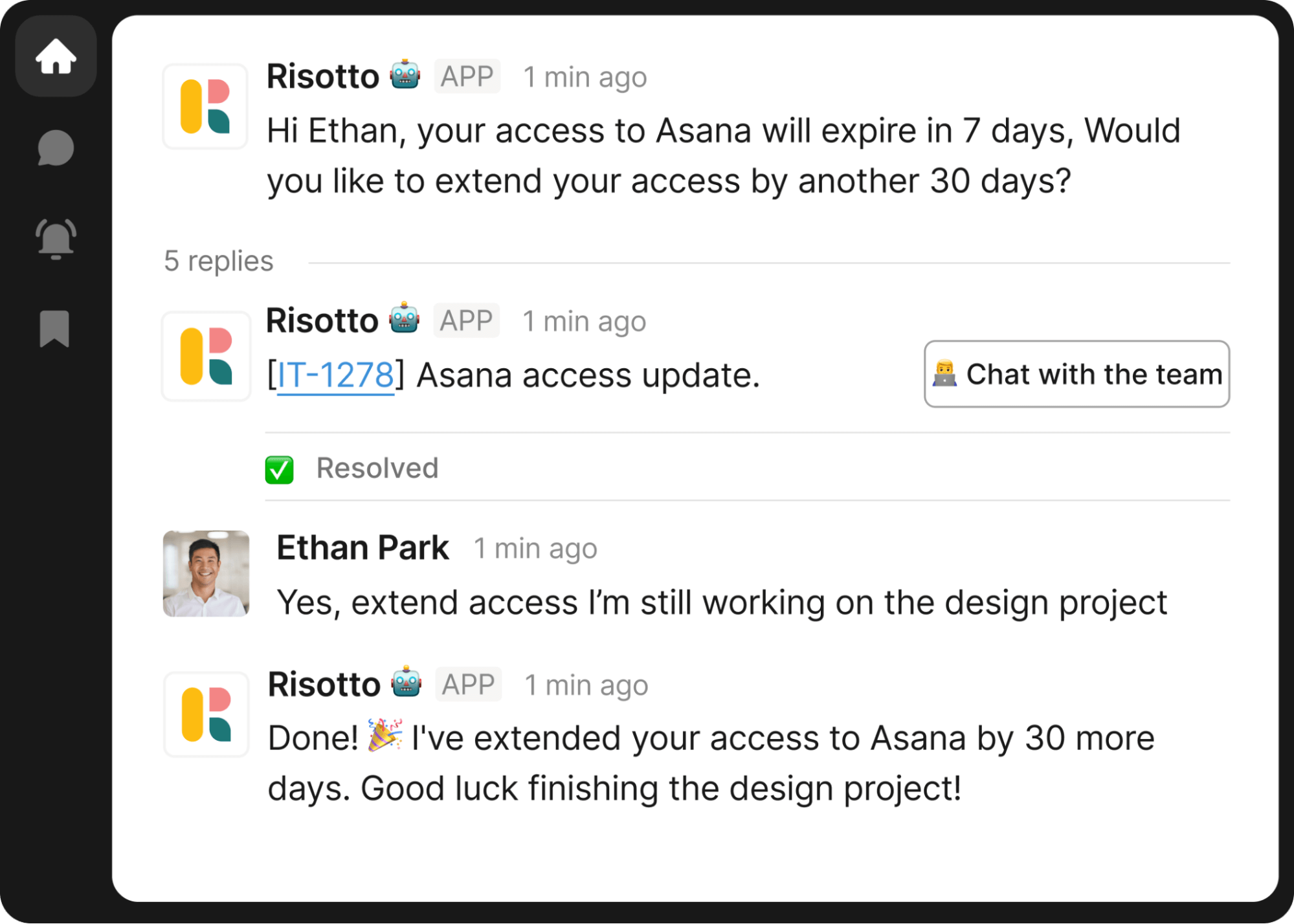
In this example:
- Risotto proactively notifies an employee before access expires: “Hi Ethan, your access to Asana will expire in 7 days. Would you like to extend your access by another 30 days?”
- The employee confirms the need to extend access: “Yes, extend access I’m still working on the design project”
- Risotto completes the update: “I’ve extended your access to Asana by 30 more days.”
Example #2: Approval-Based Access
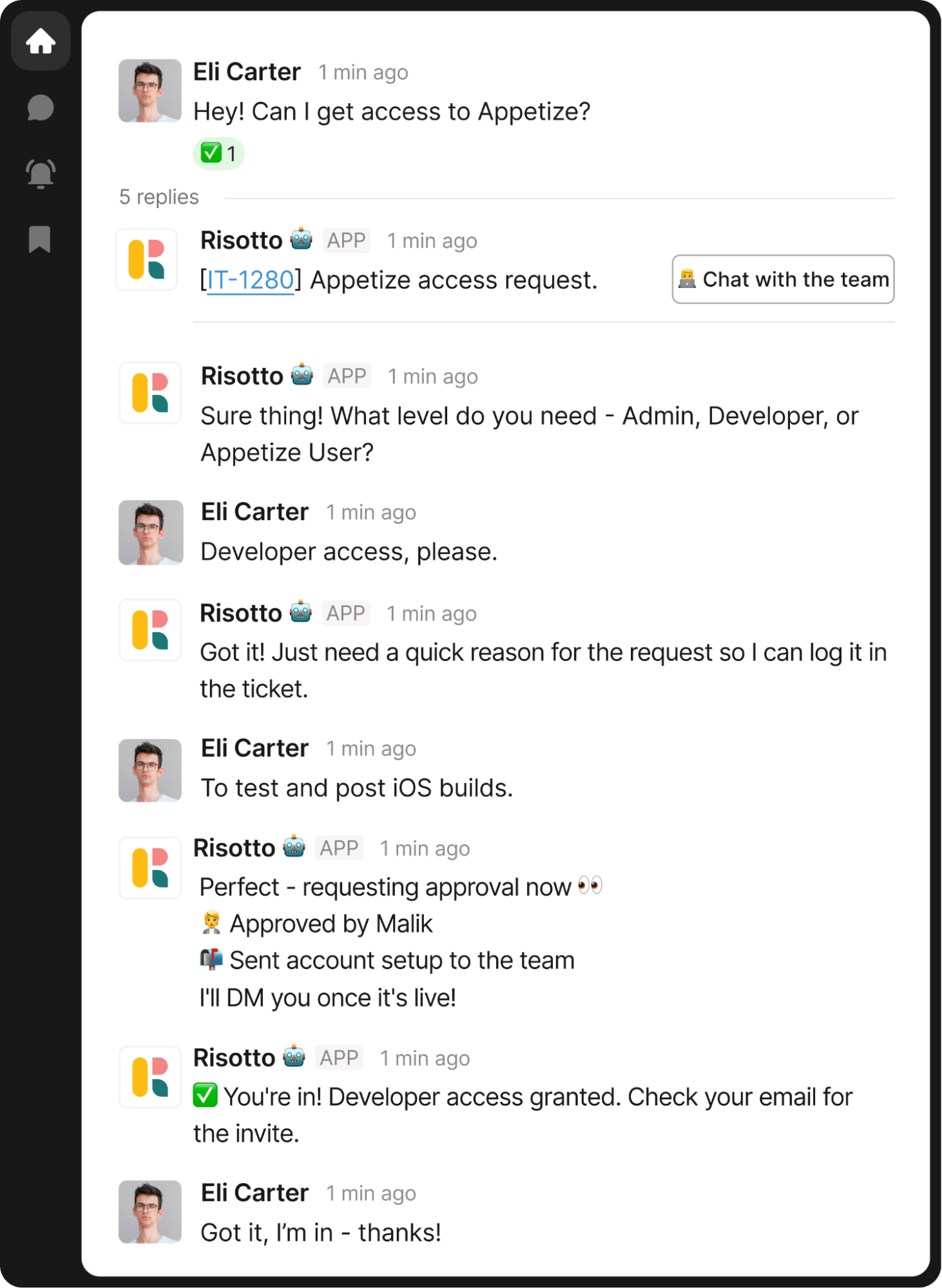
In this example:
- An employee requests software access: “Hey! Can I get access to Appetize?”
- Risotto asks: “What level do you need — Admin, Developer, or Appetize User?”
- The employee specifies the access level: “Developer access, please.”
- Risotto requests justification in real-time: “Just need a quick reason for the request so I can log it in the ticket.”
- The employee provides context: “To test and post iOS builds.”
- Risotto automatically routes the request for approval and keeps the employee informed: “Requesting approval now 👀”
- Once approved, Risotto automatically provisions access and closes the loop clearly: “You’re in! Developer access granted. Check your email for the invite.”
Example #3: Self-Service Access
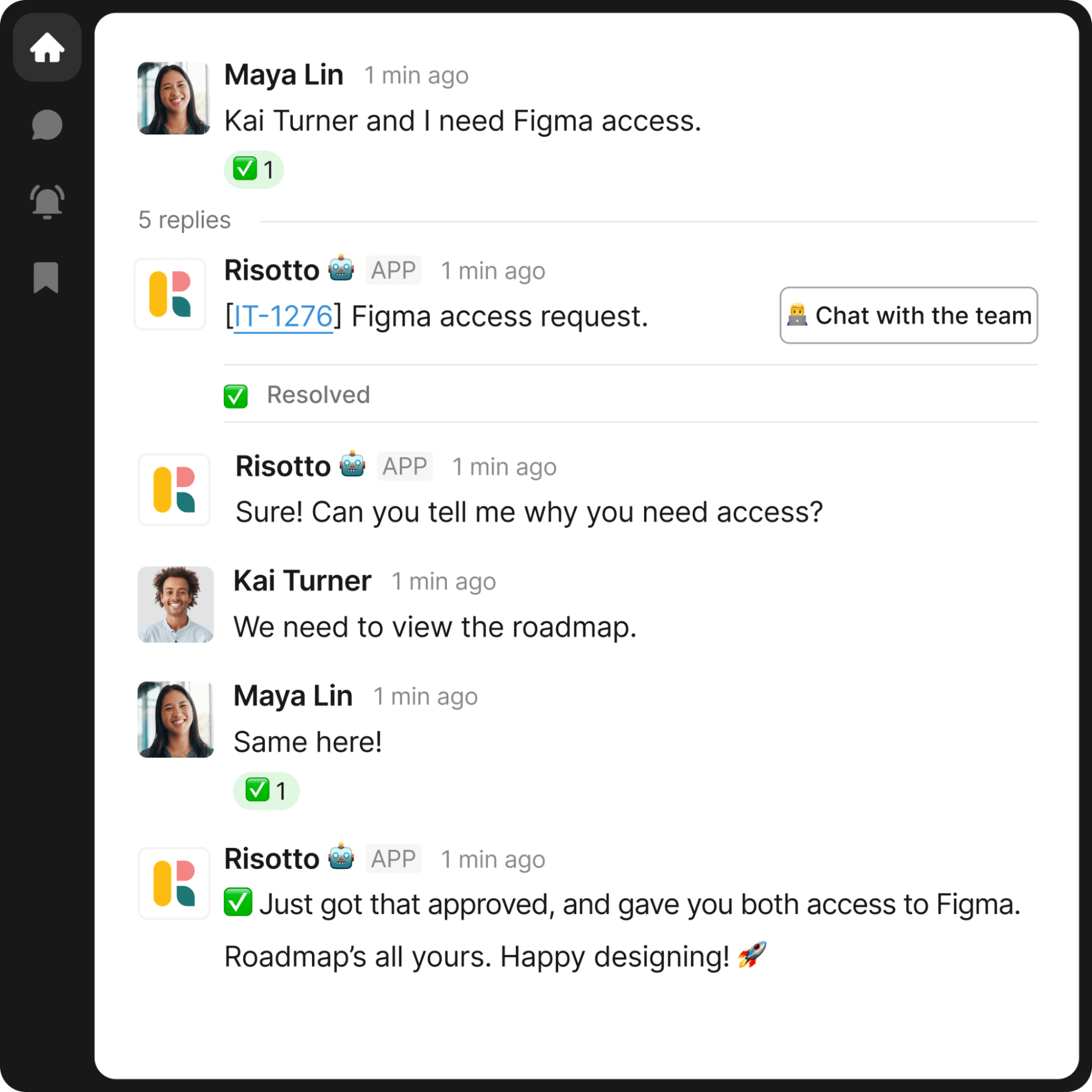
In this example:
- Two employees request software access in plain language, directly via Slack: “Kai Turner and I need Figma access.”
- Risotto gathers required justification with a simple follow-up: “Can you tell me why you need access?”
- The employees provide context without leaving the thread: “We need to view the roadmap.” / “Same here!”
- Risotto confirms completion clearly for all requesters: “Just got that approved, and gave you both access to Figma.”
Adding and Managing New Applications
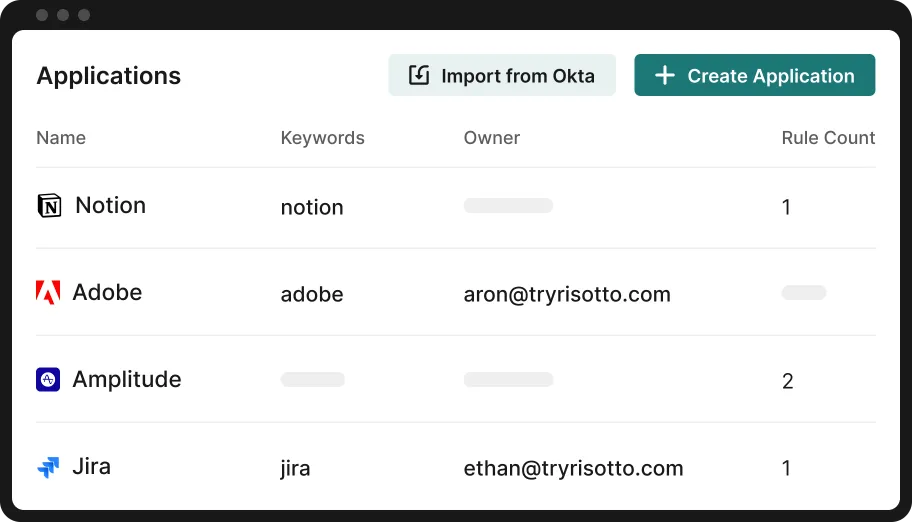
Risotto makes it easy to add and manage applications through our intuitive, self-service dashboard. Just connect your IDP (e.g, Okta, Google Groups, etc.) to import existing applications and access rules in minutes.
Leverage Segregation of Duties
For each application, you can leverage segregation of duties with Risotto’s advanced approval engine, set RBAC rules, time-based access controls, and dynamic multi-step approval flows.
As several of our customers have shared:
“When a team member asks, ‘How do I get access to Hightouch?’ they’re not looking for a link or a document; they need immediate, actionable assistance… Risotto intelligently understands the intent behind the request. It confirms existing permissions, coordinates necessary approvals proactively, and automatically provisions access upon approval. This automation significantly speeds up provisioning and improves user satisfaction.”
– Phillip Rickett, VP of IT at Fundrise
"Automated software access saves us so much time. Within minutes people get the access they need with everything tracked, approved, and no additional overhead needed… For sensitive tools and resources Risotto's automated time-based access has been a game-changer."
– Collin Clifford, Legal & Compliance Manager at Superhuman
"The problem we faced is that other AI support bots were not confident in themselves. If you asked, 'Can I have access to Salesforce?' it would respond, 'Do you want access to Salesforce?' Or worse, it wouldn't find the app at all.”
– Toby Stewart, IT Engineering Manager at Ironclad
“The software access automations were a huge win for us. They were super easy to set up and we now have more than 30 applications with automated provisioning running 24/7.”
– Tom Grinberg, IT Manager at Trust & Will
"Our control for SOC 2 is that access to privileged systems is approved by a manager… Risotto is able to automate the approval process and ticket tracking portion which is exactly what we needed.”
– Vergil Smith, IT Manager at Vidyard
“Before Risotto compliance reports could take days to figure out but now I can pull everything needed in seconds.”
– Jason Huey, Senior IT Systems Administrator at ThoughtSpot
3. Password Resets
In our case study with Jobber, we discuss how employees sometimes waited 35 hours for routine requests — password resets being one of the most common. After implementing Risotto, they achieved a 3-hour AI TTR.
Here's one example of Risotto handling a password reset request for Jobber automatically, without any manual IT intervention:
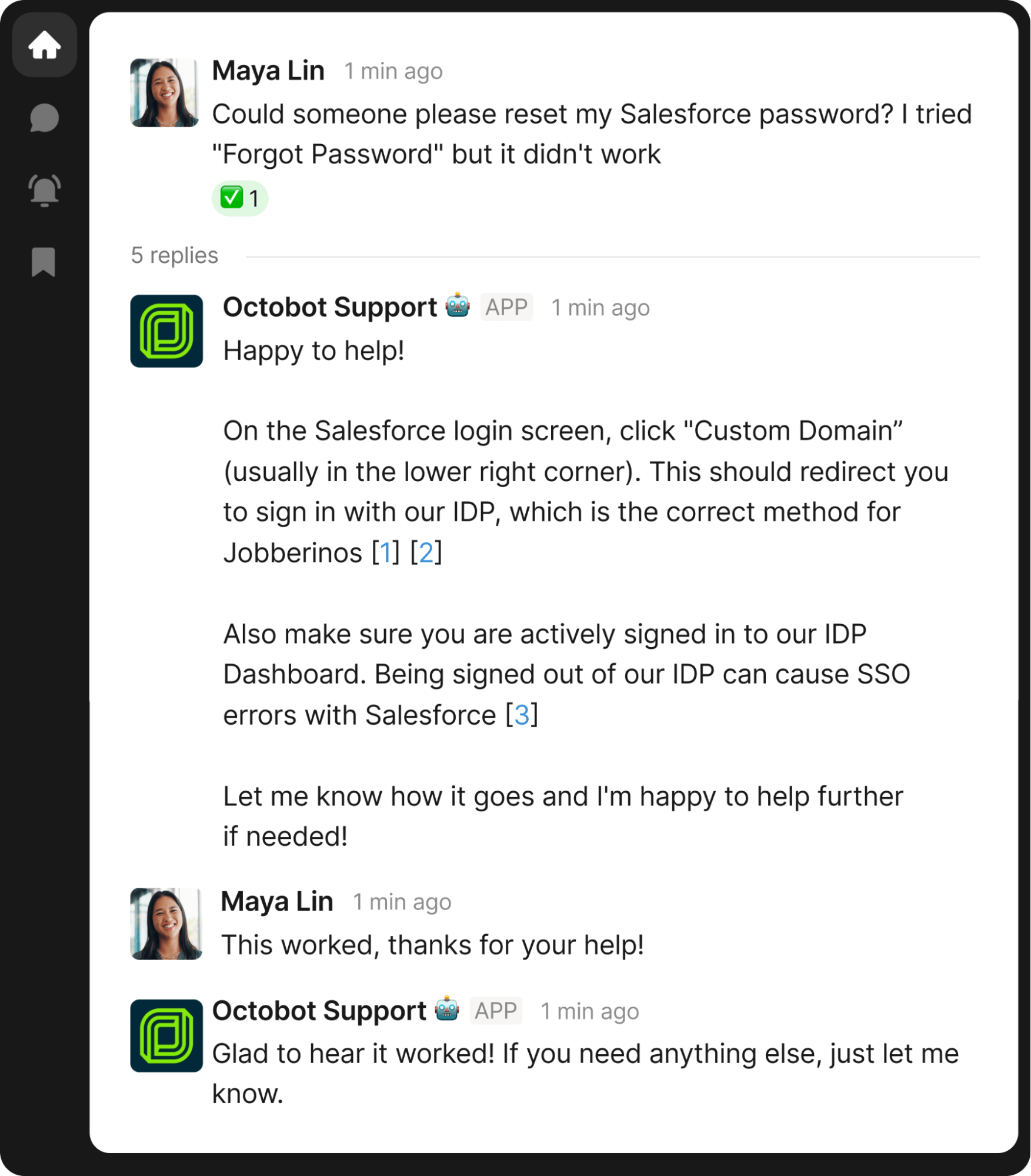
Notice the bracketed citations [1], [2], and [3] in Risotto's response — clicking these shows exactly where the information came from. As we've mentioned, Risotto doesn't just pull from your knowledge base; it can draw from multiple sources, including past ticket resolutions and similar Slack conversations in designated channels.
This ensures you never answer the same question twice.
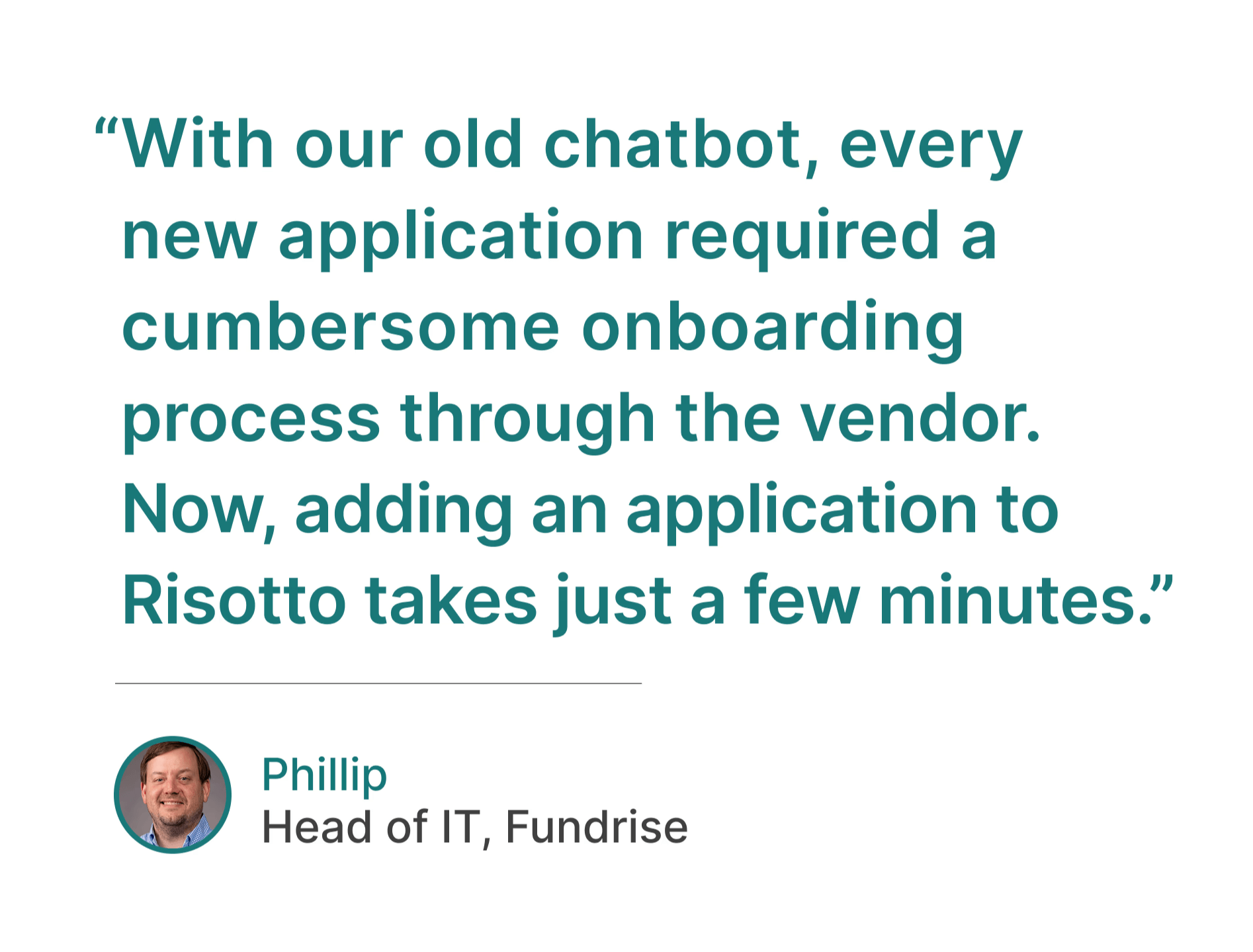
As Phillip Rickett, VP of IT, Fundrise, stated:
"With Risotto, instead of constantly writing new documentation, our team can simply answer questions, and Risotto learns as we go. It's like having an AI teammate that gets smarter every day without any extra effort from us."
4. Automatic Ticket Routing and Escalation
When Risotto can't resolve an issue, our AI agent intelligently escalates and routes tickets to the right person in the right department, based on previous ticket history and your pre-configured settings.
The entire workflow happens in Slack. All prior troubleshooting steps are already included in the ticket, so IT agents don't waste time repeating questions. As Mike Smith, IT Operations Manager at Jobber, put it:
“Risotto keeps a historical record of all the information an employee has provided, even links and screenshots… if someone on our team wants to take a look, they can reference Risotto and continue the conversation without asking for context all over again.”
IT agents can reply directly in Slack, enabling back-and-forth with the employee without leaving existing workflows. As mentioned earlier, everything syncs bi-directionally with your existing ticketing system, and we log every conversation and action, creating a complete audit trail for compliance.
Here's an example of Risotto escalating a ticket to the most relevant IT agent in Slack:

As you can see in this example:
- An employee reports an issue and follows guided troubleshooting for a known conference room problem.
- Risotto delivers targeted steps, ending with a clear fallback: “Let me know if you need further assistance or if these steps don’t resolve the issue.”
- The employee confirms the issue persists: “I tried that and it’s still not working, what next?”
- Risotto intelligently escalates to the right IT agent based on their ticket history — in this case, routing to @Amanda Hill because she's handled AV support issues before.
- Amanda can see all of Risotto's previous troubleshooting steps in the ticket, so she doesn't have to start from scratch. Based on this, she realizes it requires an in-person fix and replies: "Hey Andrew, I'll be right there!"
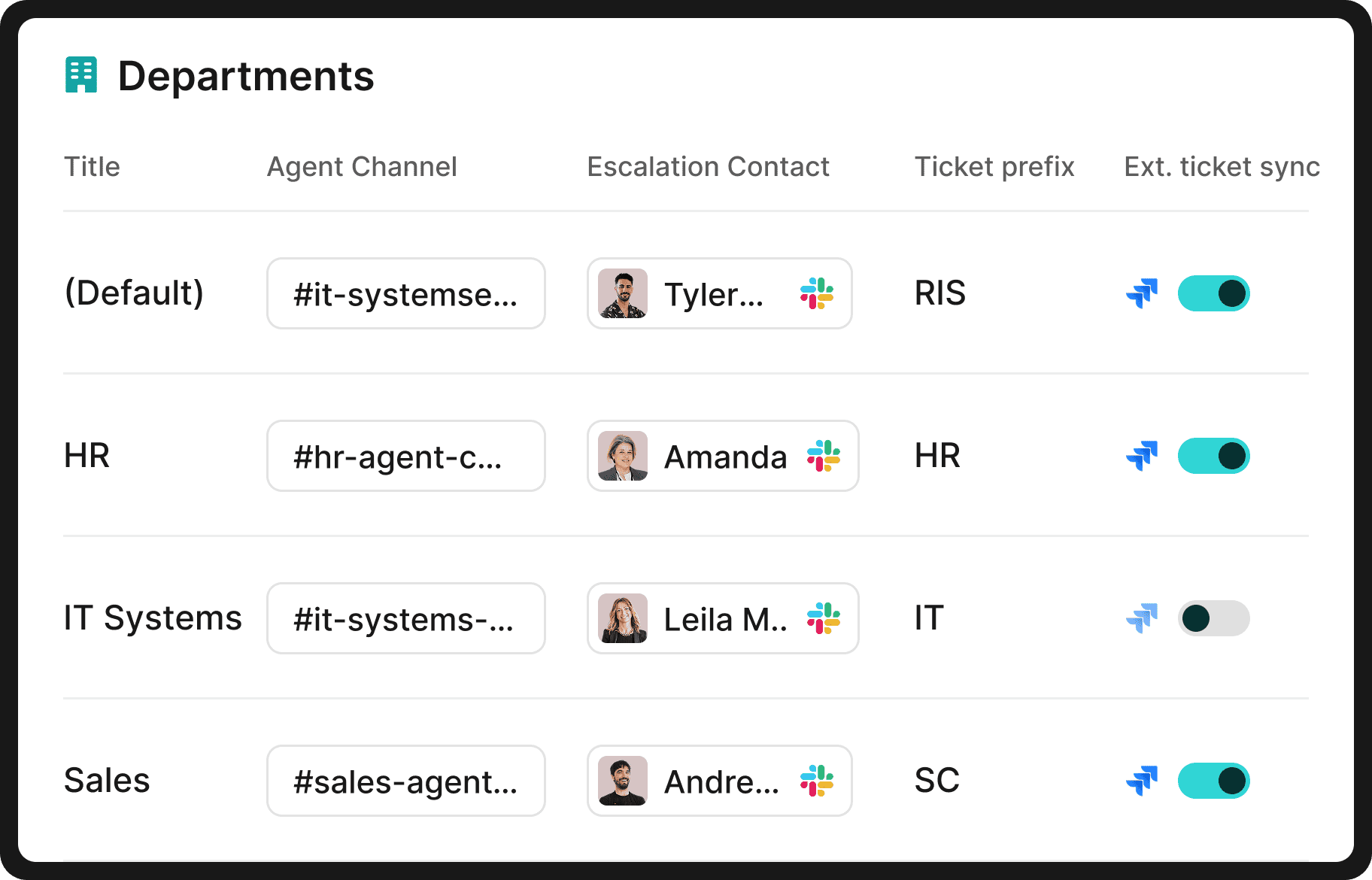
Note that, while Risotto was built by IT for IT, it is also frequently adopted by other departments, such as HR, Sales, Legal, and Finance, which deal with their own repetitive tasks and tickets. When used across multiple departments, Risotto's AI agent intelligently routes tickets to the right team and person.
5. Automated Device Management
Risotto seamlessly integrates with a variety of MDM tools, including Kandji:
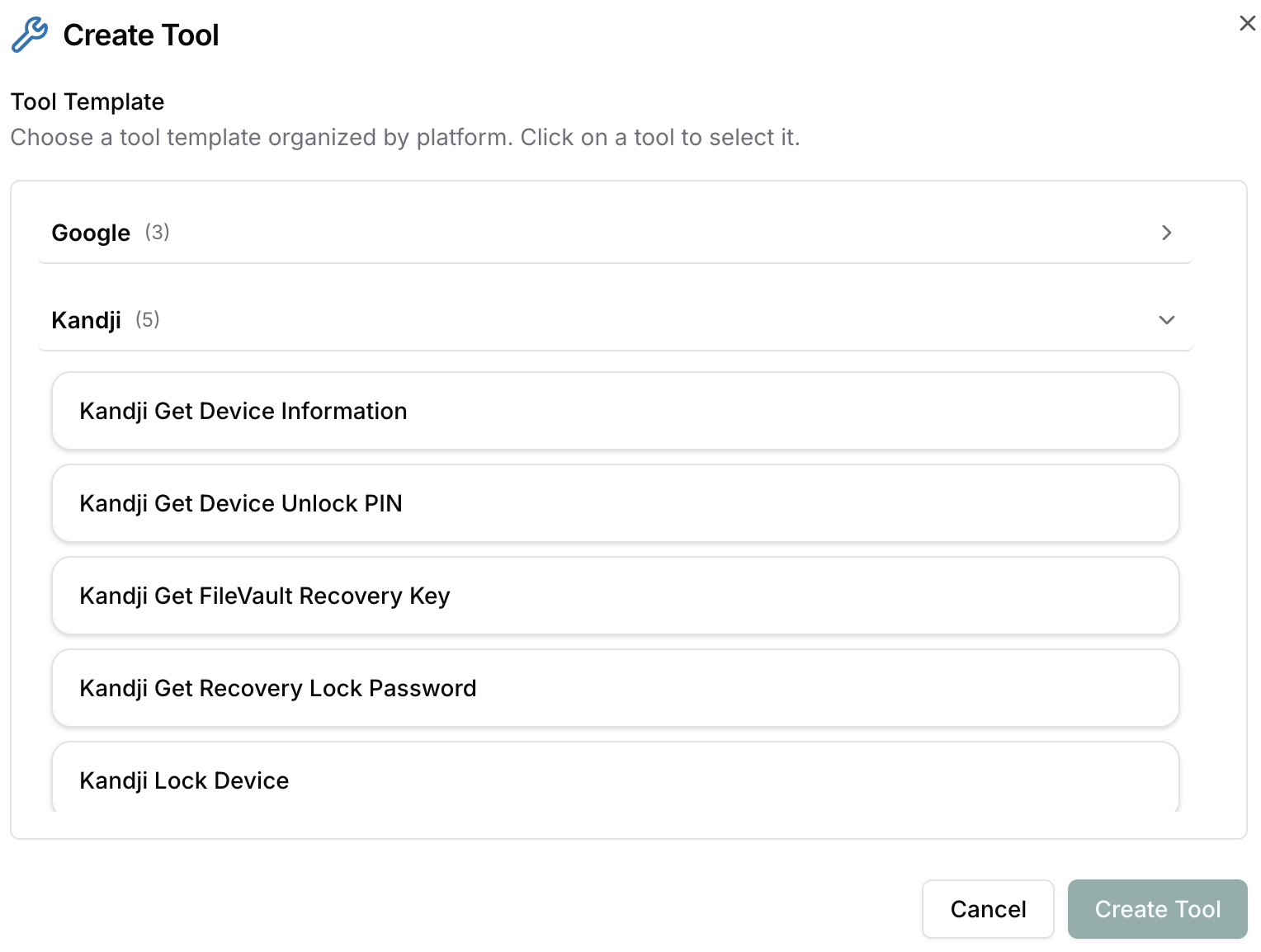
All within a seamless Slack-based workflow, Risotto can:
- Retrieve device information
- Access unlock PINs
- Pull FileVault recovery keys
- Obtain recovery lock passwords
- Execute remote lock commands
The result: Routine device management tasks now resolve instantly, with minimal manual IT intervention.
Risotto can also automate a plethora of other tasks involving end-to-end employee onboarding and offboarding.
6. AI Writing Suggestions
Another way to automate IT support is to give agents AI-powered writing assistance. For example, with most service desk automation tools, once an IT agent has typed a response, they can ask AI to polish it, expand it, summarize it, and so on.
What's unique about Risotto is that IT agents can loop in ChatGPT directly as they're typing — ChatGPT's suggested response appears right there in Slack, which they can edit before sending it to the employee.
This saves IT agents significant time and is one of Risotto's most popular features.
7. Analyzing Ticket Patterns
Understanding ticket patterns shouldn't require manual dashboard exploration.
Risotto’s Analytics Assistant brings conversational intelligence to your support metrics. Instead of digging through dashboards, just ask Risotto what you want to know. For example:
- What were last week's top ticket drivers?
- Which KB articles need updating?
- What access automations would boost my auto-solve rate?
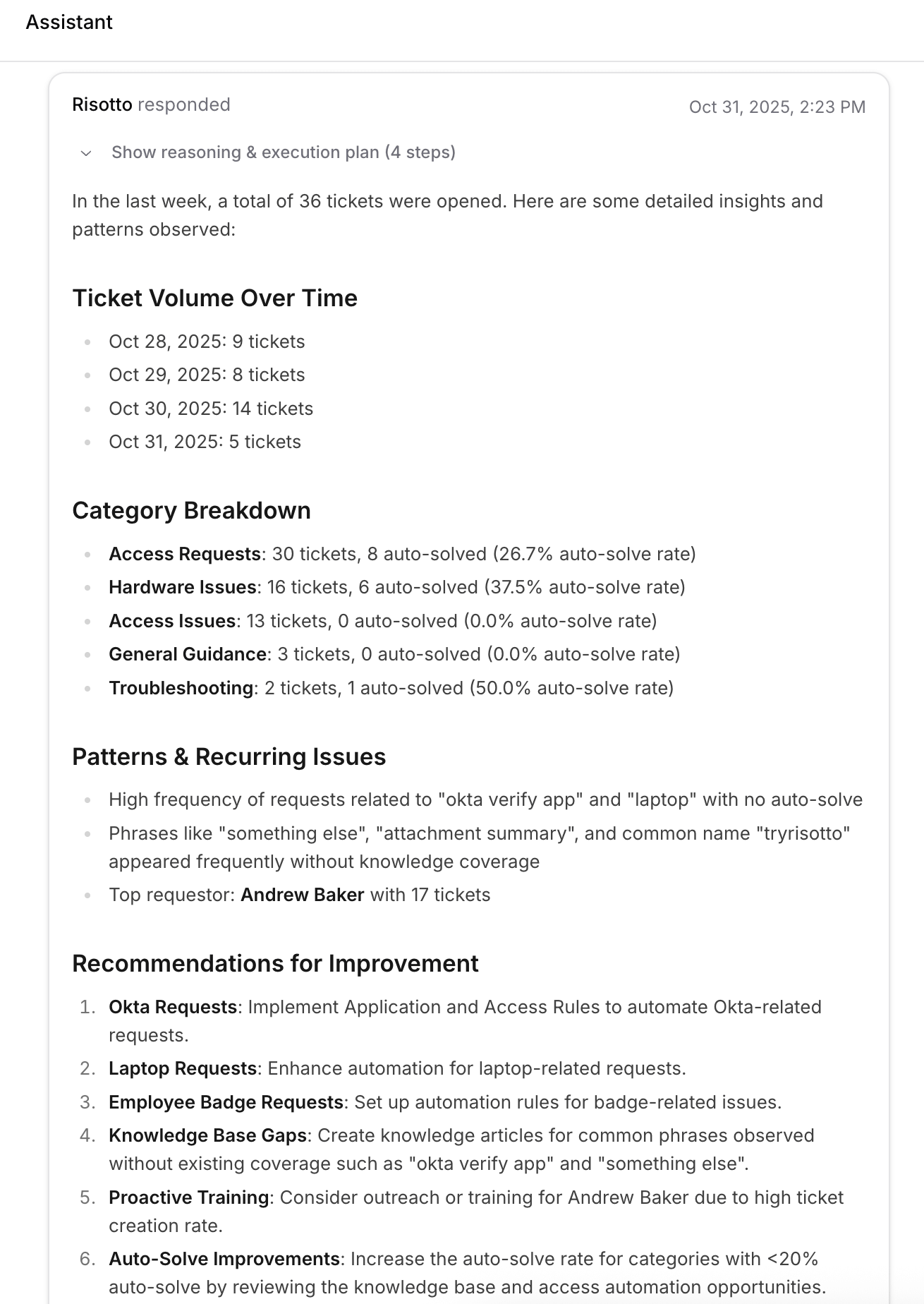
In the example above, notice how Risotto didn't just surface common ticket patterns and issues — that's only part of the value — it also recommended actionable solutions.
8. AI-Generated Ticket Summaries
Many service desk tools offer AI-generated ticket summaries for IT agents, which is useful for longer tickets or when the issue isn't immediately clear.
When Risotto escalates a ticket, it provides a summary along with the full resolution steps the AI agent attempted, all directly in Slack.
This Slack-native approach benefits IT agents while also driving employee adoption, since employees don't have to leave their existing workflows.
As Phillip Rickett, VP of IT at Fundrise, stated:
“We want AI to seamlessly fit into our team’s daily operations, meeting our users where they already work… Risotto’s minimal operational overhead and integration into Slack has enabled us to achieve exactly that.”
9. Automated SLA Tracking
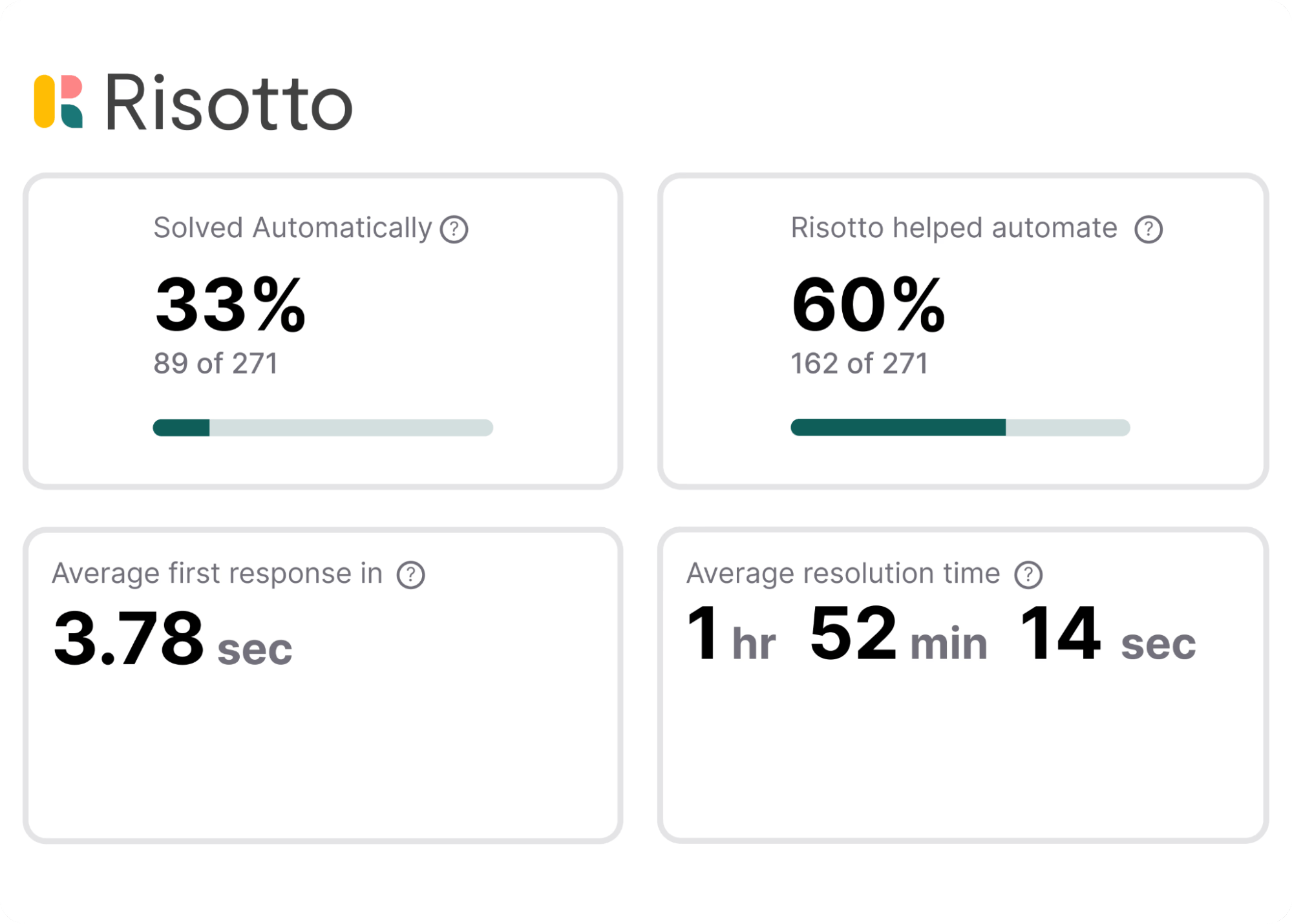
Risotto offers comprehensive SLA (Service Level Agreement) tracking with all the standard ITSM metrics you'd expect from a service desk tool.
But what's unique to Risotto is how we prioritize automation metrics:
- The ‘solved automatically’ metric (top left) tracks tickets completely resolved without any human intervention. This is our north star — the core metric Risotto is designed to improve and optimize.
- The 'Risotto helped automate' metric (top right) captures tickets where IT agents were involved, but Risotto had already handled initial troubleshooting and gathered context. Agents can resolve these issues faster without repeating early troubleshooting steps.
Our case studies showcase Risotto’s significant ticket automation rates:
- Fundrise: Automated nearly 60% of IT support tickets
- Superhuman: Automated nearly 20% of IT support tickets
- ThoughtSpot: Automated nearly 48% of IT support tickets
- Trust & Will: Automated nearly 35% of IT support tickets
- Jobber: Automated nearly 38% of IT support tickets
- Hazel Health: Improved deflection rates from 3–5% to over 20%
- Shakepay: Automated nearly 40% of IT support tickets
- Ironclad: Automated nearly 90% of access-related IT requests
- Vidyard: Automated nearly 56% of IT support tickets
Beyond automated ticket resolution rates, we also track other traditional SLA metrics.
For example, as Charlie Verrey, IT Manager at Retool, shared in our case study: “Our target SLA was 2 days and we’re now beating that averaging only 1 day to ticket close using Risotto. So we’re meeting that SLA very well and Risotto is a big part of that.”
Also, as we share in the Jobber case study, one of the key SLA metrics they saw improvement in was 3-hour AI TTR (down from 35-hour human TTR). This translated to 2,747 hours saved waiting for ticket resolution and improved customer satisfaction.
Interested in Learning More About Risotto’s IT Service Desk Automation Capabilities?
Risotto is beloved by IT teams and end users alike, and it’s a great solution to reduce ticket volumes and achieve help desk automation and scalability.
We offer enterprise-grade functionality with setup in hours (not the weeks or months required by legacy providers).
Risotto integrates seamlessly with Slack, Microsoft Teams, existing ticketing systems (e.g., Jira, ServiceNow, Freshservice, and Zendesk), and a plethora of other tools.
We invite you to:
Liked the article? Share on:
On this page
Try Risotto for free for 30 days. Commit only when you see the value.


See more recent articles


Want faster solutions and happier employees?
Ensure Legal never answers another "do we need an NDA for this?"
Every policy question is stealing time from the work Finance was hired to do.
Turn Slack requests into action items instead of engineering interruptions.
The biggest deal risk might be an unanswered internal question.
Run a united support system that your employees can depend on.
Build the automations you’ve been planning on for months.
The bottleneck isn't your team. It's the groundwork before they can actually help.
Get support data that your team can talk to.
Jump on a call to understand:
Risotto handles repetitive support requests across tools and teams, so IT gets back to solving real problems, not rerunning the same ones.
.svg)
%20(1).webp)
See what makes the Iru integration a 10/10 for our clients.