%20(1).svg)

Atlassian Assist is Jira Service Management's built-in Slack and Microsoft Teams extension for conversational ticketing — it lets employees raise and track service requests directly from chat, with a two-way sync back to JSM.
In this article, we'll cover:
- A brief overview of Atlassian Assist — what it is, how it works, and its core features, with links to Atlassian's official documentation, the Slack Marketplace listing, and the Microsoft Teams Marketplace listing for the full setup walkthrough.
- Where Atlassian Assist + JSM's Virtual Service Agent hit a ceiling — the limitations IT teams run into when trying to get AI-powered ticket resolution out of JSM's native capabilities, and how Risotto solves them. Risotto is our Slack-native AI IT agent that's purpose-built to integrate with Jira Service Management. It auto-resolves 20–60%+ of tier-1 tickets out of the box, and was built by co-founder Alex Confer, who previously led IT engineering at Dropbox and Gusto. Explore Risotto's origin story.
- Case studies & results from companies who added Risotto on top of their existing Jira setup, spanning large enterprises like Gusto (~3,000 requests/month) to midsize teams like ThoughtSpot (~1,500 requests/month), and smaller teams as well:
- How Hazel Health switched from Atlassian Assist & Jira's Virtual Agent to Risotto and improved ticket automation rates from 3–5% to 20%+. (Read full case study).
- How Trust & Will used Risotto as the AI ticket-resolution layer on top of Jira Service Management and automated 35% of IT tickets. (Read full case study).
- How ThoughtSpot integrated Risotto with Jira, Slack, and Okta in less than a week, automating 48% of IT tickets and reducing resolution time from 31 to 6.5 hours. (Read full case study).
- How Gusto integrated Risotto with Jira, Slack, Confluence, and Okta in 2 weeks, auto-solved 53% of IT tickets on the first day of implementation, and saved 114,000 hours of support wait time. (Read full case study.)
- How Jobber integrated Risotto with Slack, Jira Service Management, AWS, Jamf, and Confluence in 2 days, achieving 38% IT ticket automation and saving 2,747 hours of support wait time. (Read full case study.)
- How Hazel Health switched from Atlassian Assist & Jira's Virtual Agent to Risotto and improved ticket automation rates from 3–5% to 20%+. (Read full case study).
Atlassian Assist: Overview, Key Features & Setup
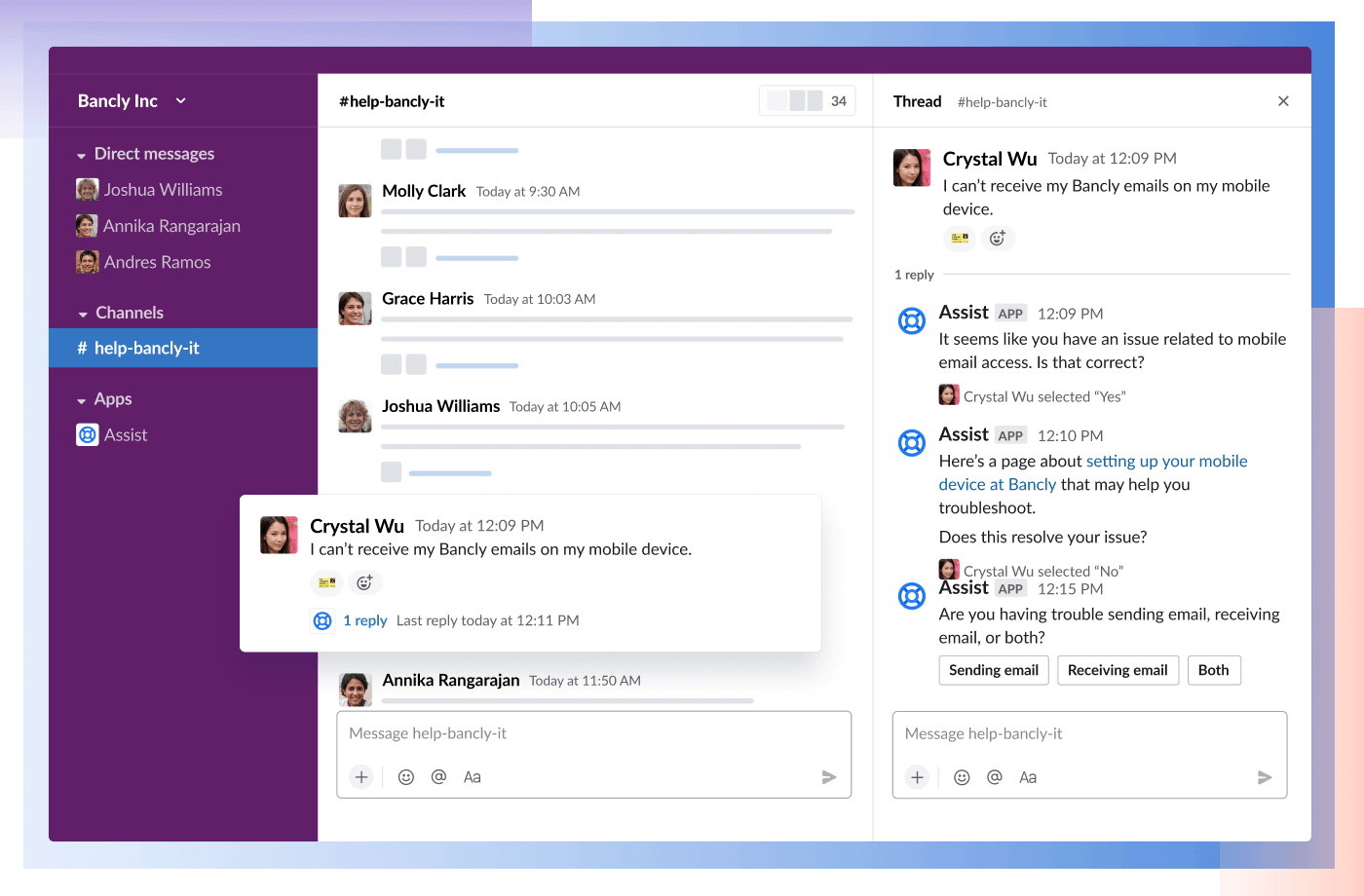
Atlassian Assist is Jira Service Management's conversational ticketing extension for Slack and Microsoft Teams. It gives employees a way to raise, track, and resolve service requests directly from a chat — with a full two-way sync back to JSM.
Instead of making people leave Slack or Teams to file a ticket in a portal, Assist brings the help desk into the tools they're already using. A Jira Service Management Cloud subscription is required.
Much of what we cover below is drawn from Atlassian's official chat feature guide, the Slack Marketplace listing, and the Microsoft Teams Marketplace listing. We've summarized the key points below, but those are the best resources if you want the full details.
Key Features & Capabilities
At a high level, Jira Assist is built around five core functions — create, automate, categorize, report, and resolve — all powered by conversations in your chat tool. Here's what that looks like in practice:
- Slash commands — employees can raise requests using /assist, /halp, /helpdesk, or /support, with a description of their issue.
- Emoji reactions — react to any message in a request channel with a ticket emoji (Slack) or use the ticket creation message action (Teams) to convert it into a JSM issue.
- Message shortcuts — use Slack's "More actions" menu or Teams' equivalent to raise a request from any message, including DMs.
- Approvals via DM — approvers get a direct message and can approve or deny requests without ever opening JSM.
- Automatic issue creation (Slack only) — when turned on, every message posted in a request channel automatically becomes a ticket. If the request type has required fields, the requester gets prompted to fill them out.
- EmojiOps (Slack only) — use emoji to trigger Jira automations. For example, you can use the eyes emoji to assign an issue to yourself or a checkmark to close a request.
- Private request handling (Slack only) — for sensitive departments like HR, Finance, or Legal, requests can be handled privately. (In Microsoft Teams, all issues are automatically private by default).
- Virtual Agent integration (premium, Slack only) — automatically recognize incoming requests and attempt to reply using JSM's Virtual Agent.
Getting Started: The Three Core Components
Assist's setup revolves around three components that work together:
- Agent channel/team — a private Slack channel or Microsoft Teams team where your IT staff (or whichever team is providing support) triages and works on incoming requests. This is the "back of house" where agents manage tickets without help-seekers seeing the internal discussion.
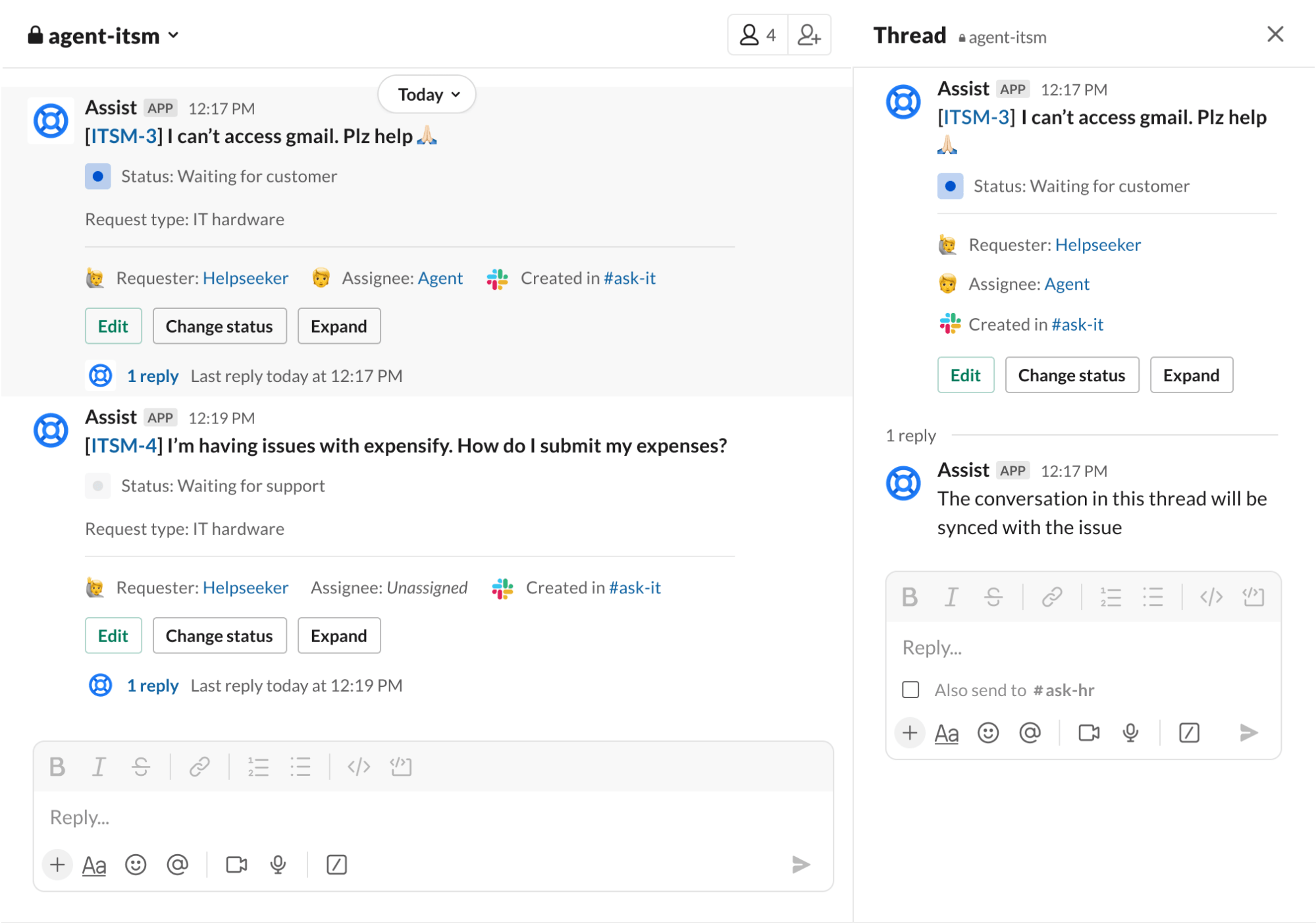
- Request channel — the Slack channel or Teams channel where employees post their questions and issues. When someone posts a message here, it can be turned into a JSM issue via emoji reactions, message shortcuts, or automatically (if auto-creation is turned on). Agents can work the full ticket lifecycle — assign, comment, transition, resolve — from the conversation thread.
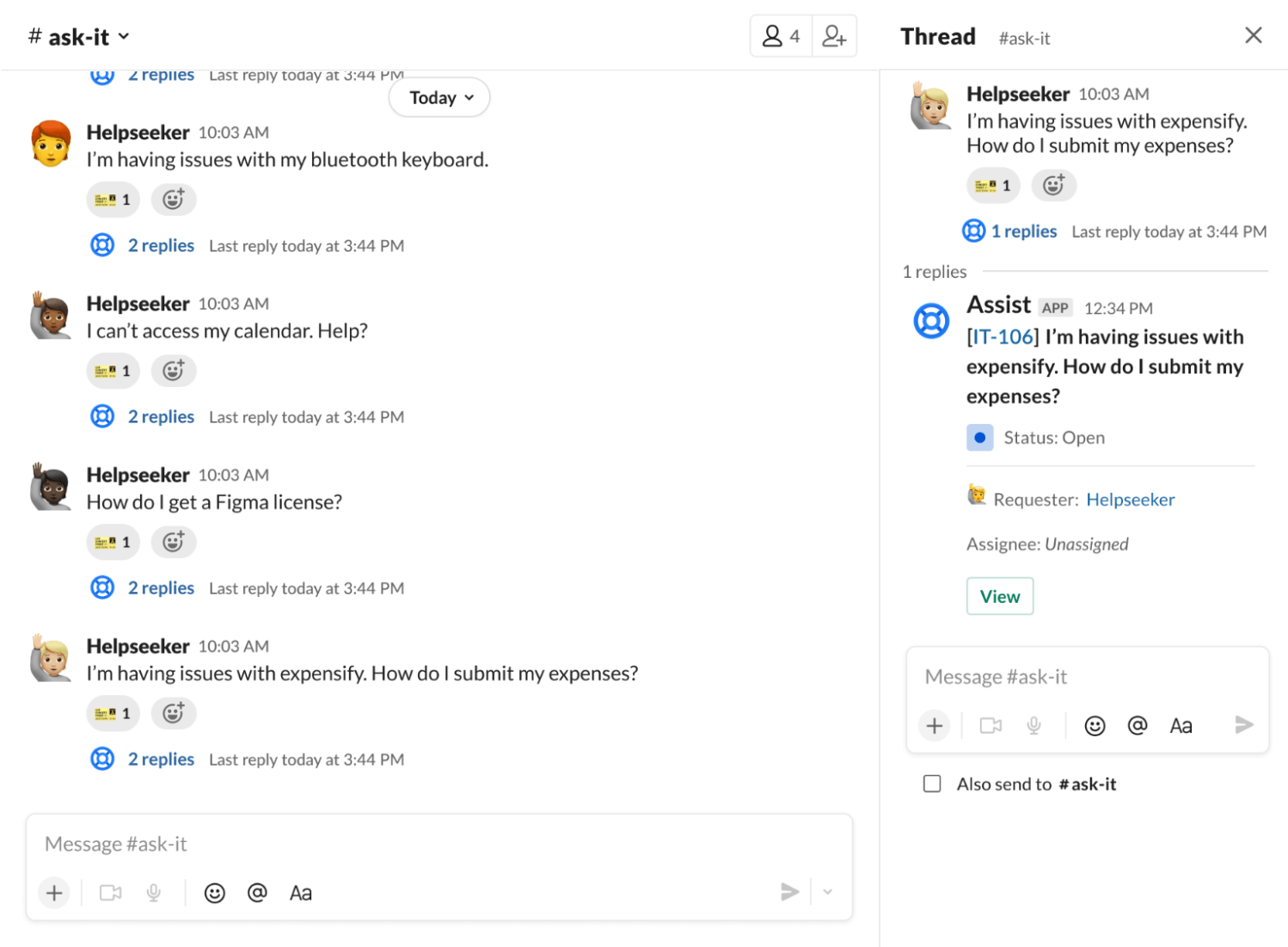
- Atlassian Assist (the bot) — the Slack and Microsoft Teams app that powers the two-way sync between chat conversations and your JSM service desk. The Assist bot connects everything together, posting updates, collecting form responses, and routing requests between the request channel and the agent channel.
Quickstart Guide
Project admins can set up chat from their JSM project settings by navigating to Channels > Chat > Configure. The steps differ slightly depending on whether you're using Slack or Microsoft Teams:
If you're using Slack:
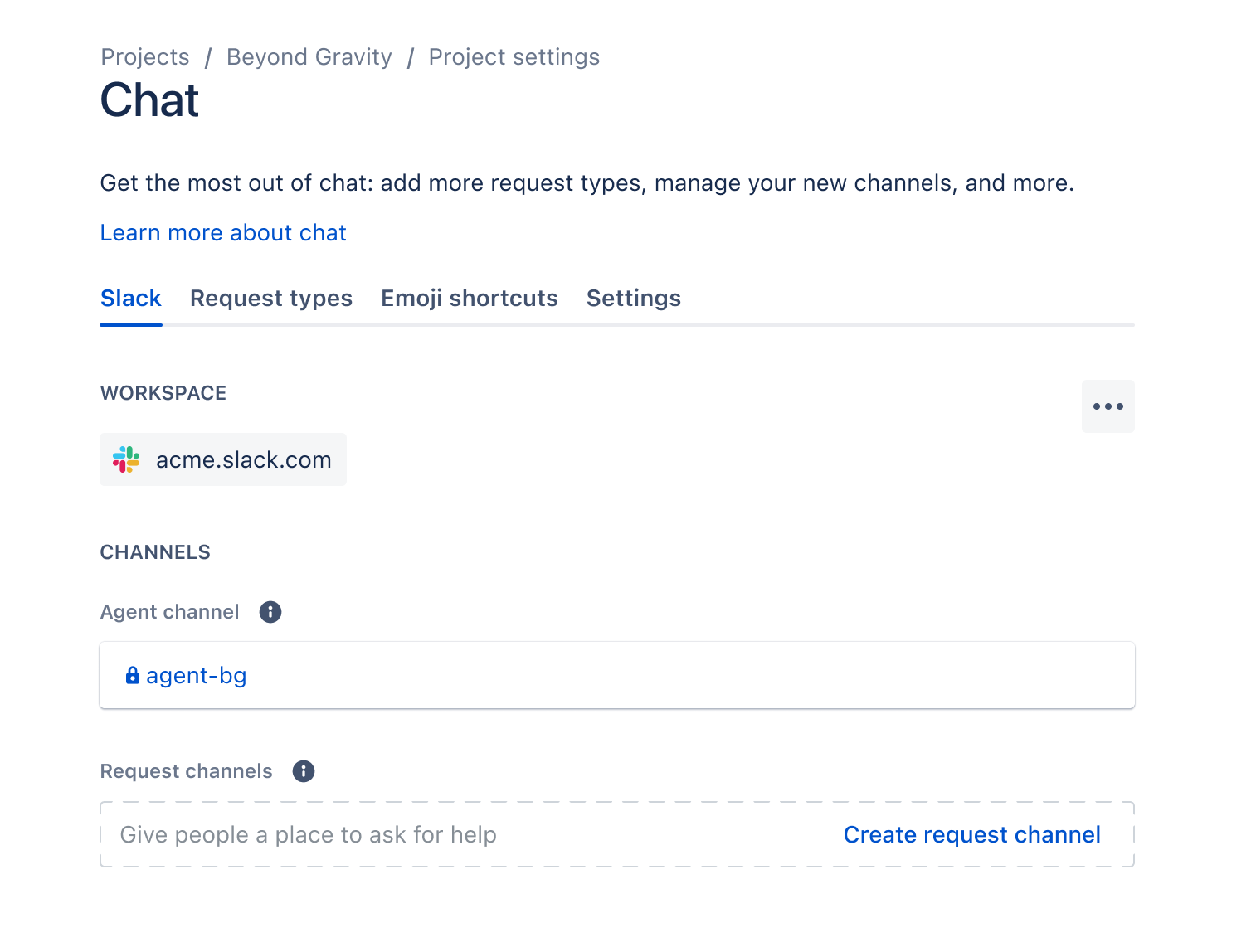
- From your service project sidebar, select
Channels, thenChat, thenConfigure.
- Select
Add to Slack.
- Choose the Slack workspace you want to connect to your Jira site, then select
Allow.
- Select the request types you want to use in Slack, then select Add (you can add more later).
- Assist will suggest a name for your private agent channel based on your project key — customize it if you'd like.
- Select
Createto finish setup.
If you're using Microsoft Teams:
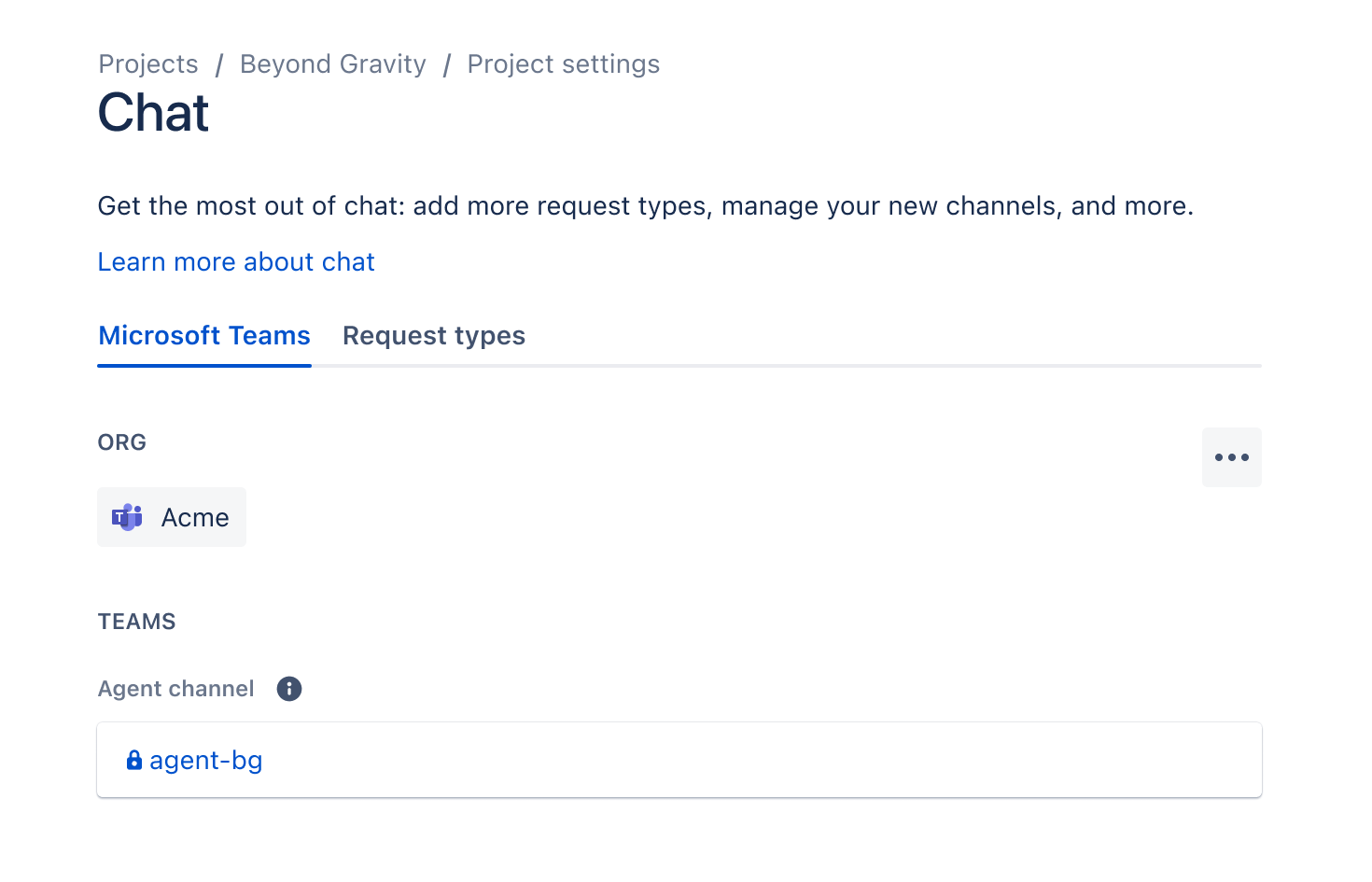
- Set up your agent team — before installing the Assist app, go to Microsoft Teams and create a designated private team for your agents.
- Connect to Teams and choose request types — navigate back to your JSM chat settings and follow the Assist installation prompts through the app store. During onboarding, you may need to grant the app permissions (if you can't, your Teams admin will need to).
- Set up your request channel — create a new channel (or select an existing one) in Teams, and invite the Assist bot. To add the bot, type "@get bots" in the channel and select
Assist.
A few things to keep in mind:
- A Jira site can only connect to one Slack workspace or one Microsoft Teams org.
- Some request type fields (like URLs and attachments) aren't supported natively in Slack or Teams, so those request types may need to be filled out differently.
These are solid foundations for getting Jira conversational ticketing off the ground and aiding team collaboration.
But there's a meaningful gap between what Atlassian Assist and virtual service agents can handle out of the box and what it takes to get AI to actually resolve tickets consistently. That's the gap the rest of this article covers, and where Risotto comes in.
Where Atlassian's Built-In AI Capabilities Hit a Ceiling & How Risotto Fills the Gap (& Augments Your Existing Jira Setup)
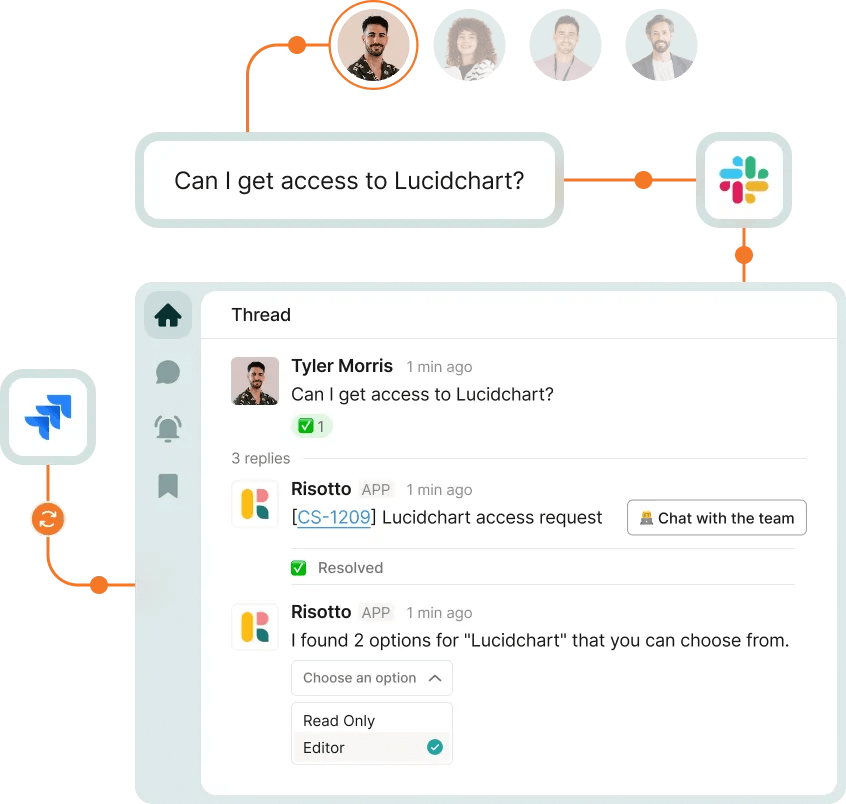
Most teams that adopt Atlassian Assist don't stop there. The natural next step is to pair it with JSM's Virtual Service Agent — a premium feature that adds an AI layer on top of Assist.
Where Assist handles ticket routing between Slack and Jira, Virtual Service Agent attempts to go a step further by resolving those requests using knowledge base articles and pre-configured intent flows.
The Problem
In theory, Assist + Virtual Service Agent gives you the full stack — ticket routing and resolution. In practice, this is where many IT teams hit a wall.
Virtual Service Agent can resolve some requests on its own, but the quality and consistency of those resolutions tends to be low — it leans heavily on surfacing KB articles rather than taking direct action, and when it does attempt to resolve a ticket, the results are often unreliable.
On top of that, the intent flows require significant upfront configuration, and the whole system depends on your team continuously writing and maintaining documentation to keep the AI useful.
Teams that have tried this path — like Hazel Health, who ran both Jira Assist and Virtual Service Agent before switching to Risotto — often end up with ticket automation rates in the single digits despite months of effort.
Where Risotto Comes In

That's the gap Risotto was built to close.
Risotto is our AI IT agent that lives natively in Slack or Teams and integrates directly with your existing Jira Service Management setup.
Jira stays exactly where it is as your ticketing backbone, but Risotto replaces Assist and the Virtual Agent as the Slack-facing layer. When an employee asks a question or submits a request in Slack, Risotto doesn't just surface a KB article and hope for the best; it fully auto-solves 20–60%+ of tier-1 tickets — whether that's answering a knowledge question conversationally, provisioning software access, performing MDM actions, resetting passwords, and more. The results speak for themselves:
- Fundrise: Automated nearly 60% of IT support tickets
- Gusto: Automated nearly 55% of IT support tickets
- Superhuman: Automated nearly 20% of IT support tickets
- Ironclad: Automated nearly 90% of access-related IT requests
- ThoughtSpot: Automated nearly 48% of IT support tickets
- Trust & Will: Automated nearly 35% of IT support tickets
- Thinkific: Automated nearly 46% of total support tickets
- Jobber: Automated nearly 38% of IT support tickets
- Hazel Health: Improved deflection rates from 3–5% to over 20%
- Shakepay: Automated nearly 40% of IT support tickets
- Retool: Reduced SLA resolution time from an average of 2 days to under 1 day
- Vidyard: Automated nearly 56% of IT support tickets
Risotto was co-founded by Alex Confer, who previously led IT engineering at Dropbox and Gusto. After years of dealing with the gap between what enterprise IT tools promised and what they actually delivered, we built the tool we wished existed.
That background shows up in how the product works, and in the specific problems it was designed to solve. Explore our origin story.
Here are the five areas where the Assist + Virtual Agent combination falls short and how Risotto addresses each one:
1. The Configuration & Maintenance Burden

🚫 With JSM: Getting Assist connected to Slack and Jira is the straightforward part. The real lift starts when you try to make Virtual Service Agent useful — building intent flows, configuring automation rules, maintaining keyword triggers, and mapping out custom workflows for each type of request. It's a project in itself, requiring significant resources and expertise.
Every time your team adds a new tool, changes an access policy, or restructures a department, those workflows need updating. The maintenance burden compounds over time — and it falls on the same IT team that was supposed to be freed up by the automation.
❇️ With Risotto: Risotto was designed around the idea that IT teams shouldn't need to become full-time automation engineers to get value out of AI. The Jira and Slack integrations are pre-built, and you can be fully up and running in hours (not weeks or months). There's no intent-flow builder to configure, no keyword triggers to maintain.
The AI learns from your existing knowledge sources — knowledge base docs, past Slack conversations, resolved tickets — and starts working immediately.
Our onboarding is led by folks like Alex who've actually led IT teams at large enterprise organizations. That hands-on approach means teams aren't left figuring things out from documentation alone.
"Getting Risotto integrated with Jira, Slack, and Okta was so seamless and fast. Risotto is one of the easiest tools I've implemented. We were up and running in less than a week and already seeing our first autosolves."
– Jason Huey, Senior IT Systems Administrator at ThoughtSpot
"We’ve completely replaced JIRA Assist with Risotto, it was a seamless transition… Ease of deployment was huge. We didn't need a consultant or months of configuration. Risotto just worked."
– Peter Hadjisavas, Head of IT at Hazel Health
“The speed and simplicity of Risotto’s setup was a great sign that we had made a good decision… We accomplished nearly the same configuration with Risotto in an hour that took us months with the other company.”
– Phillip Rickett, VP of IT at Fundrise
“Risotto’s AI-powered support system had a massive impact straight out of the box and with very little setup. Employees now get fast, efficient answers with the same precision as one of our professionals.”
– Mike Smith, IT Operations Manager at Jobber
“Risotto had the most thorough onboarding experience I’ve ever been a part of. Alex was great — he met with us weekly and made it very easy to quickly get up and running.”
– Collin Clifford, Legal & Compliance Manager at Superhuman
“Working with the Risotto team was awesome from day one. They all have IT backgrounds and really cared about making us successful.”
– Tom Grinberg, IT Manager at Trust & Willso
“We include Risotto in all our onboarding material now, and once people see how useful it is they keep coming back to use it more which is a really good sign.”
– Toby Stewart, IT Engineering Manager at Ironclad
2. Ticket Resolution vs. Ticket Deflection

🚫 With JSM: As we covered above, Virtual Service Agent can resolve some requests — but the quality and consistency of those resolutions is often low. It leans heavily on surfacing KB articles, and when it does try to answer directly, the results are frequently unreliable. For anything that requires an actual action (provisioning access, resetting a password, running a device command), the ticket often gets passed to a human agent.
The result: your IT team ends up manually handling the majority of tickets, and the "AI" layer ends up functioning more as a triage step than a resolution engine.
❇️ With Risotto: The metric we optimize for is auto-solve rate, meaning the ticket was fully resolved without any human involvement. Not deflected. Not triaged. Resolved.
That distinction matters because Risotto doesn't just surface articles. It engages employees conversationally — asking follow-up questions, troubleshooting in real time, and executing actual actions like provisioning access, resetting passwords, and running MDM actions. It behaves the way a skilled IT agent would, just faster and available 24/7.
For most IT teams, Risotto handles 20–60% of incoming tickets without any human involvement. And when it can't resolve a ticket, it escalates seamlessly to an agent in Slack with the full conversation history and troubleshooting context attached, so the agent picks up where Risotto left off instead of starting from scratch.
3. How the AI Gets Smarter Over Time
🚫 With JSM: One of the less obvious problems with JSM's AI is where it gets its knowledge from. It relies primarily on your existing knowledge base — which means someone on your team has to write, organize, and continuously update those articles. If an article is outdated, incomplete, or just doesn't exist for a particular topic, the AI has nothing to work with.
This creates a frustrating cycle: your IT team resolves a ticket manually, the knowledge from that resolution lives only in Slack (or in someone's head), and the next time a similar question comes in, the AI still can't answer it because nobody turned that resolution into a KB article.
❇️ With Risotto: Risotto breaks that cycle by learning directly from how your agents resolve tickets. When Risotto escalates a question to an IT agent and that agent resolves it in Slack, Risotto absorbs the resolution — the context, the steps taken, the outcome — and applies it the next time a similar question comes up.
Your team's day-to-day work in Slack becomes the knowledge base. No one has to stop and write documentation. The AI gets smarter from the work your team is already doing.
“The killer feature for us was that it could effortlessly learn and capture knowledge that our team creates every day in Slack… with Risotto, instead of constantly writing new documentation, our team can simply answer questions, and Risotto learns as we go.”
– Phillip Rickett, VP of IT at Fundrise
"The more we use Risotto, the smarter it gets — that's what makes it different from every other tool we've tried."
– Peter Hadjisavas, Head of IT at Hazel Health
"Risotto started answering complex product questions even I didn't know off the top of my head. It was pulling insights from our own past Slack conversations, surfacing knowledge that would have otherwise been buried."
– Peter Hadjisavas, Head of IT at Hazel Health
4. Managing Identities and Access Inside the Help Desk

🚫 With JSM: Access requests follow a predictable pattern: an employee requests access to a tool, a manager approves it, IT provisions it, and eventually it needs to be revoked. Every step should be tracked for compliance. In theory, that makes access management a perfect candidate for automation.
In practice, very little of that comes pre-built in JSM. Getting meaningful access automation working requires significant configuration time, and the more moving parts you add, the more fragile the setup becomes. Many teams give up partway through and just keep handling access requests manually — or they get something partially working but find it breaks easily and still requires human involvement at multiple steps.
❇️ With Risotto: Access automation is one of Risotto's core capabilities — not an afterthought bolted onto a ticketing system. The workflows come pre-built, run entirely inside Slack with full JSM sync, and are built for enterprise-grade requirements out of the box. Most teams get it up and running in a few hours — yes, really.
An employee types something like "Can I get access to Figma?" in Slack, and Risotto handles the rest:
- Collects business justification directly in the conversation
- Routes to the right approver(s) in Slack based on the tool and the requester's role
- Provisions access automatically upon approval — including Just-In-Time (JIT) access for time based requests that auto-revoke
The entire lifecycle — request, justification, approval, provisioning, audit trail — is handled in Slack and synced to Jira Service Management in real time. Nothing falls through the cracks, and everything is documented for compliance.
"Risotto became the orchestration layer for Jira Service Management and gives us instant automation with AI. We always wanted to require a reason for application access, but it was really difficult to integrate that into JSM. Risotto adds that functionality to JSM and so much more."
– Tom Grinberg, IT Manager at Trust & Will
"When a team member asks, 'How do I get access to Hightouch?' they're not looking for a link or a document; they need immediate, actionable assistance. Risotto intelligently understands the intent behind the request. It confirms existing permissions, coordinates necessary approvals proactively, and automatically provisions access upon approval."
– Phillip Rickett, VP of IT at Fundrise
“The software access automations were a huge win for us. They were super easy to set up and we now have more than 30 applications with automated provisioning running 24/7.”
– Tom Grinberg, IT Manager at Trust & Will
“Automated software access saves us so much time. Within minutes people get the access they need with everything tracked, approved, and no additional overhead needed… For sensitive tools and resources Risotto’s automated time-based access has been a game-changer.”
– Collin Clifford, Legal & Compliance Manager at Superhuman
“Sending a compliance report from Risotto with all of the tickets tagged correctly — that’s so much easier, it’s definitely made audits a far less stressful experience.”
– Vergil Smith, IT Manager at Vidyard
5. Scaling Beyond IT to Other Departments
🚫 With JSM: To implement AI conversational ticketing, spinning up new departments in JSM means more service projects, more configuration, more request types, and more maintenance — all of which adds cost and complexity. For teams like HR that just want a simple way to answer the same onboarding questions every week, JSM can feel like massive overkill.
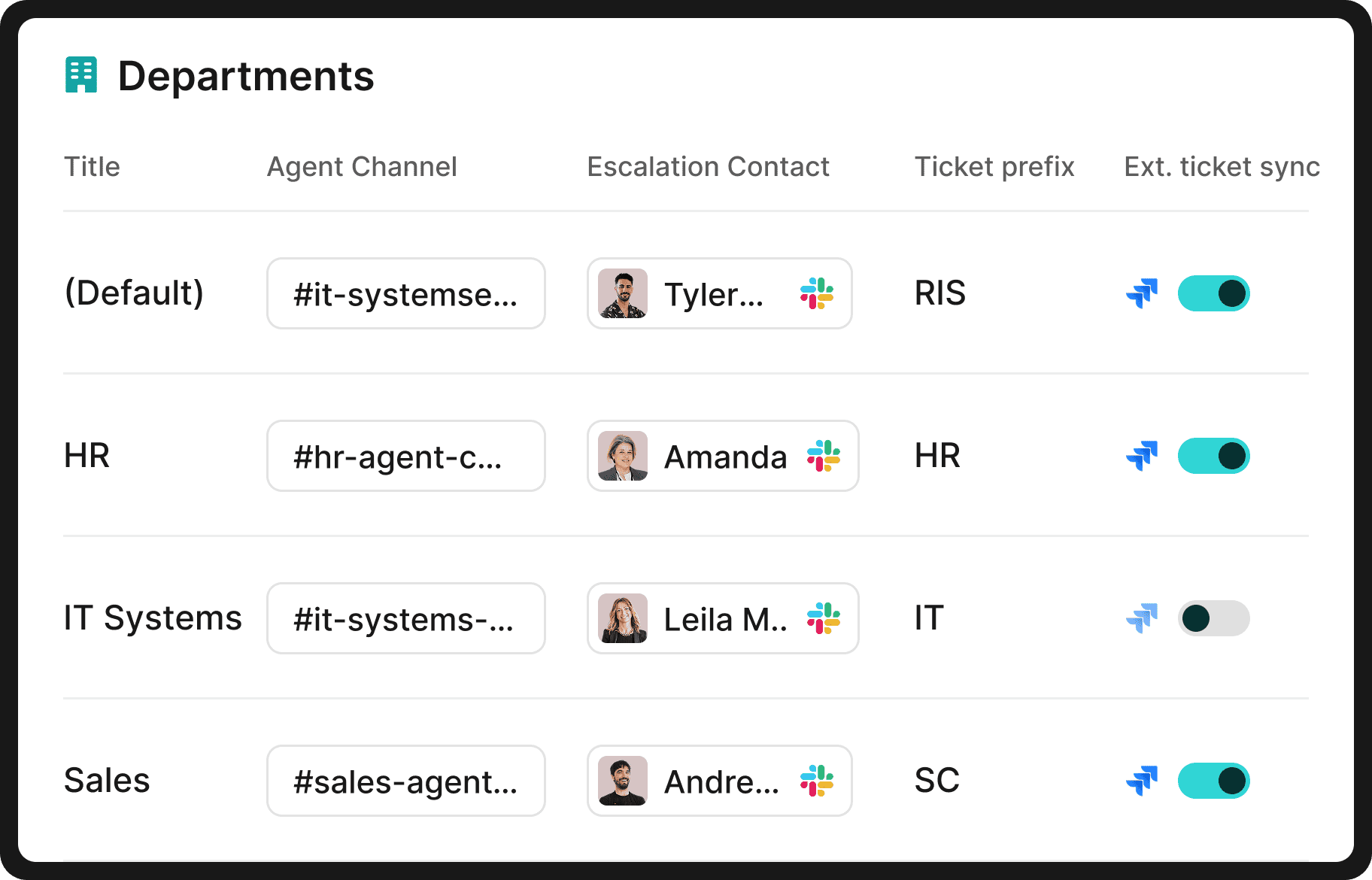
❇️ With Risotto: The multi-department expansion happens naturally. Once IT is running on Risotto, other teams see employees getting instant answers in Slack and want the same thing. And because every department is included under a single license — no per-team fees — there's no budget conversation blocking adoption.
What makes this work in practice:
- Non-technical teams don't need to learn Jira — Risotto has a built-in ticketing system that's simpler and more intuitive for teams like HR, Legal, and Finance. That said, if a department does want to use Jira, Risotto integrates with it just as well.
- Each department gets its own setup — separate knowledge bases, permissions, escalation paths, and workflows.
- Routing is automatic — Risotto directs requests to the right team and person based on context and prior ticket history.
"The multi-department capabilities are awesome. Our engineering and RevOps teams now also want to use Risotto as they also get lots of the same questions over and over again."
– Collin Clifford, Legal & Compliance Manager at Superhuman
"Once you add in HR, our combined automation rate is even higher at 50.2%."
– Jason Huey, Senior IT Systems Administrator at ThoughtSpot
"Risotto started autosolving tickets immediately. Within the first few weeks, we saw departments that had never tracked ticket requests before — like our Cloud team — asking to get on the platform and streamline their support function."
– Erik Van Dijk, Senior IT Manager at Jobber
Case Studies: Augmenting Jira Service Management with Risotto

The five case studies below all follow a similar arc: an IT team was running Jira Service Management, hit a ceiling with their existing automation capabilities, and added Risotto as the AI layer in Slack. JSM stayed as the ticketing backbone — Risotto became the conversational and ticket resolution layer on top.
The companies range from large enterprises like Gusto (~3,000 requests/month) to midsize teams like ThoughtSpot (~1,500 requests/month), and smaller teams as well.
Hazel Health: Integrating Risotto with JSM & Increasing IT Automation by 4x

Hazel Health is the clearest apples-to-apples comparison in our customer base, because they were running exactly the stack this article is about: Jira Service Management + Jira Assist + Virtual Service Agent.
Their IT team supports a telehealth company serving over 5 million students, with tickets coming in across multiple departments, products, and time zones. They'd invested significant time configuring Assist's keyword triggers and maintaining Virtual Agent workflows — and after all that effort, their deflection rates sat at 3–5%.
When they replaced Assist and the Virtual Service Agent with Risotto, automation rates increased by 4x. As Peter Hadjisavas, Head of IT at Hazel Health, put it:

In addition, Peter shared:
- "Ease of deployment was huge. We didn't need a consultant or months of configuration. Risotto just worked."
- "The more we use Risotto, the smarter it gets — that's what makes it different from every other tool we've tried."
That 4x improvement came without the maintenance overhead they'd been dealing with before. And because Hazel Health's providers often work outside standard business hours, the 24/7 availability in Slack was especially valuable. Risotto is also HIPAA compliant, which was a non-negotiable for their team.
For more details, read the full case study.
Trust & Will: IGA Automation in Slack & Integrating with JSM

When IT Manager Tom Grinberg joined Trust & Will, over 50% of incoming tickets were access requests. He'd set up JSM as their ticketing system, but getting meaningful automation around access workflows proved to be a time sink that created more overhead than it saved.
Risotto changed the equation by handling the full access lifecycle in Slack — request, justification, approval routing, provisioning, and more — with everything syncing back to JSM automatically. As Tom shared:
- "We always wanted to require a reason for application access, but it was really difficult to integrate that into JSM. Risotto adds that functionality to JSM and so much more."
- "Risotto became the orchestration layer for Jira Service Management and gives us instant automation with AI."
The result: 35% of IT tickets automated, 30+ applications with automated provisioning running around the clock, and compliance tracking that used to require manual effort now built into every workflow.
For more details, read the full case study.
ThoughtSpot: Automating 48% of IT Tickets & Integrating with JSM
ThoughtSpot's IT team is a good example of what happens when a lean team (~1,500 requests/month, serving 1,000+ employees) tries to find an AI automation layer that actually works without creating more work than it saves.
They'd evaluated several platforms before Risotto. Each one required significant upfront configuration and didn't deliver enough value fast enough to justify the investment. Meanwhile, employees were frustrated — tickets would sit for days, and employees had to chase IT for updates.
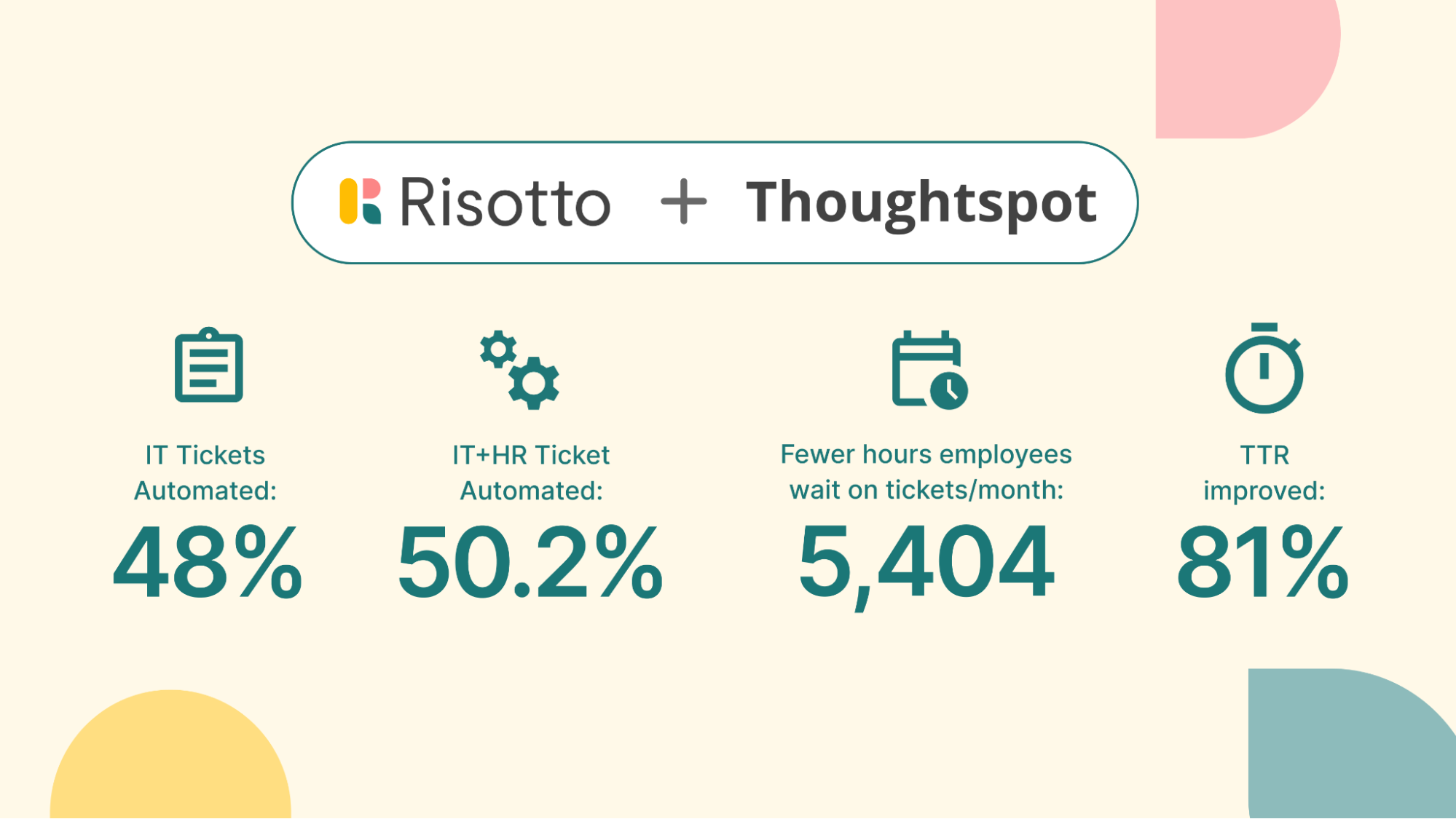
Risotto integrated with their existing Jira setup, Slack, and Okta in under a week. The difference was immediate: resolution time dropped from 31 hours to 6.5 hours, and 48% of IT tickets were automated. As Jason Huey, Senior IT Systems Administrator, shared:
- “Getting Risotto integrated with Jira, Slack, and Okta was so seamless and fast.”
- “Risotto is one of the easiest tools I’ve implemented. We were up and running in less than a week and already seeing our first autosolves.”
- “Risotto takes away the telephone tag we had to play so now employees get what they need faster and more efficiently.”
- “Before Risotto, compliance reports could take days to figure out but now I can pull everything needed in seconds.”
- “One special thing about Risotto is it’s constantly improving with every question. We see it getting better and better every day.”
ThoughtSpot also expanded beyond IT — after adding HR, their combined automation rate hit 50.2%, and their accounting team achieved an 80% auto-solve rate for transactional queries.
For more details, read the full case study.
Gusto: 53% Auto-Resolution on Day One at Enterprise Scale & Seamless JSM Integration

Gusto is the largest-scale example in our customer base — roughly 3,000 support requests per month across a growing enterprise. Their existing chatbot lacked the integration depth and learning capabilities they needed, and their IT team was losing hours to manual troubleshooting and access provisioning instead of focusing on strategic work.
Risotto integrated with Gusto's full stack — Jira, Slack, Confluence, and Okta — in two weeks with zero downtime. The day it went live, 53% of tickets were auto-resolved. That number has held a steady 55% average since. As Jose Izquierdo, Head of AI Operations at Gusto, shared:
- "We came to Risotto hoping to hold the line — but the results blew away our expectations. We doubled our resolution rate on day one, and it hasn't dropped since."
- "Employees can get help directly within Slack. They can kick off workflows for getting access to any internal tool, ask any HR-related question, or resolve questions about GitHub repository access — all without leaving Slack."
What stands out about Gusto's implementation is the breadth: 11 departments onboarded, 157 access rules, 50+ runbooks, and 114,000 hours of support wait time saved. AI time-to-resolution sits at 5 hours compared to a 35-hour human TTR. Every exchange is documented for full SOC 2 compliance.
For more details, read the full case study.
Jobber: 38% IT Ticket Automation, 30 Apps & 12 departments Integrated with Risotto & JSM

Jobber's five-person IT team was overwhelmed. Employees waited an average of 35 hours for resolution, and ticket work consumed the time they needed for strategic projects.
They'd previously piloted another platform designed to add automation on top of JSM. It wasn't a fit — the setup was too complex and the results didn't justify the effort. So when they evaluated Risotto, the bar was "show us value fast or we're not interested."
Risotto integrated with Slack, JSM, AWS, Jamf, and Confluence in two days. The impact was immediate. As Mike Smith, IT Operations Manager at Jobber, shared:
“Risotto’s AI-powered support system had a massive impact straight out of the box and with very little setup. Employees now get fast, efficient answers with the same precision as one of our professionals.”
Within weeks, departments that had never tracked tickets before were asking to get on the platform. As Erik Van Dijk, Senior IT Manager at Jobber, shared:
"Risotto started autosolving tickets immediately. Within the first few weeks, we saw departments that had never tracked ticket requests before — like our Cloud team — asking to get on the platform and streamline their support function."
Key results: 38% IT ticket automation, 41% Revenue Technology automation, AI TTR of 3 hours (down from 35), 2,747 hours saved, and 30 apps across 12 departments integrated.
For more details, read the full case study.
Interested in Learning More About Risotto & Augmenting Jira Service Management?
We invite you to:
- Schedule a demo
- Read our origin story
- Explore customer success stories
- Fundrise: Automated nearly 60% of IT support tickets
- Gusto: Automated nearly 55% of IT support tickets
- Superhuman: Automated nearly 20% of IT support tickets
- Ironclad: Automated nearly 90% of access-related IT requests
- ThoughtSpot: Automated nearly 48% of IT support tickets
- Trust & Will: Automated nearly 35% of IT support tickets
- Thinkific: Automated nearly 46% of total support tickets
- Jobber: Automated nearly 38% of IT support tickets
- Hazel Health: Improved deflection rates from 3–5% to over 20%
- Shakepay: Automated nearly 40% of IT support tickets
- Retool: Reduced SLA resolution time from an ~2 days to under 1 day
- Vidyard: Automated nearly 56% of IT support tickets

Liked the article? Share on:
On this page
Try Risotto for free for 30 days. Commit only when you see the value.


See more recent articles



Want faster solutions and happier employees?
Access that's easy to ask for and impossible to get wrong.
Ensure Legal never answers another "do we need an NDA for this?"
Every policy question is stealing time from the work Finance was hired to do.
Turn Slack requests into action items instead of engineering interruptions.
The biggest deal risk might be an unanswered internal question.
Run a united support system that your employees can depend on.
Build the automations you’ve been planning on for months.
The bottleneck isn't your team. It's the groundwork before they can actually help.
Get support data that your team can talk to.
Jump on a call to understand:
Risotto handles repetitive support requests across tools and teams, so IT gets back to solving real problems, not rerunning the same ones.
.svg)
%20(1).webp)
See what makes the Iru integration a 10/10 for our clients.