%20(1).svg)
The ITSM integrations your service desk needs
An ITSM integration can look complete and still leave IT doing most of the work manually. This guide explains which integrations matter most and how to judge whether they’ll work properly with the systems you already use.


You've probably been here before. You sign with a new ITSM vendor because it looks like it connects to everything you already use. Six weeks into implementation, you realize some of the integrations don't work the way you assumed.
That’s the problem with evaluating ITSM integrations by the number of logos on an integrations page. A connection might only handle one part of the workflow. What matters is if the tools can both exchange the information they need and actually trigger or carry out the actions to resolve the request.
In this guide, we’ll cover the integrations a modern internal service desk needs, how integration depth affects what you can automate, and what to ask a vendor before adding another tool to your stack.
TL;DR
- An ITSM integration connects your service desk to the systems involved in resolving employee requests, so information and actions can move between them.
- Six categories matter most for internal IT: chat, ticketing, identity, knowledge, HRIS, and device management.
- Two vendors can list an integration with the same tool but support very different functionality. Some connections only retrieve information, while others can make changes in the connected system.
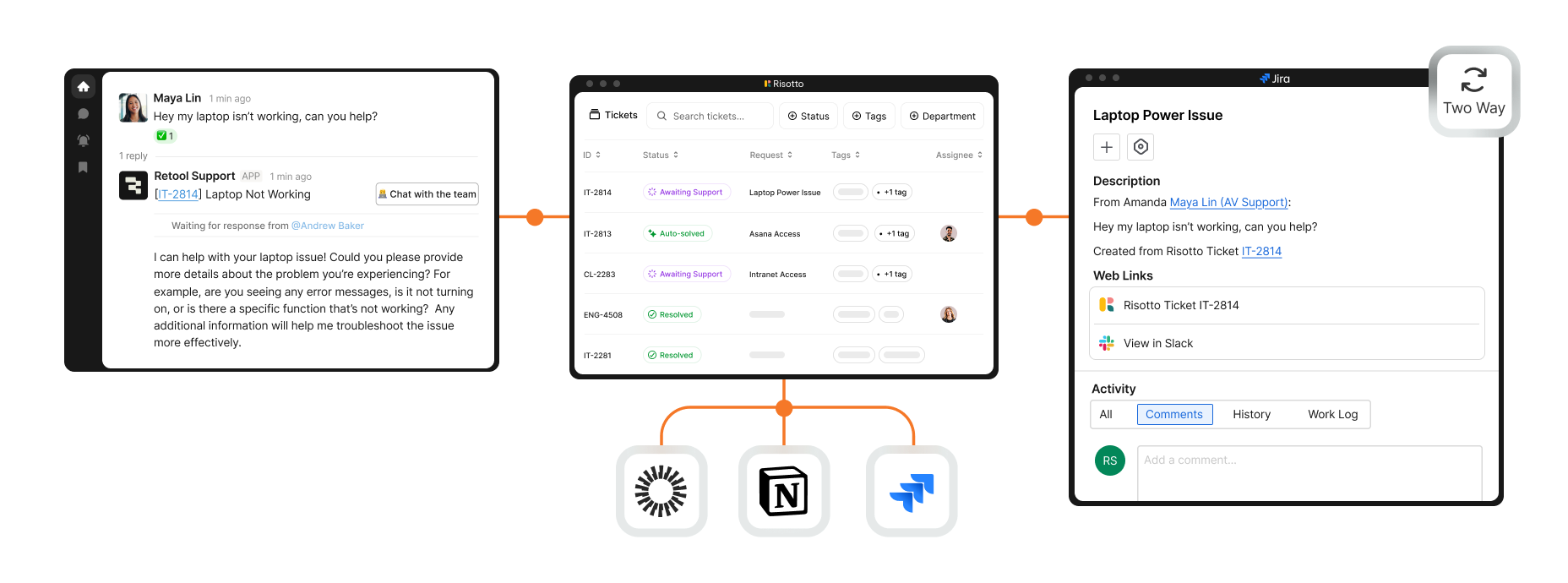
- Two-way sync keeps ticket fields, statuses, comments, and attachments aligned. This is needed when employees work in chat and IT works in the ticketing system.
- Ask vendors whether the integration can make changes, how that activity is recorded in your existing ticketing system, and what happens when there's no connector for one of your tools.
- Risotto sits on top of your existing ITSM platform, auto-resolving Tier-1 requests in Slack or Teams while your ticketing system stays the system of record.
What ITSM integration means
An ITSM integration connects your service desk with the systems involved in resolving employee requests, so information can move between them and work can happen without IT manually switching between tools.
Most support requests involve more than one system. For example, an employee might ask for access to Notion in Slack. The request may need approval from their manager, a change in Okta, and an update in the ticketing system once access has been granted.
A knowledge request follows a different path. An employee might ask a question in Teams, while the answer comes from a connected source such as Confluence or Google Drive.
These connections can be built in different ways, including through native integrations or middleware such as an iPaaS.
Here, we’re focused on the integrations that connect other systems directly into the service desk workflow, so information and supported actions can move between the tools involved in resolving a request.
What you get out of good ITSM integration
Below, we break down the main benefits of strong ITSM integrations, from resolving more requests end to end to keeping reporting and audit records accurate.
Resolve more requests end to end
When the systems involved in a request are connected, more of the workflow can happen automatically.
Take a software access request. Instead of a ticket reaching IT and waiting for someone to handle the next steps, the request can move through approval and provisioning within the same workflow. The fewer manual steps IT has to complete, the more requests can be auto-solved from start to finish.
Reduce manual updates between systems
When employees and IT work in different tools, the integration should keep both sides current. If an employee replies in Slack, that response can be added to the ticket automatically. If the IT team updates the ticket, the relevant update can flow back to Slack.
That saves IT from copying comments or status changes between tools and reduces the chance of one system holding an outdated version of the request.
Keep reporting tied to the system of record
A well-integrated workflow can keep ticket data up to date in the system your team already uses for reporting.
That means measures such as resolution time or auto-solve rate can be calculated from the same ticket records, rather than having to reconcile activity across separate reporting tools.
Maintain a clear audit trail
For workflows such as software access, you need a reliable record of what happened: who made the request, who approved it, what access was granted, and when temporary access expires. If access is granted incorrectly or isn’t revoked when it should be, someone could retain access to systems or sensitive data they no longer need.
Keeping those events connected to the same request gives IT a clearer record to review later and reduces the gaps that can appear when approvals and actions happen separately across different tools.
The 6 most important integrations for internal IT support
Which systems a service desk needs to reach depends on the request. These are the six categories that come up most for internal IT, what each one automates, and what stays manual without it.
1. Chat
Examples: Slack and Microsoft Teams
Chat integrations connect the service desk to Slack or Teams, so employees can ask for help and keep the conversation going there.
An employee can raise a request in Slack or Teams while a ticket is created in the background. Follow-up questions and updates stay in the same conversation, so the employee doesn’t have to switch to a separate portal to continue the request.
Without that connection, IT may have to manually turn chat messages into tickets or ask employees to restart the request somewhere else.
2. Ticketing
Examples: Jira Service Management, Freshservice, Zendesk, and ServiceNow
A ticketing integration connects the tools where requests are raised or handled with the platform where IT manages those tickets.
For example, a request raised in chat can create a ticket automatically, while later comments or status changes are reflected in the ticketing system.
Without that connection, IT may have to maintain the same request in two places and copy updates between them manually.
3. Identity
Examples: Okta, Google Workspace, Microsoft Entra, and Opal
Identity integrations connect the service desk to the systems that manage employee accounts and access.
Using the Notion example from above, the workflow may need to check the employee’s identity and existing permissions, collect approval, and then grant the appropriate access through the identity platform.
Depending on the provider, the same connection can also support tasks such as password resets, MFA recovery, or adding and removing employees from access groups that control which apps or resources they can use.
Without that connection, IT may still have to open the identity platform and complete those steps manually.
4. Knowledge
Examples: Confluence, Notion, Google Drive, SharePoint, Guru, and Slack
Knowledge integrations connect your support workflow to your internal documentation, so relevant information can be retrieved when an employee asks for help.
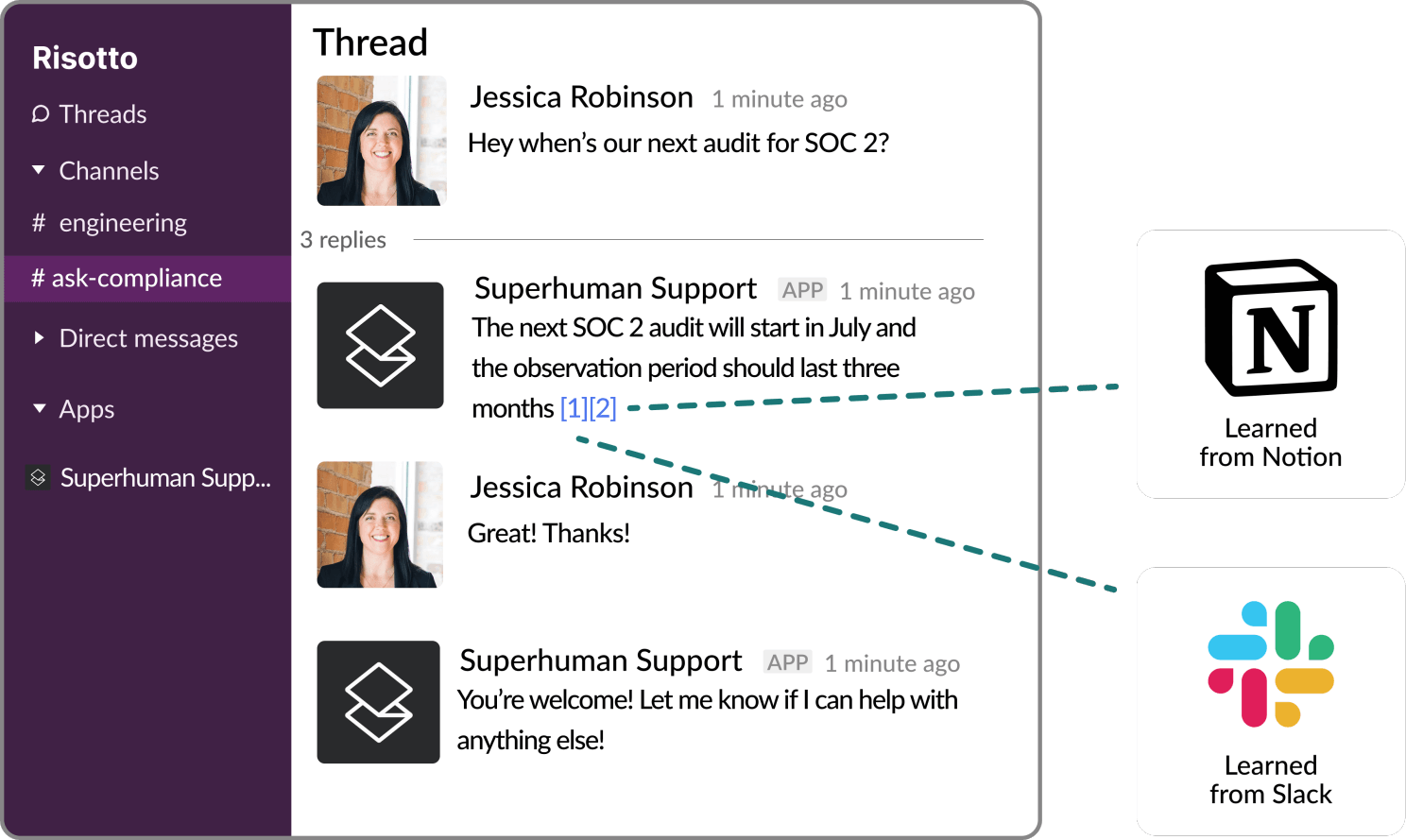
An employee might ask a question in Slack, while the relevant instructions are stored in Confluence or Google Drive. Connecting those sources makes that information available within the support workflow, whether it’s being used by an AI agent, an IT agent, or surfaced to the employee directly.
Without those connections, the relevant documentation may sit outside the support workflow, leaving employees or IT to search for it separately.
5. HRIS
Examples: Workday, HiBob, and BambooHR
HRIS integrations connect your service desk to employee data in the HR help desk system, such as a person’s role, manager, start date, or employment status.
That data can be used to start and automate the right workflows. For example, adding a new hire to the HRIS can trigger onboarding tasks, while an employee departure can start the relevant offboarding process.
Employee details can also be pulled into those workflows automatically, so IT has the information it needs without looking it up separately.
Without that connection, changes in the HR system may not automatically reach the service desk, leaving more of the handoff and data entry to HR and IT.
6. MDM
Examples: Jamf and Iru
MDM integrations connect your service desk to the systems IT uses to manage employee devices.
Depending on the integration, that can make device information available during a support request or allow certain device actions to be carried out directly. For example, Jamf supports actions such as locking a device and retrieving a FileVault recovery key.
Without that connection, IT may need to open the MDM platform separately to identify the device, check its status, or complete the required action, adding another manual step to the request.
How much can an ITSM integration actually do?
The integrations above tell you which systems can connect to the service desk. They don’t necessarily tell you how much each connection can do.
Two vendors might both advertise a Jira or Okta integration while supporting very different levels of functionality.
One connection might only retrieve information. Another might also update the connected system or keep changes synchronized in both directions. That difference affects how much manual work the integration can remove.
Ticketing is a good example. Creating a Jira ticket from a request in Slack is useful, but it doesn’t mean later changes will automatically stay aligned between the two systems.
With two-way sync, updates made in either place can be reflected in the other. That covers:
- Ticket fields and statuses
- Comments and who wrote them
- Attachments and screenshots
- Updates made from either system
- A clear record of activity across the request
For example, an employee might reply in Slack while an IT agent responds from Jira. If those updates don’t sync, each person ends up seeing a different version of the conversation.
What you need to ask vendors about integrations before you sign
We’ve shown how two vendors integrate with the same tool but offer very different functionality. When you evaluate a vendor, these five questions will help you understand what its integrations can actually do with the tools already in your stack.
1. Can the integration make changes in the connected tool?
Find out whether the integration can only read information or whether it can also make the changes needed to complete a request.
For example, can an Okta integration only check an employee’s existing access, or can it also grant or remove access?
2. Will our existing ticketing and reporting still work?
If the new tool handles a request, check how that activity is recorded in your existing ticketing system.
Will the ticket still show the right assignee, status, and resolution? And will that information still feed into the reports your team already uses?
3. What happens if an employee replies in chat while IT replies in the ticketing system?
Ask the vendor to show you what happens when an employee responds in Slack or Teams while IT is working from Jira or another ticketing platform.
Do both replies appear in both places? If they don’t, the employee and IT can end up looking at different versions of the same conversation.
4. What happens if there isn’t an integration for one of our tools?
Find out whether the vendor can connect it another way, such as through an API, and whether that connection can do what you need it to do.
5. Who sets up the integration, and how long does it take?
Clarify whether your team can connect it themselves or whether the vendor needs to set it up for you.
Then confirm how long that usually takes so you have a realistic idea of the work involved before the integration is usable.
How Risotto layers onto your existing ITSM stack
A useful ITSM integration lets the systems you already use work together, so requests get resolved with less manual work from IT.
Risotto is an AI-native ITSM platform that auto-resolves Tier-1 requests in Slack or Teams, using knowledge, runbooks, and integrations with systems such as your identity provider and ticketing platform.
When a ticket escalates to Tier 2, the Risotto assistant pulls in the context and proposes a resolution plan for the agent picking it up.
It sits on top of your existing ITSM platform rather than replacing it. When Risotto is connected to your ticketing system, requests and updates stay synchronized between the two.
Because that activity is written back to your existing ticketing system, it remains your system of record and your team can continue using the reporting already in place.
Software access requests run through their approval chain, with time-based access and expiry dates where you need them, and an audit-ready log of who was granted access and why.
ThoughtSpot connected Jira, Slack, and Okta in less than a week and saw its first autosolves in that time. Jason Huey, their Senior IT Systems Administrator, called Risotto one of the easiest tools he's implemented. The team reached a 50.2% total automation rate, while average resolution time fell from 31 hours to 6.5 hours.
Liked the article? Share on:
On this page
See how Risotto connects with the tools you already use


See more recent articles



Want faster solutions and happier employees?
Access that's easy to ask for and impossible to get wrong.
Ensure Legal never answers another "do we need an NDA for this?"
Every policy question is stealing time from the work Finance was hired to do.
Turn Slack requests into action items instead of engineering interruptions.
The biggest deal risk might be an unanswered internal question.
Run a united support system that your employees can depend on.
Build the automations you’ve been planning on for months.
The bottleneck isn't your team. It's the groundwork before they can actually help.
Get support data that your team can talk to.
Jump on a call to understand:
Risotto handles repetitive support requests across tools and teams, so IT gets back to solving real problems, not rerunning the same ones.
.svg)
%20(1).webp)
See what makes the Iru integration a 10/10 for our clients.