%20(1).svg)

Slack DMs work for IT support until headcount grows. Access requests, password resets, and ‘quick questions’ pile up across chat and help channels. Work goes unassigned, approvals stall, and IT loses track of their workload. A traditional support portal adds structure, but employees often bypass it because it pulls them out of Slack and into a separate system.
Slack ITSM platforms offer another option: bring structure into Slack without forcing employees into a separate support system. But not every platform works the same way.
Some use Slack mainly for ticket intake and notifications, while agents still manage the full workflow in Jira, Freshservice, or another portal. Others keep requests, approvals, and Tier-1 resolution inside Slack while syncing everything back to the existing ITSM.
This guide compares the best Slack ITSM platforms in 2026, including their Slack functionality, AI capabilities, pricing, and suitability for different team sizes and existing ITSM stacks.
TL;DR
Slack-native ITSM vs. Slack-connected ITSM: why this distinction matters
Most ITSM platforms let employees submit a request from Slack. The key difference is where the work happens after that request is created.
Slack-native ITSM: Employees request help through a message, DM, or support channel. Agents can manage the ticket in Slack, with approvals, escalations, and updates handled in the same workspace. A separate portal may exist, but it’s not required for day-to-day support. Risotto and Console are examples of Slack-native platforms.
Slack-connected ITSM: Employees may be able to create tickets and receive updates in Slack, but agents manage the queue and complete most of the work in a separate ITSM portal. Jira Service Management, Freshservice, and ServiceNow follow this model to varying degrees
The clearest way to tell the difference is to ask one question: Can an IT agent manage a request from intake through resolution without leaving Slack? If the answer is yes, the platform is Slack-native. If the agent needs to return to a separate portal to manage or complete the request, it is Slack-connected.
That difference has a direct impact on adoption. Employees often bypass support processes that pull them away from Slack, and buyers repeatedly describe the same frustrating flow: an employee starts with a Slack bot, gets redirected to a portal, and has to wait for IT to complete the request manually. A Slack-native experience removes the extra steps and makes the approved support process easier to follow.
Do you need to replace your existing ITSM to go Slack-native?
No. You can add a Slack-native support experience without replacing your existing ticketing system.
In this hybrid model, employees use Slack to request help, answer follow-up questions, and track the ticket through to resolution. IT teams can manage the request in Slack or continue working in Jira Service Management, Freshservice, ServiceNow, or another ITSM.
Bi-directional sync keeps both interfaces up to date. Changes to the ticket’s status, assignee, comments, and attachments are reflected in Slack and the ITSM, regardless of where the work happens.
The existing ITSM remains the system of record for reporting, governance, and compliance. This gives teams a Slack-native support experience without losing the processes and records already built into their ITSM.
Augment or replace? How to decide for your team
Smaller teams with straightforward ticket volume can often run Slack-native end-to-end. Teams with established compliance or change management requirements may be better off keeping their current ITSM and adding a Slack-native support layer on top of it.
Consider these factors before deciding:
- How much have you already invested in your ITSM? Migrating to a new ITSM tool may mean migrating ticket history, rebuilding workflows, retraining the team, and ending existing contracts. If the system still works well behind the scenes, augmentation can deliver a better Slack experience without taking on a full migration.
- Which processes and records depend on your current ITSM? Teams that rely on their ITSM for compliance, audit records, reporting, or change management will usually want to preserve it as the system of record. A Slack-native layer can improve how requests are handled without disrupting those controls.
- What problem are you actually trying to solve? If employees avoid the portal or IT wants to handle more support inside Slack, replacing the backend may be unnecessary. One 600-employee company wanted a Slack front door while keeping Freshservice as its system of record, so the two platforms ran in parallel with tickets synced both ways.
- How many teams could use the same support model? A Slack-native layer can extend the same request experience beyond IT to departments such as HR, Legal, and Finance. This lets each team improve how employees ask for help without forcing every department to migrate to a new system at once.
The bottom line: Replacing may make sense when the current ITSM adds little value and migration is straightforward. Augmentation is usually the safer choice when important workflows, records, and controls already depend on the existing platform.
5 best Slack ITSM Platforms in 2026
The platforms below take different approaches to bringing IT service management into Slack. Some keep the full support workflow in Slack, while others use it mainly for intake, updates, or selected actions. Compare them based on how much work stays in Slack, what their AI can resolve, and how well they fit your existing ITSM setup.
1. Risotto: Slack-native tool for teams that want to auto-resolve Tier-1 requests without replacing their ITSM
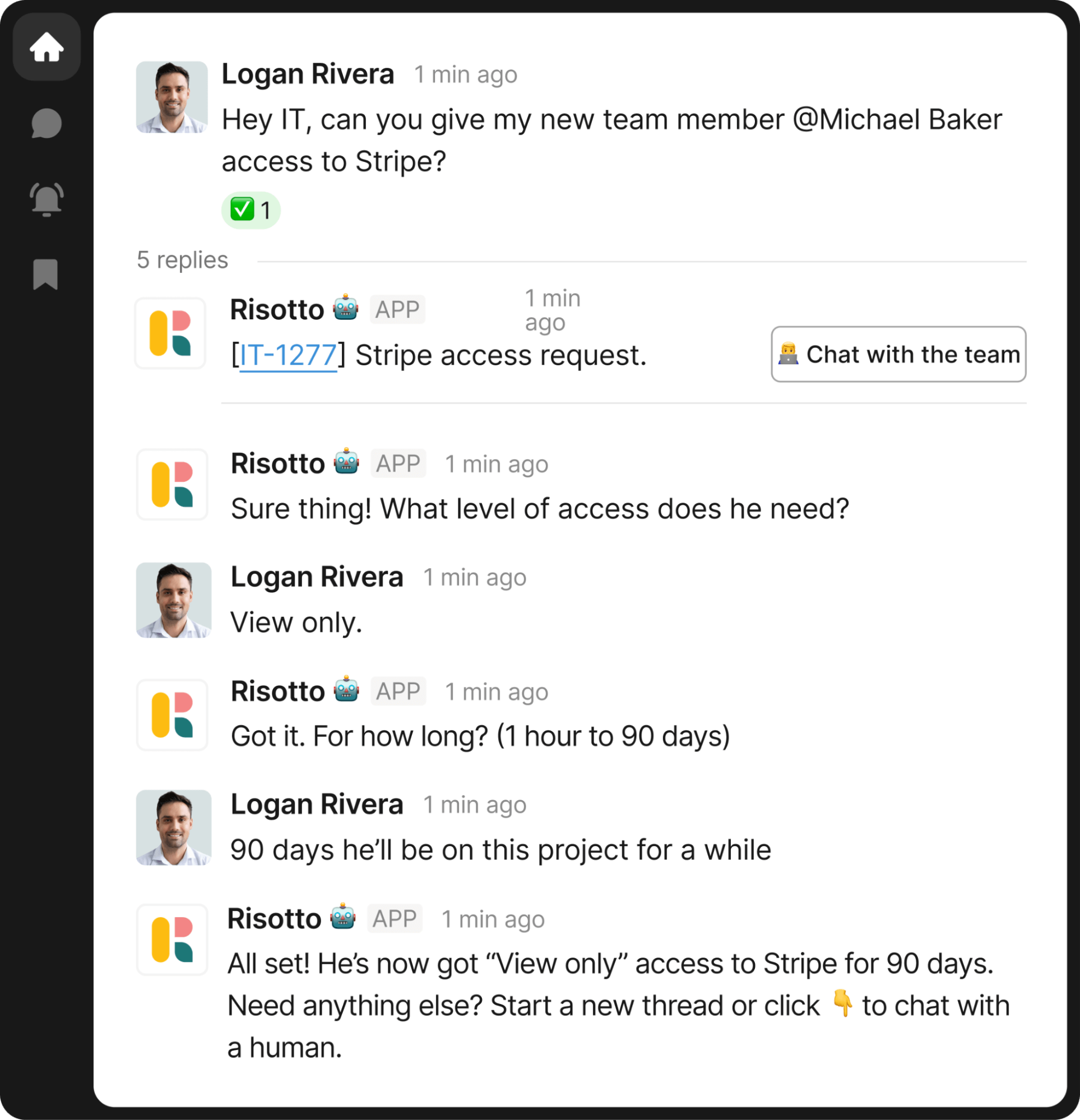
Risotto is an AI-native, Slack-native ITSM platform that resolves internal support requests where employees already ask for help. Employees can describe a problem, request software access, and receive a resolution inside Slack. Agents manage tickets through interactive Slack cards, while the Slack Home tab provides one place to view and create requests.
Unlike bots that only surface documentation, Risotto uses approved knowledge, past support conversations, and data from connected systems to troubleshoot issues and take action. When specialist input is needed, it escalates the request with the conversation history and work already completed. Solved tickets can also become Knowledge Hub articles which helps Risotto answer similar requests in the future.
Teams can use Risotto as their ITSM or connect it to Jira Service Management, Freshservice, ServiceNow, or Zendesk. Bi-directional sync allows agents to work in Slack or their existing platform. This makes Risotto a strong fit for Slack-first teams that have outgrown support DMs but want to keep their current systems.
Key features:
- Tier-1 ticket automation: Uses conversational, context-aware AI to answer questions, troubleshoot problems, and complete common requests inside Slack.
- Governed access provisioning: Collects the business reason, routes the request for approval, and provisions access through Okta, Google Workspace, Entra, Okta IGA, or Opal. Approval records and audit trails remain intact.
- Tier-2 agent assistance: Helps specialists investigate escalated tickets by gathering relevant context and proposing a resolution plan.
- Bi-directional ITSM sync: Keeps ticket status, assignee, comments, and attachments aligned across Slack and platforms such as Jira, Freshservice, ServiceNow, and Zendesk.
- No-code automated runbooks: Teams describe a workflow in natural language, and Risotto creates the runbook and connected tools needed to automate it.
Pricing: The Startup plan costs $1,250 per month when billed annually and is available to companies with fewer than 200 employees. Enterprise pricing is custom. Risotto can work alongside an existing ticketing platform or act as the team’s standalone ITSM. A 30-day trial is available.
See how Risotto auto-resolves IT tickets inside Slack, no portal required. Learn more
2. Freshservice: Best for mid-market teams that want Slack ticketing alongside a broader ITSM suite
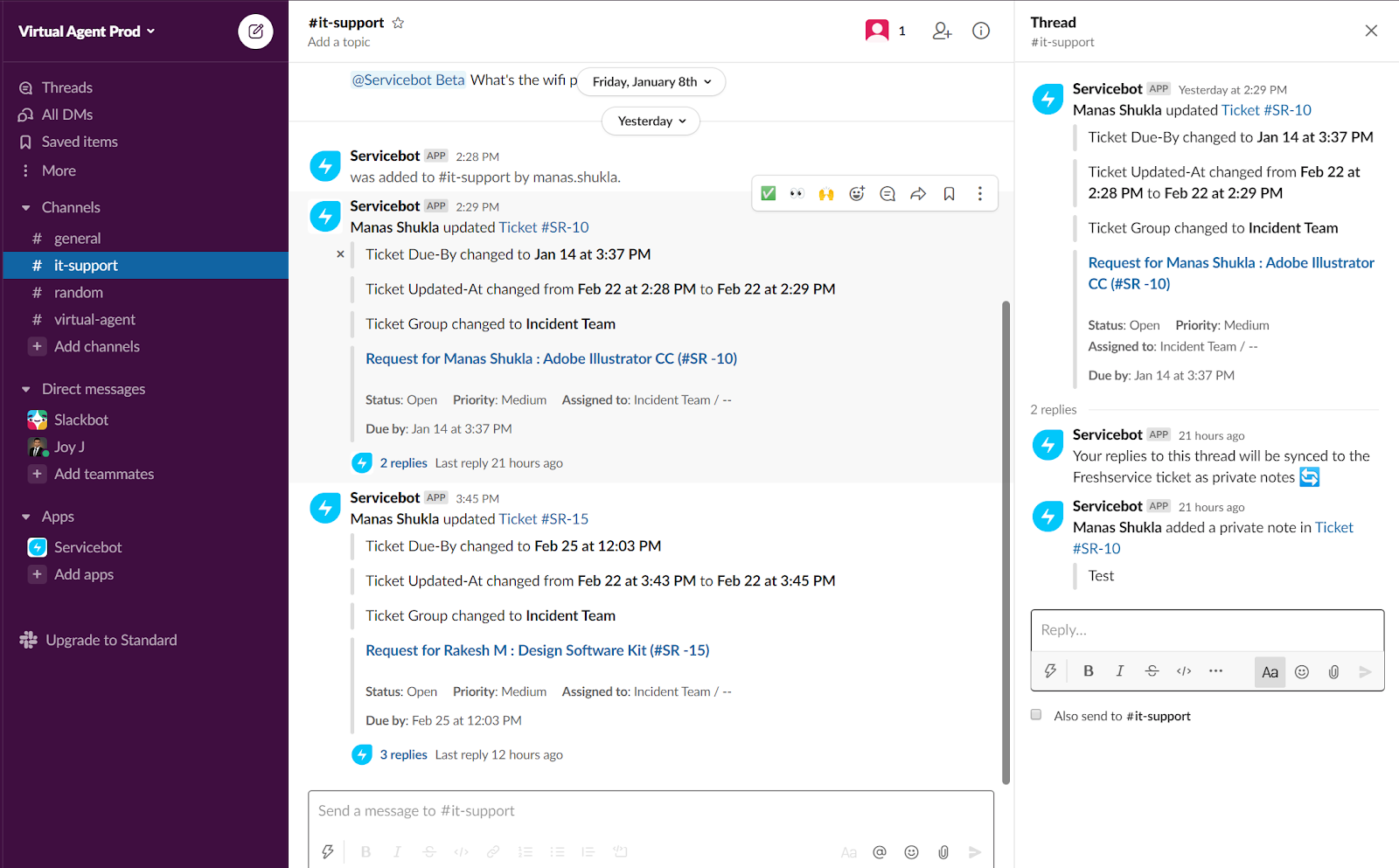
Freshservice’s Slack-connected ITSM platform that extends its service desk into Slack through ServiceBot. Employees can create requests there, while agents can assign tickets, update properties, and add notes. The Freddy AI Agent can answer common questions using the company’s knowledge sources and complete a small number of configured workflows. Each ticket has its own Slack thread, with replies and status changes synced back to Freshservice.
Its main differentiator is the wider ITSM functionality behind that Slack experience. Freshservice includes asset management, change management, workflow automation, and operational reporting.
Key features
- Slack ticketing and collaboration: Employees can create tickets in Slack, while agents can update requests and continue the conversation in ticket-specific threads that sync with Freshservice.
- Workflow automation: Teams can automate ticket routing, approval flows and repeat processes such as onboarding tasks
- Asset management and reporting: Freshservice connects service requests with asset records and gives teams dashboards for tracking support activity and operational performance.
Pricing: Freshservice starts at $19 per agent per month for Starter, $49 for Growth, and $99 for Pro when billed annually. Enterprise pricing is custom. ServiceBot for Slack is available across the plans, while the Enterprise plan includes Freddy AI.
3. Siit: Best for smaller IT teams that want to automate requests and manage IT assets in one platform
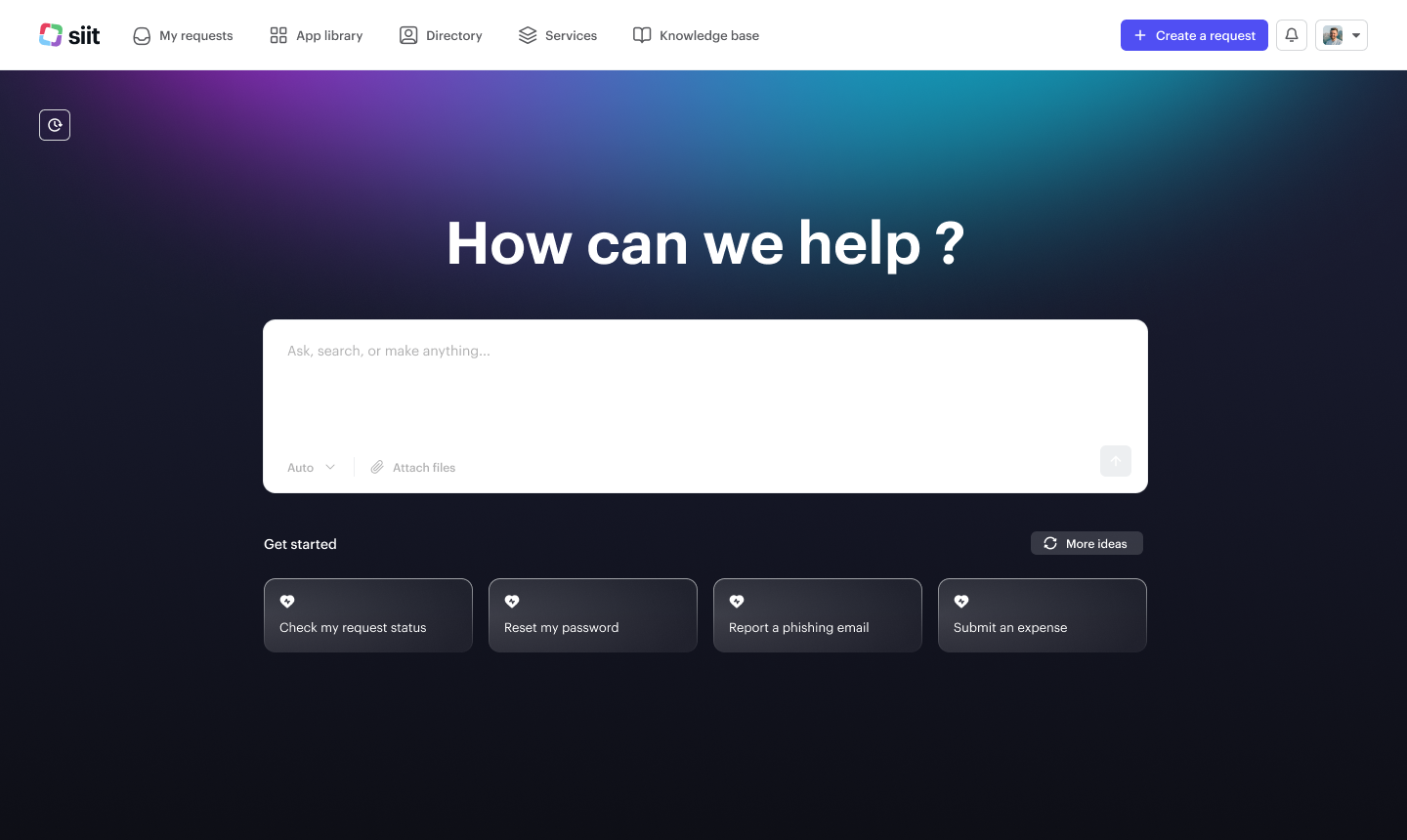
Siit’s Slack-native service desk for smaller and mid-market teams that want to manage support across IT and other internal departments. Employees and agents can keep the request conversation in Slack, while approvals, handoffs and status changes remain connected to the same ticket.
Its main differentiator is the workflow builder. Admins can create no-code processes with triggers, conditions, and approval rules, then execute them across connected operational systems. Siit’s AI Agent uses employee context and these predefined playbooks to complete supported tasks like basic troubleshooting. Equipment and application inventories are also included, which gives lean teams workflow automation and basic asset oversight in one platform.
Key features:
- Slack-native request management: Keeps conversations, approvals, and ticket updates connected in Slack.
- Visual workflow builder: Lets teams create no-code processes with conditional logic and approval rules.
- Context-aware AI Agent: Uses employee data and predefined playbooks to complete supported actions across connected tools.
Pricing: Siit is priced per admin, with unlimited employees included. Essentials costs $23 per admin per month when billed annually. Standard costs $45 and adds automated workflows, asset and SaaS management, integrations, and reporting. Pro costs $89 and includes the IT Agent, AI Assist, and AI-powered triage. Custom enterprise pricing is also available, along with a 14-day free trial.
4.Jira Service Management: Best for larger IT teams that need to coordinate major incidents from Slack
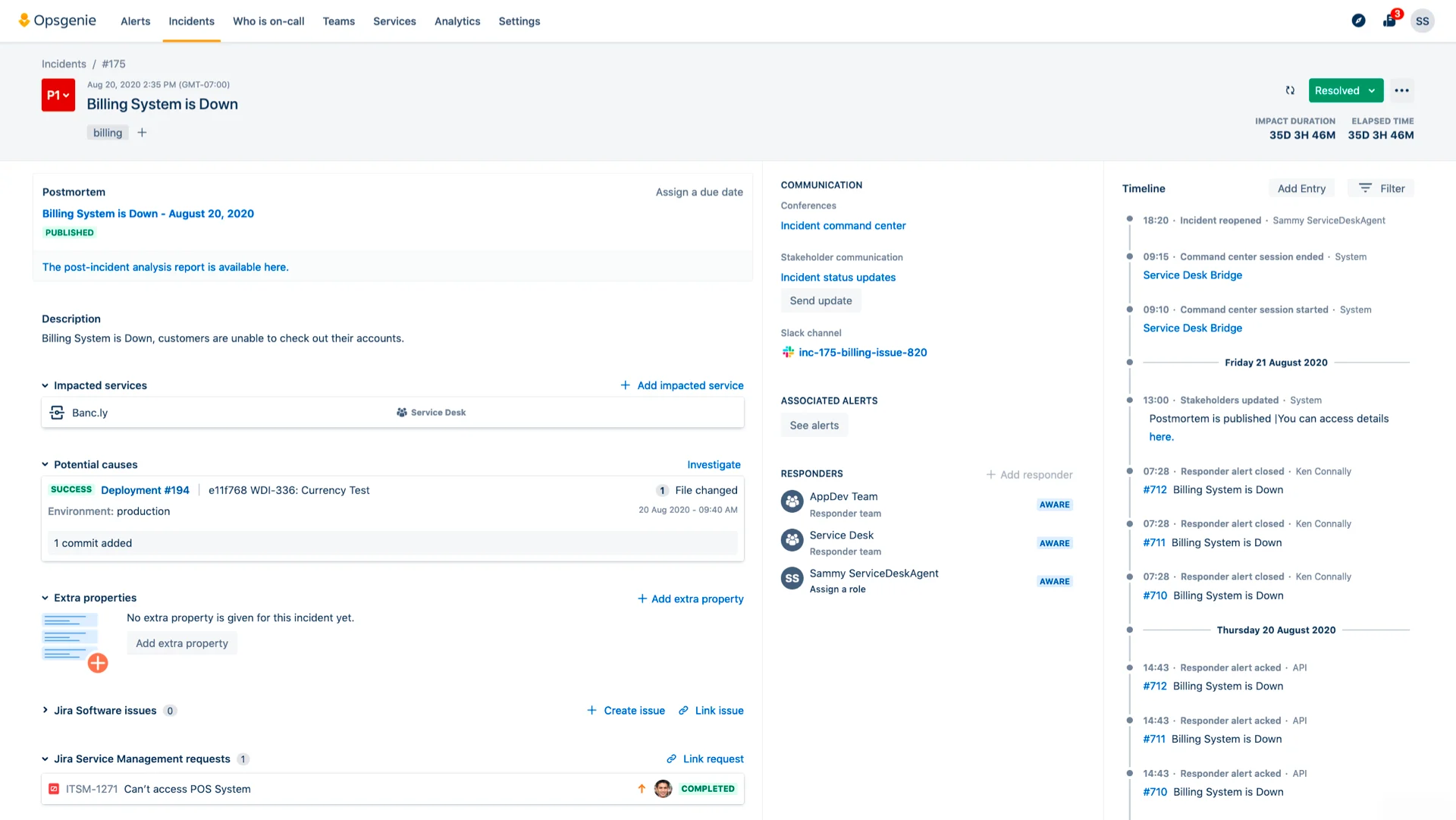
With Jira Service Management, agents can respond to requests, add internal notes, assign tickets, update statuses, close requests, and process approvals from Slack.
For employee support, the Virtual Service Agent, available on Premium and Enterprise plans, identifies the type of help someone needs and guides them through a predefined support flow. It can also answer questions using connected knowledge before passing unresolved requests to an agent.
Jira Service Management also has a separate ChatOps integration for incident response. Responders can create a formal incident record from Slack and connect it to a dedicated channel. The team can then coordinate the response, update the incident and communicate with stakeholders from that channel. Rovo can summarize the conversation and produce a timeline once the incident is resolved.
Key features:
- Slack request management: Agents can respond, add internal notes, update statuses, close tickets, and handle approvals in Slack.
- Incident ChatOps: Teams can coordinate responders, update incidents, and communicate with stakeholders from Slack.
- AI-assisted support: The Virtual Service Agent handles configured support conversations, while Rovo summarizes incidents and creates timelines.
Pricing: Free for up to three agents. Standard costs $20 per agent per month. Premium costs $51.42 and adds the Virtual Service Agent and advanced incident and change management. Enterprise pricing is custom. Premium and Enterprise include 1,000 assisted conversations per month, with additional conversations starting at $0.30 each.
5. ServiceNow: Best for large enterprises that want AI self-service through Slack
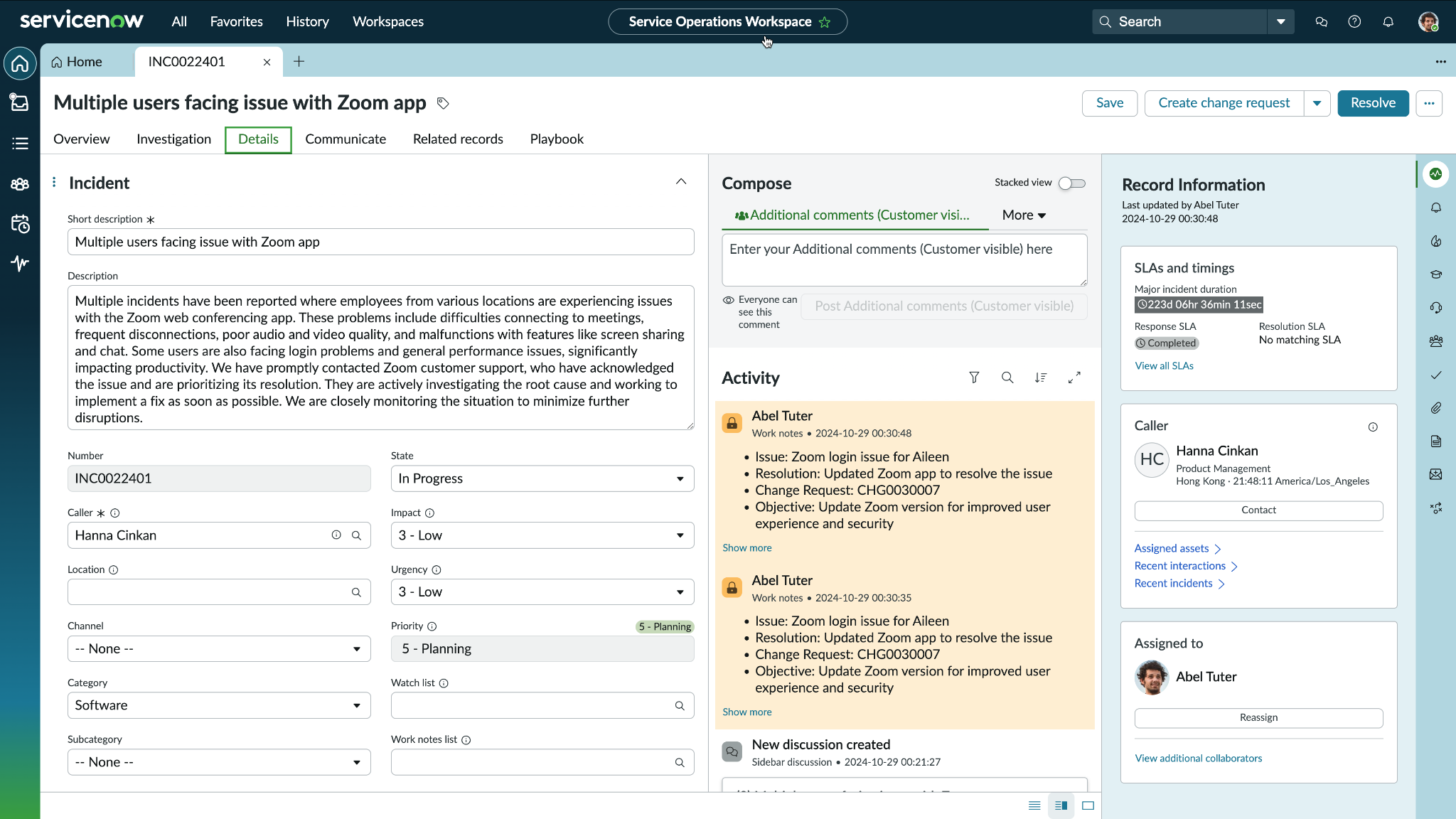
ServiceNow that brings its Virtual Agent into Slack. Employees can ask questions, complete common requests such as password resets or software access and escalate unresolved issues to a live agent.
Slack acts as the employee-facing support channel, while IT teams manage the wider ticket lifecycle in ServiceNow. This includes incidents, service requests, problems, and changes, with each workflow connected to the platform’s CMDB.
Beyond answering questions, ServiceNow’s AI can classify requests, prioritize incidents, and carry out approved actions through existing workflows. This makes it best suited to large enterprises that want Slack-based self-service connected to formal service management processes.
Key features:
- Virtual Agent for Slack: Gives employees conversational access to IT support from Slack without requiring them to open the ServiceNow portal.
- AI-powered self-service: Answers common questions and guides employees through configured requests such as password resets or software access.
- Live agent escalation: Passes unresolved conversations to a human agent when the request cannot be completed through self-service.
Pricing: ServiceNow does not publicly disclose its ITSM pricing. You’ll need to request a custom quote.
Choosing the right Slack ITSM platform
Look beyond whether a platform can create tickets from Slack. The more important questions are where agents manage those tickets, which requests the AI can resolve without human intervention, and how the platform fits with the systems your team already uses. The right tool will make support easier to access without adding configuration work or weakening the reporting and controls built into your ITSM.
Risotto is designed for fast-growing, Slack-first teams that have outgrown support DMs but know employees will avoid a separate portal. It turns Slack requests into tracked tickets, auto-resolves common Tier-1 work, and gives specialists the context they need when an issue requires human judgment.
That doesn't mean teams have to abandon the systems already running behind the service desk. Risotto can act as the ITSM or sync bi-directionally with Jira Service Management, Freshservice, ServiceNow, or Zendesk. Employees stay in Slack, while IT retains its existing workflows, audit records, and system of record. This gives teams a structured, AI-powered service desk without a lengthy portal rollout or rip-and-replace migration.

Liked the article? Share on:
On this page
Outgrown Slack DMs? Discover how Risotto transforms Slack into an AI-powered IT service desk.


See more recent articles



Want faster solutions and happier employees?
Access that's easy to ask for and impossible to get wrong.
Ensure Legal never answers another "do we need an NDA for this?"
Every policy question is stealing time from the work Finance was hired to do.
Turn Slack requests into action items instead of engineering interruptions.
The biggest deal risk might be an unanswered internal question.
Run a united support system that your employees can depend on.
Build the automations you’ve been planning on for months.
The bottleneck isn't your team. It's the groundwork before they can actually help.
Get support data that your team can talk to.
Jump on a call to understand:
Risotto handles repetitive support requests across tools and teams, so IT gets back to solving real problems, not rerunning the same ones.
.svg)
%20(1).webp)
See what makes the Iru integration a 10/10 for our clients.