%20(1).svg)

.png)
Connect Risotto to Jamf. Resolve Mac support requests before they become tickets.
Run Jamf workflows directly from Slack with Risotto. Reset passwords, provision devices, push policies, and handle repeat Apple support requests automatically.
Trusted by modern companies that can’t afford slow internal support.





















Less manual Mac support. Faster turnaround. Fewer interruptions for IT.



Make your Apple support move at chat speed, not IT queue speed.
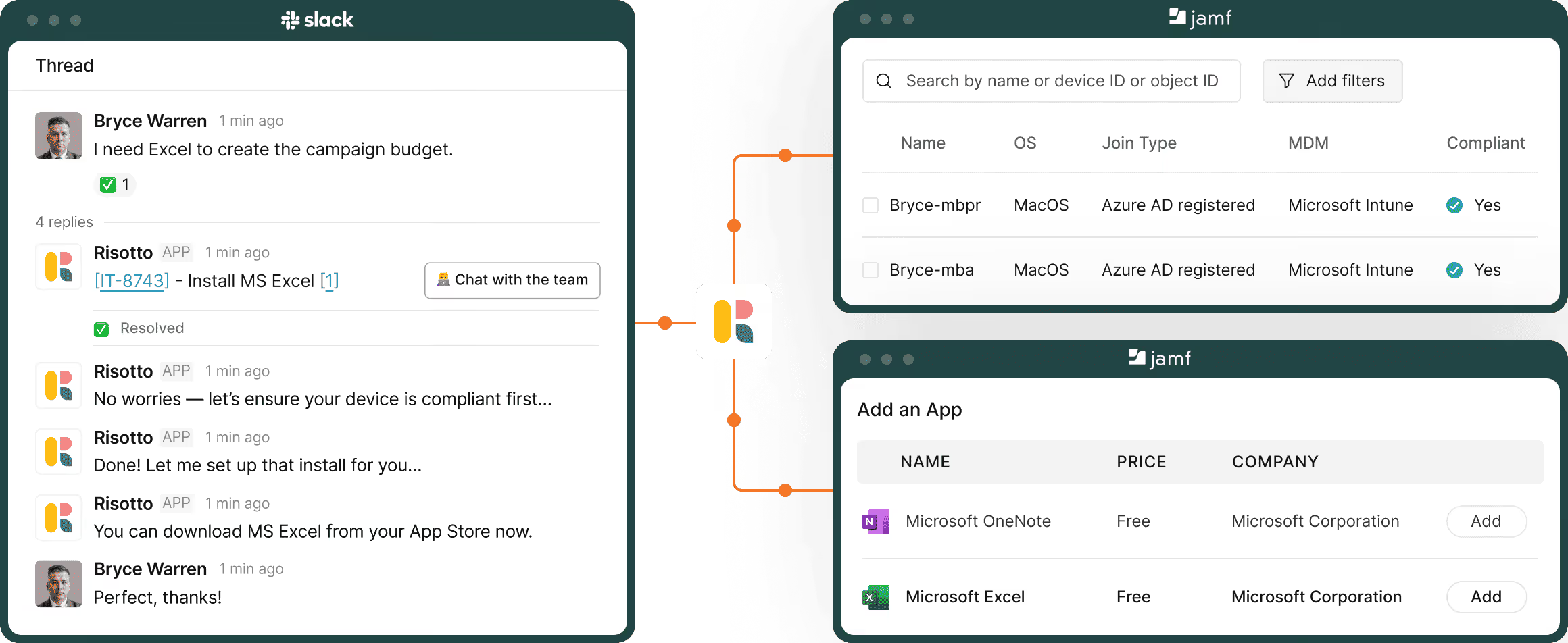
Let employees ask for help in plain language. Risotto identifies the request and automatically runs the correct Jamf action, from password resets to device provisioning.
Deploy apps, update configurations, enforce policies, and run remediation workflows directly from chat. Handle routine Mac support before it turns into a ticket backlog.
Create Jamf automations using simple instructions with Runbooks. Chain together approvals, device checks, app installs, notifications, and follow-up actions without writing code.
Handle password resets, credential syncs, and authentication issues automatically through conversational workflows that connect directly to Jamf.
Pull serial numbers, OS versions, encryption status, installed apps, and enrollment details instantly when employees or IT ask for device information.

Let employees ask for help in plain language. Risotto identifies the request and automatically runs the correct Jamf action, from password resets to device provisioning.

Deploy apps, update configurations, enforce policies, and run remediation workflows directly from chat. Handle routine Mac support before it turns into a ticket backlog.

Create Jamf automations using simple instructions with Runbooks. Chain together approvals, device checks, app installs, notifications, and follow-up actions without writing code.

Control which employees can trigger which workflows. Respect access policies while still providing employees with self-serve support inside chat.

Handle password resets, credential syncs, and authentication issues automatically through conversational workflows that connect directly to Jamf.

Pull serial numbers, OS versions, encryption status, installed apps, and enrollment details instantly when employees or IT ask for device information.
Automate the Apple device requests your team handles every day.
Enroll new Macs, iPhones, and iPads with a simple conversation and get employees up and running faster.
Let employees request and install approved software without waiting on an agent to help them.
Diagnose common device issues, run checks, and guide employees through proven fixes, all in chat.
Provision devices, software, and access for new hires. Revoke access and trigger offboarding workflows automatically when employees leave.
Log every workflow with full context. See what action was taken, when they were completed, and the results.
Manage lost devices, hardware refreshes, and replacement requests through a single window.
Security shouldn’t wait.
Get Risotto to make it lightning-fast.
Risotto creates a step-by-step remediation plan for tier-2 tickets and executes it upon agent approval.
Chain multiple Jamf actions together. Lookup device info, check compliance, deploy fixes, and verify success step-by-step, from a single conversation.
Risotto understands context, interprets screenshots, and asks follow-up questions to fill in gaps before acting.
Log every workflow with full context. See what action was taken, when they completed, and the results
All the questions between “interesting” and “let’s set this up.”
Still have questions? These might help.
From custom workflows to advanced access policies, our support team helps you get the most out of every integration.
Can Risotto handle Jamf actions directly from Slack?
Yes, employees ask for help in chat, and Risotto triggers the right Jamf workflows automatically. Password resets, app installs, device provisioning, compliance actions, and more happen without someone opening the Jamf console manually.
Do employees need Jamf access to get support?
No. Employees stay entirely inside Slack. Risotto handles the Jamf workflows, updates, and device actions behind the scenes while keeping employees informed in the thread.
Can Risotto understand screenshots and Mac error messages?
Risotto reads screenshots, interprets error messages, gathers missing details, and asks follow-up questions before taking action. Employees do not need to explain technical issues perfectly to get help.
Can we control which workflows employees can trigger?
Set permissions, approval flows, and access rules for different actions. Give employees fast self-serve support without opening up sensitive admin controls.
Does Risotto replace our existing Jamf setup?
No. Risotto works on top of Jamf. Your existing policies, device groups, configurations, and workflows stay exactly as they are. Risotto simply makes them executable through conversation.
What happens when Risotto cannot resolve an issue automatically?
It escalates with context already attached.
Risotto logs the conversation, captures device details, includes screenshots or errors, and routes the request to the right IT owner without employees repeating themselves.
Cut 3-hour response times down to 30 seconds.
Every policy question is stealing time from the work Finance was hired to do.
Turn Slack requests into action items instead of engineering interruptions.
The biggest deal risk might be an unanswered internal question.
Run a united support system that your employees can depend on.
Build the automations you’ve been planning on for months.
The bottleneck isn't your team. It's the groundwork before they can actually help.
Get support data that your team can talk to.
Jump on a call to understand:
Most Apple support delays happen between the request and the response. Risotto eliminates that wait by turning conversations into instant device actions, delivered directly through Jamf.
.svg)
%20(1).webp)
See what makes the Iru integration a 10/10 for our clients.