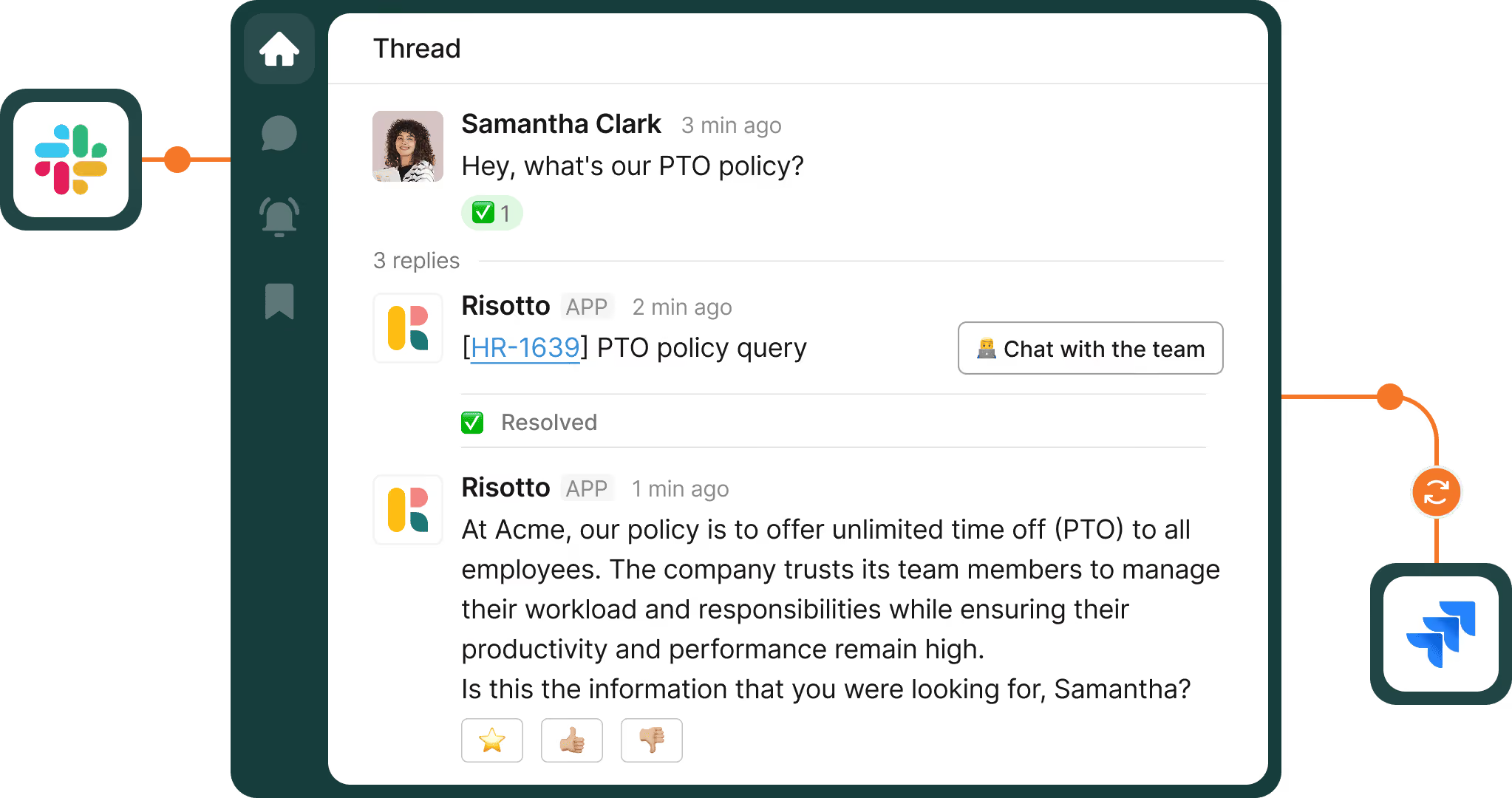
An employee messages HR in Slack to ask how many vacation days they have left. The answer is in the HRIS, but someone still has to look it up and reply. When requests like this keep coming through DMs and shared inboxes, even simple questions become difficult to manage.
As one interim People leader told us: 'I can't manage things in DMs anymore... This system is breaking and no longer working.'
The HRIS might already automate processes like leave approvals, but that doesn't necessarily help with requests arriving through other channels. Resolving them automatically means connecting employee questions to the data and systems needed to handle them. IT typically manages those connections, so HR often depends on IT to build its workflows and make changes.
Below, we'll explain why HR requests can be difficult to automate and where automation delivers the most value. We'll also walk through practical examples, how to get started and what to look for in HR workflow automation software.
TL;DR
- HR requests are hard to automate because many never reach a shared system, the right answer depends on who’s asking, and the work often happens in tools IT manages.
- Start with one request that comes up often and carries little risk, such as PTO balance checks. Track auto-solved requests and first-response time.
- Keep employee relations, performance, and accommodation cases with HR, and have a person review sensitive replies before they’re sent.
- Once IT connects the systems and sets the guardrails, HR can change the wording and steps in plain English.
- When comparing software, check department-level privacy first, then HRIS integrations and approval steps.
What is HR workflow automation?
HR workflow automation runs repeatable requests and processes from start to finish, without anyone doing each step manually.
Workflows can be triggered by an employee question, an HRIS event like a new hire, or a set time such as a daily check for new hires. Then, it will update the systems involved and record what changed.
Here's how that works for an employee question: someone asks in Slack to update their home address. An AI agent confirms the new details, then the workflow updates their record in the HRIS and logs the request as a ticket.
Why HR workflows are hard to automate
HR teams already use software to manage payroll, employee records, and leave. However, automating the requests employees make about those processes is more complicated.
Here are three common challenges.
Requests arrive everywhere, and many are private
Employees ask HR wherever is easiest: a DM to someone they know, an email, a public channel, or the shared inbox. A request sent to one person's DM or inbox stays there. No system can pick it up, and no one else on the team knows it exists.
The obvious fix is to send everyone to one HR channel. But employees won't post about leave, pay, or medical issues where colleagues can see them.
One Head of HR told us an earlier team 'didn't feel comfortable having just one open channel where people were like, hi, HR bot, I want to take a leave of absence.' So HR needs one system that takes requests privately, and some of those, like employee-relations issues, need to go to a named person as a confidential case.
The right answer depends on who's asking
Many HR questions have more than one correct answer. Leave entitlements vary by country, benefits depend on which plan the employee is enrolled in, and expense limits often differ by role or seniority.
So an automated answer needs to factor in the employee's own data from the HRIS and the policy that applies to them. Without both, the answer is either generic, and the employee asks HR anyway, or wrong.
A wrong answer often does the most damage. One payroll company's People team found its bot telling employees they could enter a flat-dollar 401(k) amount when the plan only allows a percentage.
Instead of saving time, the bot created a new job: two teammates now review 'every single ticket that comes through four times a day.'
The work happens in systems IT runs
Completing an HR request often means making changes in tools HR doesn't manage, such as Slack, Okta, and the ticket system.
Offboarding is a clear example. HR confirms the departure, but IT removes the employee's Slack access and deactivates their Okta account.
'HR basically instructs us, please initially remove Slack access... then they say, okay, go ahead and turn everything off,' one IT admin told us. Automating that takes connections between the HRIS, the identity provider, and each app, and IT manages all of them.
Because IT controls those tools, IT usually builds the automations that connect them. HR can't change those automations itself, so every policy or process change becomes a request to IT. Custom scripts make it slower still, because often only the person who wrote them knows how they work.
Benefits of HR workflow automation
Once requests reach one system, answers draw on the right data, and IT has connected the tools, routine HR requests can run without anyone stepping in.
Here's what that changes for employees, HR, and IT:
- Routine requests get resolved without HR stepping in: An employee can check their leave balance and request time off in chat, and the request goes straight to the HRIS.
- Answers match the employee's situation: A workflow can be set up to pull the employee's location and HRIS data, so they get the policy that applies to them.
- Employees can ask sensitive questions privately: Requests about pay, leave, or health go to HR's department queue, out of public channels and IT's queue.
- Every request leaves a record: The ticket history shows who asked, who approved, and what changed.
- Help outside office hours: Routine questions get answered while HR is offline or in another time zone.
- HR can update its own workflows: Once IT connects the systems and sets the guardrails, HR can change the wording and steps in plain English, without a request to IT.
- More time for judgment calls: With fewer routine requests, HR has more time for employee relations, policy, and people decisions.
Hazel Health, which uses Risotto for both IT and HR, sees several of these benefits. Risotto auto-solves 35% of its HR requests, keeps sensitive matters visible only to authorized teams, and its HR team builds runbooks with minimal IT involvement.
HR workflow automation examples
So which HR requests should you automate first? Start with the ones that come up often, follow the same steps every time, and touch more than one system.
The 11 examples below fit that description, from onboarding and PTO requests to confidential cases and HRIS updates. For each one, we explain why it's worth automating and what the workflow does.
1. Onboarding
When a new employee joins a company, HR adds them to the HRIS, but IT still has to set up their accounts, app access, and equipment.
An employee onboarding workflow is triggered by a new hire event in the HRIS and starts those tasks automatically, so HR doesn't have to pass each one to IT manually.
2. Offboarding
Offboarding involves a few departments, including HR, IT, and sometimes Legal or Finance. Once HR confirms the departure, a workflow can start each offboarding task, such as collecting documents, notifying the right people, and removing system access.
At one 900-person adtech company, a termination means pulling NDAs, sending documents for signature in DocuSign, building an exit packet, and scheduling an exit interview, then updating Workday.
These tasks also have to run in sequence. Some access goes the moment someone leaves, while other systems stay open until the handover is done.
3. PTO balances and time off requests
Employees shouldn't need to contact HR every time they want to check how much leave they have left. An AI agent can look up their balance in the HRIS, explain which leave types they have, and help them submit a time off request in chat.
The time off request then goes through the HRIS's own approval process, so the manager approves it as usual.
4. Policy and benefits questions
Many HR questions are already answered in policy documents and benefits guides, but employees can't always find the right section.
An AI agent can answer them from those approved sources and pass anything unclear to the benefits team. Answers stay consistent, and HR stops answering the same question again and again.
5. Country-specific policies and documents
Employees in different countries can have different leave entitlements, holidays, and paperwork. A workflow can be set up to use the employee's country to pick the right policy or document template.
Some documents still need a person. For example, visa invitation letters differ by consulate, and India requires a wet-ink signature, so the workflow can prepare the letter, but someone in HR has to sign it.
6. Employment verification letters
Employees often need proof of employment for a lender, landlord, or visa application. Without automation, HR writes each letter manually.
A workflow can fill a letter template with the employee's HRIS data and send it to HR to approve before it goes out.
7. Confidential intake and routing
Requests about compensation, medical issues, or employee relations need to reach a specific HR specialist and no one else.
An AI agent can take the request in a DM, collect the details up front, and route it straight to that person. HR starts with the information it needs, and the employee doesn't have to explain the situation twice.
8. Life events
A single life event often creates several requests. An employee having a baby might need parental leave, a benefits change for a qualifying life event, and a move to part-time, all in one message.
Each request has its own steps and owner. The workflow needs to handle each one and make sure the right owner knows when theirs was auto-solved, so nothing gets missed.
9. Manager and org changes
Changes to reporting lines, departments, and job titles mean repetitive updates across HR and IT systems.
Simple changes with few fields are easy to automate, which is why one company that logged 'over 1,200 transactions... of just org changes' started there.
For more complex changes, the workflow collects the details and sends them to a person for review before any records change.
10. Personal detail updates
Updating an address or emergency contact is simple, but when HR makes every change manually, the admin adds up.
An AI agent can confirm the new details with the employee in a DM, then the workflow updates their HRIS record.
11. HR inbox to tickets
Many People teams still take questions through a shared address like “hr@company.com.” Several people read the same inbox, so requests are easy to miss or answer twice.
A workflow can turn each email into a ticket, categorize it, and route it to the right person. HR gets a record of the work and can track email requests the same way as chat requests.
See how Risotto resolves routine HR requests in Slack and Teams. Book a demo.
How to automate HR workflows
Once you've picked a request from the list above, these five steps get it running end to end, with the right approvals and a record of each step.
1. List your most frequent HR requests
Pull a month of requests from the HR inbox, chat, and any existing tickets, and group the ones that repeat. Then pick one that comes up often and carries little risk, meaning it doesn't involve sensitive data and a mistake is easy to fix. PTO balance checks and manager changes are good first choices.
Record how many requests you get before you launch. Volume rises once requests are tracked, because requests that used to stay in DMs start being counted, so you need a starting number to measure against.
In Risotto, for example, the Tier-2 Assistant can review your past tickets and suggest which requests to automate next.
2. Decide what stays human
Some requests need a person to make the call, such as employee relations issues, performance improvement plans (PIPs), and accommodations.
A workflow can take these requests in privately and route them to the right specialist, but the decision stays with that person.
Set these rules by category before launch, so nobody has to judge each request as it arrives. For compensation and medical questions, also limit who can see them. 'If someone's asking a comp question... it's only our eyes and no one else's,' one People Ops lead told us.
Some sensitive replies don't need a decision, just a careful answer. For those, use an 'AI drafts, a person sends' approach: the AI agent writes the reply as an internal note, and someone in HR reviews and sends it.
In Risotto, for example, the Tier-2 Assistant investigates escalated HR tickets and proposes a resolution, and someone on the team approves, edits, or overrides it before anything runs.
3. Choose how each workflow is built
Some steps have to run the same way every time, like changing an employee record or granting system access. Others need flexibility, like understanding the request, asking follow-up questions, and finding the right policy.
This is the role of AI in HR workflow automation: the AI agent handles the conversation, and fixed steps handle changes to records and access.
In Risotto, for example, teams write automated runbooks in plain English, or describe what they want to the AI workflow builder and approve each step as it builds the runbook.
Teams can start from a template, such as Workday Time Off Request, and add scripted steps where every run must be the same. New-hire and termination triggers work natively with BambooHR, HiBob, and Rippling, and through a webhook for Workday.
Not every request needs a runbook. Risotto also answers HR questions straight from your knowledge base.
Add a screenshot of an HR runbook in Risotto, showing the trigger and steps for a leave balance and PTO request.
4. Connect the systems and set approvals
IT usually connects the HRIS, chat, and ticket system, then decides who approves what and who can see which requests.
Check what each integration supports before you build, since some only read employee data while others can also update records or start workflows from HRIS events.
Each request should leave a record of who asked, who approved, and what changed. With the systems connected and the guardrails set, IT can hand the workflows over, and HR owns the wording and steps from there.
One IT director summed up the handover they planned for their HR team: 'We set this up for you and then it's yours.'
With Risotto for HR teams, for example, runbooks can include approval steps for named people, groups, or the requester's manager, and department membership controls who sees HR requests.
If HR already uses a ticket system, tickets sync with it. If not, HR can run its requests in Risotto's built-in ticketing.
5. Launch where employees already ask
Turn the workflow on in Slack or Teams, where employees already ask for help. With conversational ticketing, each chat message becomes a ticket without the employee filling in a form.
Route the HR email address into the same system, so email requests are tracked alongside chat requests.
Then watch which requests still reach a person, and pick your next workflow from those. To measure progress, track these metrics:
- Auto-solved requests: The share of requests resolved without anyone in HR stepping in.
- First-response time against a target: One Director of People Ops moved from 75% to 83% of requests meeting a four-hour target in four weeks.
- Response time in the responder's working hours: Response targets should follow the hours of the person answering. 'It shouldn't have to respond within 8 business hours Pacific time. It should be India time.'
- Answer rate on documents: One People Ops manager set a 60 to 70% target for benefits questions answered from their docs.
- “Notification noise”: The share of tickets that are automatic system notifications, like confirmations and status alerts, rather than real employee requests. These inflate volume and bury real requests. One team found 'about half of our global mobility and immigration tickets are just notification noise.'
What to look for in HR workflow automation software
Once you know which requests to automate, the next question is which tool to use.
When you compare the top HR workflow automation platforms, start with one question: does the workflow automation software complete HR requests across systems, or only route them to a person?
Privacy matters just as much. It's often the first thing People teams ask about: 'Can the people who have access to the bot's responses for IT be able to see the ones for HR?'
Look for these in the best workflow automation for HR ops:
- Department-level privacy: HR requests should be visible only to the HR team, with tighter access for compensation and medical cases. Ask what access organization admins keep.
- Support for the channels employees use: Employees should be able to ask in Slack, Teams, or email, and keep personal requests in a private DM.
- HRIS integrations: The tool should connect to your HRIS, such as Workday, HiBob, BambooHR, or Rippling. Check whether each integration can read data, update records, and start workflows, since they differ.
- Approvals and a full history: Workflows should include approval steps, and each ticket should keep a history of every action and approval.
- Human review for sensitive replies: For sensitive questions, the AI agent should draft a reply that a person approves before it's sent.
- No-code editing for HR: HR should be able to build and edit workflows in plain English, inside guardrails IT sets, without waiting on a developer.
- AI and fixed steps in one workflow: The AI agent should handle the conversation, while scripted steps handle record changes and system access the same way every time.
- Reporting: Look for first-response tracking against service-level agreements (SLAs) and reporting on auto-solved requests, so you can measure the metrics from step 5.
- One system for requests and tickets: Requests, tickets, and workflows should live in one place and sync with your existing ticket system if you have one.
Automate your HR workflows with Risotto
You don't need to automate every HR request at once. Start with one that comes up often and carries little risk. Keep sensitive cases with people, and measure the results before you add the next workflow.
Risotto combines an HR help desk with workflow automation, so a request can go from question to completed action in one place.
Consider the employee asking how many vacation days they have left. They ask in Slack, and Risotto checks their balance in the HRIS and helps them submit the request in the same conversation.
Nobody in HR has to look anything up. Sensitive requests stay with the HR team, and once IT has connected the systems, HR can change its runbooks in plain English.
Because Risotto works as one help desk across departments, Finance and Legal can use the same setup later, without adding another tool.
Frequently asked questions
An HR workflow is the set of steps that turns an HR request into a result. A time off request, for example, starts with the employee's question, moves through a balance check and the manager's approval, and ends with an updated record in the HRIS. Many HR workflows also touch systems IT runs, like identity tools and the ticket system.
Start with one HR request that comes up often and carries little risk, like PTO balance checks. Decide which requests stay with people, then work with IT to connect the HRIS, chat, and ticket system and set approvals. Launch in Slack or Teams, where employees already ask, and track auto-solved requests and first-response time to measure progress.
Common examples include onboarding and offboarding, PTO balances and time off requests, policy and benefits questions, and country-specific documents like visa letters. Others are employment verification letters, confidential requests routed privately to HR, life events, manager and org changes, personal detail updates, and turning HR inbox emails into tickets.
An AI agent handles the conversation. It reads the employee's request, asks follow-up questions, and finds the policy that applies to them. Fixed steps make changes to employee records and system access, so those run the same way every time. For sensitive questions, the AI agent can draft a reply that a person approves before it's sent.
Yes, if the software has department-level permissions. HR requests should be visible only to the HR team, with tighter access for compensation and medical cases. Check what access organization admins keep, since some tools let admins add themselves to any department.

Liked the article? Share on:
On this page
See Risotto's AI Workflow Builder turn a plain-English description into a working HR workflow





Want faster solutions and happier employees?
Access that's easy to ask for and impossible to get wrong.
Ensure Legal never answers another "do we need an NDA for this?"
Every policy question is stealing time from the work Finance was hired to do.
Turn Slack requests into action items instead of engineering interruptions.
The biggest deal risk might be an unanswered internal question.
Run a united support system that your employees can depend on.
Build the automations you’ve been planning on for months.
The bottleneck isn't your team. It's the groundwork before they can actually help.
Get support data that your team can talk to.
Jump on a call to understand:
Risotto handles repetitive support requests across tools and teams, so IT gets back to solving real problems, not rerunning the same ones.

See what makes the Iru integration a 10/10 for our clients.