%20(1).svg)
How to choose the right IT workflow software
Choosing IT workflow software takes more than comparing feature lists. This guide shows how to judge tools by how well they fit your workflows and how quickly they can take manual work off your team.


Most IT teams evaluate software by comparing feature checklists. But a tool with twice as many features won’t do much good if it takes six months to implement, requires your team to learn a new interface, or only half-integrates with the systems you already run.
For IT teams that are stretched thin, speed and fit matter more than feature count. Speed is about minimizing the steps between request and resolution, and fit refers to whether the platform syncs with your existing stack from day one or creates headaches instead of eliminating them.
This article walks you through how to audit your current bottlenecks, then explains how to evaluate tools by the criteria that predict real value. We'll also show you how to build a simple scorecard so you can compare software more effectively and choose the solution that will save you the most time.
TL;DR
- Feature checklists measure what IT workflow tools can theoretically do, not whether they actually solve your team's bottlenecks at the speed you need.
- Audit your actual manual work first; you can't judge fit or speed without knowing which repetitive requests eat the most of your team's time.
- Score vendors on workflow speed, ease of building custom triggers, integration depth, and implementation time, not feature count.
- Pick the tool that resolves your highest-volume requests with the fewest steps, in the tools your employees already use. Everything else is secondary.
Why feature checklists don't tell the whole story
Feature checklists are straightforward, which makes them appealing to IT teams comparing software. Both tools have Tier-1 auto-resolution? Check. Both handle password resets? Check. Both integrate with your identity provider? Check.
But it’s not that simple. Feature checklists measure only one thing: what IT automation software can theoretically do. They don't measure whether it actually does what your team needs, at the pace your team needs it done.
Consider two IT workflow platforms. Both can auto-resolve password resets:
- The first does it natively inside Slack with a single click: the request comes in, the tool resolves, the employee is notified, done.
- The other requires the employee to click through to a separate portal, fill out a form, wait for approval from a manager in a different system, then get notified when it's done.
Both tools have the feature, but one platform resolves issues in minutes while the other takes hours.
Feature checklists also ignore how well a platform fits in with your existing ITSM stack. A platform with one-click integrations with your existing ticketing platform and identity provider does more useful work than a tool with twice as many integrations but only shallow, one-way syncs.
The same gap applies to implementation. A tool that takes three weeks to go live may look worse on a checklist than one that takes six months, with fewer advanced features. But for a lean team, those six months means half a year of continuing to handle everything manually. The feature-light tool has already solved your biggest problems while the feature-rich one is still being implemented.
A 3-step processing for choosing IT workflow software that will bring real time savings
Step 1: Audit your manual bottlenecks before you compare IT workflow software
You can't judge whether a tool fits your team or saves you time until you know what manual work it's supposed to automate. A platform that excels at auto-resolving password resets doesn't help a team drowning in access requests.
So before you compare tools, audit where your team's time actually goes. Start by looking at your ticket queue for the last quarter and counting the requests by category. Which ones eat the most agent hours? Which ones repeat the same pattern over and over? Which ones could be resolved without human judgment?
Once you've identified which bottlenecks eat the most time, you'll be able to judge whether a tool actually solves them and how fast it can do it.
Here are the most common bottlenecks to look out for.
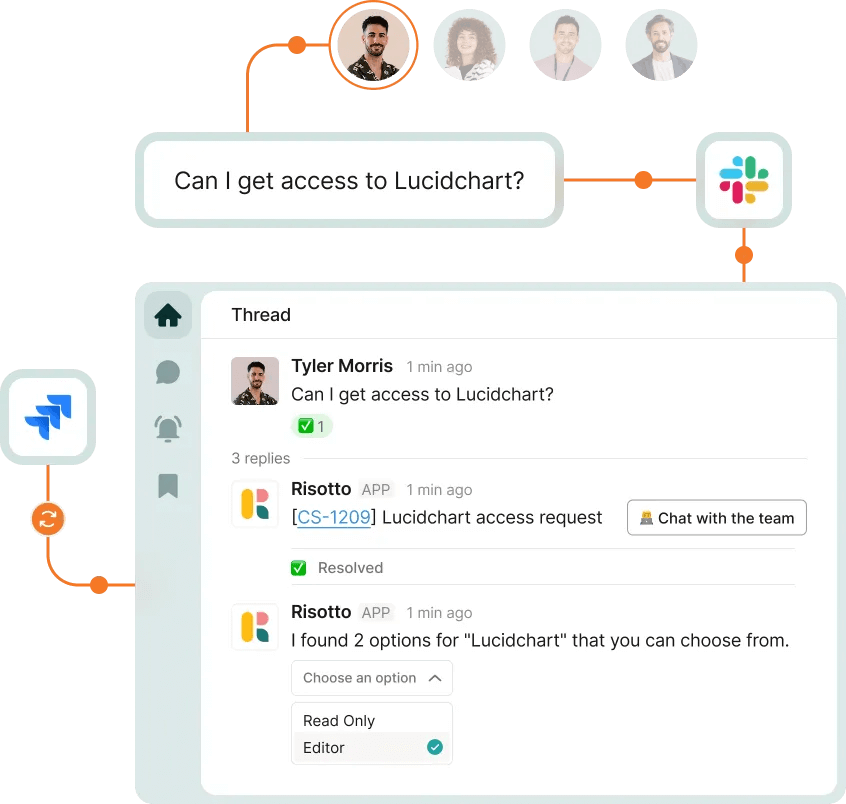
Software access requests and approvals
Manually granting employee access to SaaS tools and apps means a ticket, an approval chain (sometimes multiple), a handoff to provisioning, and a confirmation back to the requester.
For some teams, access requests make up the majority of the queue. One company we spoke to was handling around 1,800 access tickets a year, making it their single biggest request category.
If your team fields dozens of these a week, this is a bottleneck worth automating. And doing so can have a huge impact: autonomous logistics company Zipline achieved a 100% access grant automation rate with IT workflow software Risotto.
Password resets and MFA re-enrollment
If an employee locks themselves out of an account or loses a recovery code, they have to submit a ticket and wait for an agent to reset it before they can get back to work. But this process is simple, repetitive, and doesn't require judgment, which makes it ideal for automation.
Take a look at how many password reset and MFA re-enrollment requests your team gets weekly to estimate the ROI of automating this process.
Onboarding and offboarding
New hire? Departing employee? Both trigger a cascade of manual work: account creation, email provisioning, access grants, and equipment assignment for onboarding, then a revocation and offboarding checklist when an employee leaves.
Some of this can be templated and triggered automatically, but without the right tool, much of it still requires your team to manually coordinate across systems. Track how many onboarding and offboarding requests your team handles monthly, and identify which parts of these processes could potentially be automated.
Repetitive "how-to" questions that take up agent time
"How do I access the VPN?" "How do I reset my email password?" "How do I request access to Salesforce?" All these questions come in as tickets, emails, or chat messages, and your team ends up answering the same question over and over.
If a large chunk of your ticket volume includes these types of questions, automation can answer or point to a knowledge base article instead of tying up an agent. What’s more, some tools, like Risotto, can even help build and update your knowledge base from resolved tickets to ensure employees get a quicker, clearer response in the future.
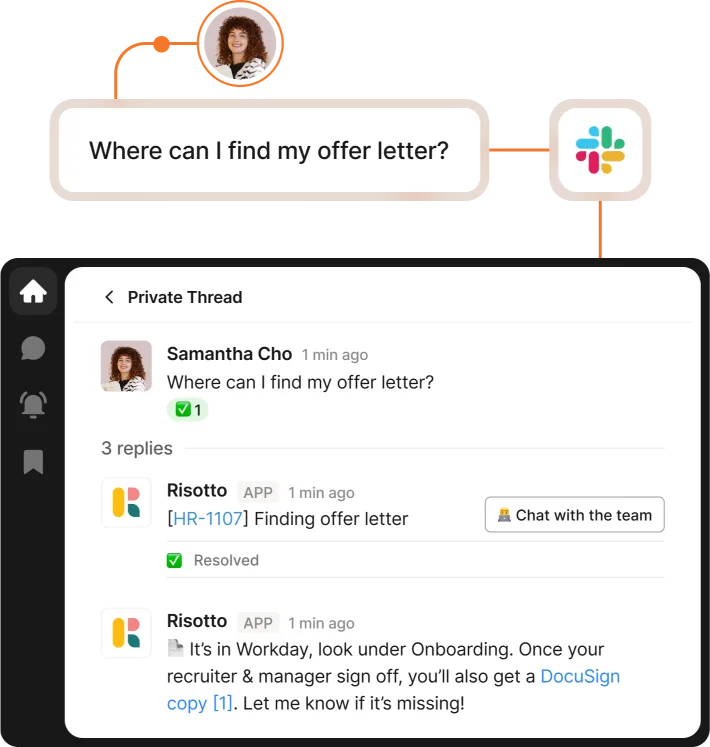
HR questions spilling into the IT queue
HR policies, benefits enrollment, and payroll questions often land on IT. Whether it’s because employees don't know where else to send them or due to IT's support channel being more visible than HR's, these questions don't belong to IT and shouldn't consume your capacity.
If they're landing in your queue, they're a bottleneck, because they're noise that obscures your actual IT work. If this is an issue for you, look for a tool that handles HR questions alongside IT requests, no matter where employees ask their question.
Pro tip: Once you’ve identified your biggest bottlenecks, capture a baseline for the metrics that matter most. Record your current auto-solve rate, resolution time, and hours spent on repetitive requests so you can measure whether a new platform actually improves them.
Step 2: Know what to evaluate beyond the feature checklist
A platform that looks identical to a competitor on a spreadsheet might require your team to babysit it during implementation, or it might only come with vendor-managed automations that slow down your ability to adapt as your needs change. The criteria that matter are the ones that predict whether the tool will actually save your team time.
Workflow speed
The bottleneck most IT teams face is how many steps an employee has to take between request and resolution and how many of those steps require manual intervention.
Consider two access request scenarios:
- Your platform lets an employee request SaaS access inside Slack, routes the approval to their manager inside Slack, and automatically provisions the access once approved, all without leaving the chat tool.
- The employee has to submit a ticket, wait for it to be triaged, click through to a separate approval portal where their manager gets an email, then wait for your team to manually provision access in the identity provider and send confirmation.
In both cases, the employee gains access, but the workflow in the first scenario is significantly faster and requires no input from your IT team. An automated workflow that resolves inside Slack or Teams means fewer tickets clogging your queue and fewer employee escalations asking "where's my request?"
Approval speed matters too. A workflow can look automated on paper but still stall if managers miss email or ticket notifications. Check where approvals happen and whether the tool can follow up automatically when someone doesn’t respond.
Questions to ask vendors:
- "Can employees resolve requests inside Slack or Teams, or do they need to open a separate portal?"
- "Walk me through a password reset or access request from request to completion. How many clicks or logins does the employee need? Does the IT team have to step in?"
- “Where do approvals happen, and what happens if an approver doesn’t respond?”
Ease of building custom triggers
Automation is only as useful as your team's ability to build and customize it. If every new workflow requires a vendor professional or an API integration from your dev team, your automation tool becomes its own bottleneck.
The best tools let your IT team build and modify automations directly, no code required. You identify a repetitive request pattern, set up a no-code runbook in the tool itself, and deploy it. When your needs change, you can update it without waiting for anyone else's roadmap or availability.
If every change goes through the vendor or depends on developer resources, you're locked into whatever automations existed on day one. Your team can't respond to new requests or adjust triggers based on what you've learned about your actual workflow, which kills adoption and introduces more manual work.
Questions to ask vendors:
- "Can our IT team build and modify automations ourselves, or does every change require your team or a developer?"
- "Show me the interface for building a custom workflow. How much technical knowledge does it require?"
Integration depth
Integration depth is the difference between a tool that syncs bi-directionally with your systems and one that moves information one way.
Shallow integrations create double the work instead of eliminating it. A tool that can read from your identity provider but can't automatically provision access means your team still has to manually grant access in the IdP after approval.
So look for software that offers bi-directional integrations that trigger real actions, like provisioning and deprovisioning access, updating tickets across systems, syncing approvals, and expiring access automatically. Your team should be able to configure the integrations once, then the platforms talk to each other without manual intervention.
Questions to ask vendors:
- "Which of our systems can this platform integrate with, and are those integrations bi-directional or one-way?"
- "If I approve an access request inside your tool, does it automatically provision the access in our identity provider and update the ticket in Jira, or does my team need to do those steps manually?"
Implementation time
Implementation time marks the days from contract signature to the first automated resolution. It includes platform setup, workflow configuration, integration testing, and training.
A slow, months-long integration means your team continues handling everything manually while the tool is being configured. For a lean team, that's a big tax on your already-stretched time. But with a tool that’s up and running in just a few days, your team can start seeing relief almost immediately.
Implementation also needs to account for training and maintenance. A platform that requires deep technical knowledge to deploy and manage will consume more of your time than one built for IT teams without dedicated ops staff.
Questions to ask vendors:
- "What's the realistic timeline from contract to first automated IT workflows running in production, including configuration, testing, and training?"
- "What's required from our team during implementation, and how much of our time should we budget?"
Measurement and auditability
IT workflow software should make it clear what the AI actually resolved. Look for reporting capabilities that separate automated resolutions from requests handled by your team and lets you trace those numbers back to real interactions. Be wary of proprietary “deflection” metrics you can’t independently verify.
Questions to ask vendors:
- “Can we see which requests were resolved automatically and which required human help?”
- “Is every interaction recorded so we can audit the results?”
Risotto customers go live and see 50%+ auto-resolution on day one; see what fast implementation actually delivers. Learn more
Step 3: Use these criteria to shortlist the best IT workflow automation tools
When comparing tools, go beyond features and build a scorecard where you rate each vendor one to five on workflow speed, implementation time, ease of building custom triggers, and integration depth.
For lean IT teams, weight workflow speed (40%) and implementation time (30%) more heavily than ease of building custom automation triggers (15%) and integration depth (15%). A tool that takes months to deploy defeats the purpose, even if it scores well on features.
Set deal-breakers before you assign a score. For example, if a tool scores below 3 on workflow speed, you may not see any measurable time savings. And if implementation exceeds nine months, you're betting relief on a timeline your team can't afford.
Calculate weighted totals for each vendor. The highest score wins, but only if they pass your deal-breaker test. This forces you to prioritize what actually matters to your team.
Use the scorecard to narrow your options, then test the strongest candidates with your own data. Pick a few of your highest-volume request types and see how each platform handles them in practice, using the baseline from Step 1 to measure the improvement.
Choose by speed and fit, not only feature count
The value of a tool shows up in how it impacts your team's capacity. For example, a platform that auto-resolves requests inside Slack without requiring you to configure complex portals frees your team to handle the work that actually needs their judgment.
Risotto, for example, does this natively. Your IT team can build no-code runbooks directly inside the platform, so every new workflow or adjustment doesn't require vendor involvement or developer cycles.
And because it's designed for speed, not feature parity with legacy tools, implementation takes hours, not weeks. Risotto customer Gusto, for example, saw 53% resolution rate on day one of implementation. That's the standard to hold every other tool against.
FAQs about IT workflow software
Does IT workflow software require developer resources to set up?
Not if it's designed for IT teams. The best platforms let your team build and modify automations directly through no-code interfaces. If every change requires a developer or vendor involvement, the platform becomes a bottleneck. The best IT workflow automation tools enable your team to customize runbooks with no external support.
How long does it take to implement IT workflow automation software?
It depends on the tool and your tech stack. Slow implementations can stretch six to nine months, consuming capacity your lean team doesn't have. But fast onboarding can enable teams to go live in hours or a single day. Ask vendors for realistic timelines including configuration, testing, and training.
What's the difference between IT workflow software and ITSM software?
IT service desk workflow software focuses on automating repetitive requests and resolving them fast, often inside the tools your team already uses, like Slack. ITSM software is broader: it manages the entire IT service lifecycle, from request to resolution to reporting.
Workflow tools are built for speed and ease of customization, while ITSM platforms often prioritize comprehensive feature sets over implementation speed. Most lean IT teams benefit from workflow automation layered on top of their existing ITSM.
Liked the article? Share on:
On this page
See how a platform designed for speed and fit actually resolves requests





Want faster solutions and happier employees?
Access that's easy to ask for and impossible to get wrong.
Ensure Legal never answers another "do we need an NDA for this?"
Every policy question is stealing time from the work Finance was hired to do.
Turn Slack requests into action items instead of engineering interruptions.
The biggest deal risk might be an unanswered internal question.
Run a united support system that your employees can depend on.
Build the automations you’ve been planning on for months.
The bottleneck isn't your team. It's the groundwork before they can actually help.
Get support data that your team can talk to.
Jump on a call to understand:
Risotto handles repetitive support requests across tools and teams, so IT gets back to solving real problems, not rerunning the same ones.
.svg)
%20(1).webp)
See what makes the Iru integration a 10/10 for our clients.