%20(1).svg)
Why most ITSM support chatbots fail and what fixes it?
Why do most IT chatbots stall a few months after launch? This article covers the four reasons behind it and what an AI agent does differently.


The bot goes live on a Monday. For a few weeks, the deflection rate climbs, and someone screenshots the chart for a leadership update. Then the line flattens. By month three, employees are DMing you directly again, and your #ask-it channel is as busy as it was before.
If you've been in this situation, you know the tool didn't break. It did what it was built to do. Which was way less than you were expecting.
This article walks you through the four reasons IT chatbots underperform, then explains what changes when the tool can act in your systems instead of just pointing at them. We'll also cover how to evaluate the next IT chatbot so you don't end up back where you started.
TL;DR
- Most IT chatbots match phrases to a manually built list of question types and phrases. Anything an employee words differently gets no match, so it becomes a ticket someone has to pick up.
- Chatbots can retrieve information but can't make changes in your systems, so access requests, password resets, and MFA issues still land with your team.
- Dead-end escalations waste IT team time and discourage employees from using the chatbot.
- When correctly configured, an AI agent can complete requests instead. It checks existing access, collects the approval in Slack, provisions in Okta, sets an expiry, and logs every step to your ticketing system.
- None of this means replacing Jira, Freshservice, or ServiceNow. The agent sits on top of your existing ITSM, which stays the system of record, and Risotto auto-solves up to 60% of Tier-1 requests.
What does an ITSM support chatbot do?
An ITSM support chatbot is a conversational tool that sits in front of your service desk and handles employee requests before they reach an IT specialist. Most of them do three things:
- Match a question to a knowledge base article
- Collect information through a form
- Open a ticket
For most bolt-on chatbots, that's everything they can do. An employee asks how to get access to Figma, the IT helpdesk chatbot finds the article titled 'Requesting software access', sends them the link, and creates a ticket for someone to action later.
None of those three things is a resolution. The employee still doesn't have Figma access. The ticket is still in your queue. All that changed is where the request entered the system. And someone on your team still has to do the work.
4 reasons why most IT chatbots underperform
Four things go wrong with IT chatbots, and they compound. Each failure sends more requests back to your team.
These failures can turn up in ITSM chatbots bundled into your service desk platform, and in standalone tools you buy separately. Here's how each one plays out.
1. They match keywords instead of understanding the request
Most chatbots work by matching phrases to a list of intents. An intent is a predefined request type, like 'reset password' or 'request access', and someone on your team builds and maintains that list.
We spoke to IT teams who've replaced these kinds of first-generation chatbots. Keeping one running meant writing over a thousand canned responses and mapping every intent by hand, and the list still only covered the phrasings someone on the IT team had thought of.
When a message doesn't match anything on that list, the bot doesn't ask a follow-up or try to work out what the person meant. The bot returns a generic 'I didn't understand that' and opens a ticket. So a request like 'I need Figma access' gets handled, while 'can someone add me to Figma' lands in your queue.
Ironclad had this issue while evaluating AI support bots from several vendors. They tested them with a common request: people asking for access to Salesforce. Ask one of those bots for Salesforce access and it would repeat the same request back as a question. Other times it couldn't find Salesforce among the apps it had been connected to, so the request went nowhere.
Toby, Ironclad's Manager of IT Engineering, described those bots as not confident in themselves, which turned simple requests into multi-step confirmation loops.
Fundrise ran into a different version of this. Their previous chatbot could only repeat what was already written in their wiki. It couldn't reason past those articles, so anything the documentation didn't cover, or covered badly, it couldn't handle.
Phillip Rickett, VP of IT at Fundrise, said the tool lacked the capability to fully understand user intent. He also made the point that his team shouldn't have to write documentation for something as well documented as removing someone from a Google group.
In both cases the chatbot was working from a fixed set of things it had been given, rather than reading what the person in front of it was asking for. You can spot the same pattern in your own ticket data. If the same request phrased two ways gets two different outcomes, the tool is matching text rather than reading the actual request.
2. They can answer but can’t resolve
Most chatbots can retrieve information but can't make changes in your systems. So actually adding the person to the Okta group, resetting the credential, and setting the access to expire in 90 days. Those requests still come back to your team to complete manually.
Three IT teams we've spoken to describe what that feels like. One disabled their ITSM vendor's Slack bot because all it did was point employees at the matching item in their service catalog, which is the list of request forms in their portal. Another described their vendor's bot as feeling like an afterthought rather than a native experience. A third called theirs 'almost offensive'.
The sad part is that these are reactions to tools working exactly as designed. The bot matched the request to the right catalog item and sent the link. The employee still had to open the portal, fill in the form, and wait for someone in IT to action the request.
Superhuman had a version of this. The makeshift Slack bot from their IT provider made every employee enter their name, email, and manager information before it would handle an access request. Even with all that information provided, the tool still couldn't resolve a routine provisioning workflow, which could take several hours.
Keep this in mind when you're evaluating a new tool. Demos are usually built around the kinds of questions the bot can answer well. Ask to see the AI chatbot auto-solve a request instead: one that ends with a change made in a real system.
3. Escalation goes nowhere
Every chatbot reaches a point where it can't go further. When that happens, the bot opens a ticket, drops it in the queue, and tells the employee someone will be in touch. Some bots pass the conversation across with the ticket. Many don't, so whoever picks it up starts from scratch and asks the employee to explain the problem again.
Sometimes escalations just get lost in the pile. Before ThoughtSpot automated their Tier-1 support, requests ran through an #ask-it Slack channel with no proper tracking, so escalations got buried in threads. Jason Huey, their Senior IT Systems Administrator, said users' biggest gripe was tickets getting 'lost into the ether' for a couple of days until they bumped them themselves.
Approvals are where escalations stall most often. One payments company found around 60 access requests sitting idle because approvers had ignored the email notifications. That's 60 employees waiting on tools they need, and an IT team that looks slow for a reason it didn't cause.
Another team put it plainly: people ignore Jira notifications but respond to Slack DMs.
Nothing broke in either case. The bot did its job, the ticket existed, the approval request was sent. It just went to a channel nobody checks.
4. Employees stop using them
After enough dead ends, employees stop trying. One team we spoke to dropped their vendor because the tool was 'not faster than a Slack ping'. That's the bar, and every employee is measuring against it, whether or not anyone says so out loud.
So employees route around these tools. IT admins we've spoken to report most requests arriving as DMs first and getting redirected afterward, and some describe shadow IT support happening in direct messages that never become tickets at all.
One team tried to fix this with an emoji-reaction workflow that pushed people back to the portal. It failed because it needed staff to remember the right emoji and for employees to read the response.
Fundrise saw this with their previous chatbot. Phillip Rickett said its limitations led employees to get answers about IT problems from ChatGPT instead. ChatGPT had no access to any of their systems, and it was still the better bet.
It gets worse when employees do use the tool. A service catalog can run to dozens of request types. Someone who needs a replacement laptop might find 'Hardware request', 'Equipment replacement', and 'New starter equipment' sitting next to each other, and rather than work out which one is right, they pick the first that looks close.
The request gets filed under the wrong type, so the automation built for it never fires. The ticket looks properly logged, but it's sitting in a queue waiting for someone to notice.
Once employees start routing around the bot, your reporting stops telling you the truth. Ticket volume falls, which looks like the automation is working. The requests didn't stop, they moved into DMs that never become tickets.
The difference between answering and resolving
The four failures we discussed above all come back to the same thing: a traditional chatbot can't auto-resolve a Tier-1 request. But when correctly configured, an AI agent can make the change itself.
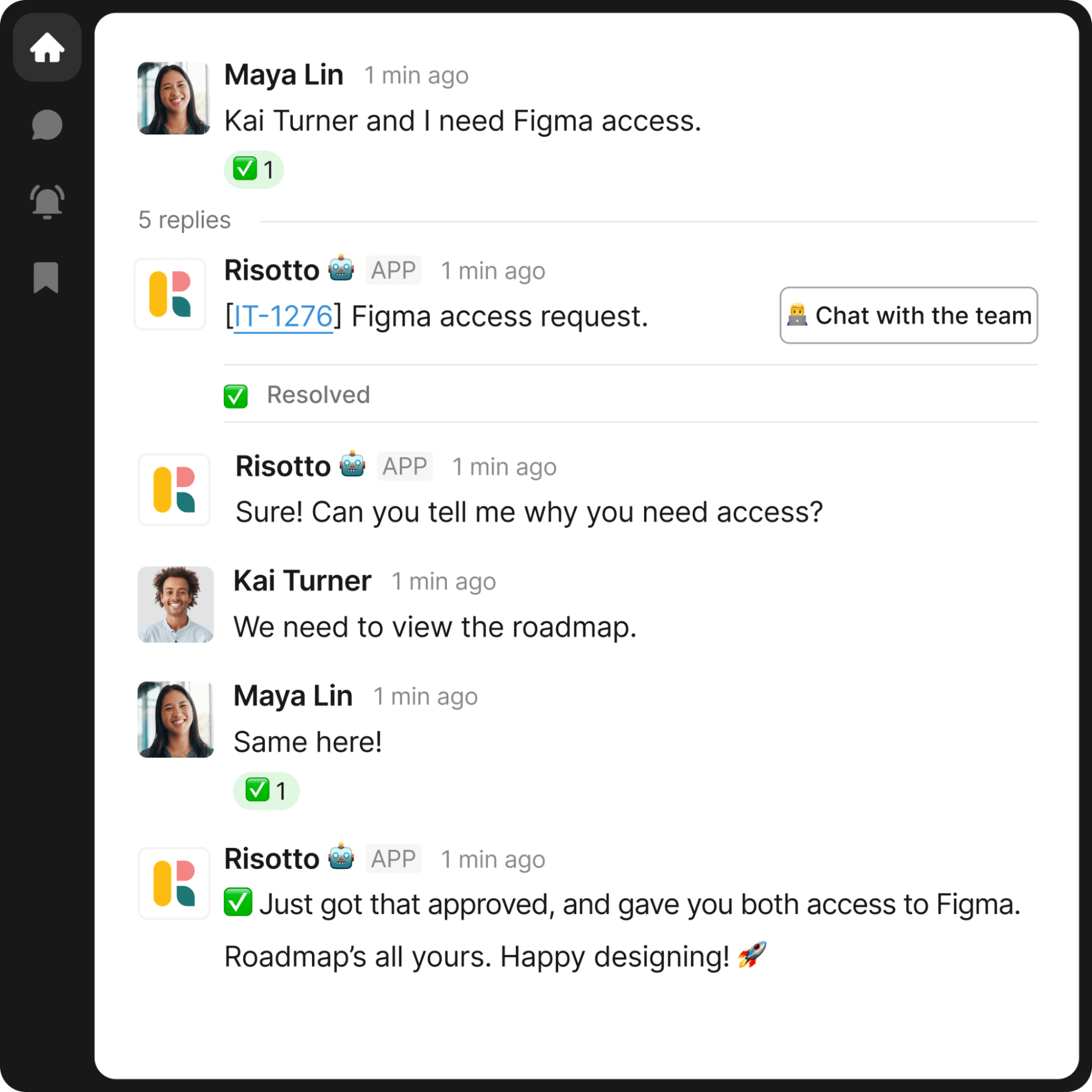
Say someone asks in Slack for access to Stripe. A chatbot creates a ticket and stops there. It has no way to grant access, so the request goes to your team.
An AI agent works the request end to end:
- Checks whether they already have Stripe access, and at what level
- Asks what level they need and why, and logs the reason in the ticket
- Sends the approval to their manager in Slack rather than by email
- Provisions the access in Okta once it's approved
- Sets it to expire in 90 days, because the request was for a project
- Confirms in the original thread
- Writes the whole exchange to the ticket in your ITSM
Nobody from IT was involved at any point. That's agentic ITSM in practice: the employee asked in Slack, got the access, and never left the conversation to do it.
Password resets and MFA re-enrollment follow the same path, minus the approval step.
At Vidyard, the AI agent runs these access workflows across Okta and Google Workspace, and logs every interaction, decision, and access change as a structured ticket.
'Everything we do in Risotto is logged in Jira,' says Vergil Smith, their Head of IT and Security. At audit time, there are no gaps to explain.
Fundrise adds tighter controls to the same workflow, with approvals ranging from a single manager to tiered sign-off for sensitive applications, and just-in-time access that expires on its own.
At Ironclad, access requests make up 60 to 70% of support tickets, some of them complex, and 91% of them are now auto-solved across 40 to 50 applications.
Resolution times drop too, which is the main practical argument for conversational AI IT ticket resolution. Vidyard's AI resolution time averages two hours, against four to six hours for manual resolutions. At ThoughtSpot it's 6.5 hours, compared to 31 hours for human agents. That reduction in manual support work is also a major part of ITSM ROI.
You don't have to replace your ticketing system
Moving from a chatbot to an AI agent doesn't mean replacing the ticketing system your team already uses.
Risotto sits on top of your existing ITSM. Employees can ask for help in Slack or Teams, while the ticket is created and kept up to date in the system your IT team already uses. In many cases, the employee doesn't even need to know a ticket was opened.
Gusto works this way. They integrated Risotto with Jira, Slack, Confluence, and Okta, and had it fully deployed across IT in two weeks with zero downtime.
Some requests will still need a human to review. When that happens, the AI agent hands over any necessary context, summarises what it has already checked, and provides a suggested fix, so your IT staff isn't restarting the conversation from a one-line ticket. And your team is focussed on the work that actually requires their judgment.
Risotto auto-solves up to 70% of Tier-1 requests, so routine access requests, password resets, and MFA issues stop consuming IT support time.
That capacity goes back into Tier 2 and Tier 3 work, and into developing the runbooks and IT support automation work that will widen what your agent can handle next month.
Liked the article? Share on:
On this page
See how Risotto can automate tier 1 IT support on top of your existing ticketing system




Want faster solutions and happier employees?
Access that's easy to ask for and impossible to get wrong.
Ensure Legal never answers another "do we need an NDA for this?"
Every policy question is stealing time from the work Finance was hired to do.
Turn Slack requests into action items instead of engineering interruptions.
The biggest deal risk might be an unanswered internal question.
Run a united support system that your employees can depend on.
Build the automations you’ve been planning on for months.
The bottleneck isn't your team. It's the groundwork before they can actually help.
Get support data that your team can talk to.
Jump on a call to understand:
Risotto handles repetitive support requests across tools and teams, so IT gets back to solving real problems, not rerunning the same ones.
.svg)
%20(1).webp)
See what makes the Iru integration a 10/10 for our clients.