%20(1).svg)
What is agentic AI in IT support? (And why it's different from a chatbot)
A practical guide to what agentic AI means for IT support, how it works and how it can auto-solve requests, run complex workflows and reduce manual work.


You may have already invested in an IT support chatbot to reduce repetitive work. It can answer simple questions and route tickets, but its impact often plateaus. Perhaps it handles only 20% to 30% of incoming requests, with little visibility into whether those requests are actually resolved. Supporting a new request type means building another scripted flow, while every process change creates more maintenance. IT still has to complete most of the work manually.
Agentic AI goes further. Rather than stopping at an answer or handoff, it can understand what an employee needs, choose the right process and take approved action across connected systems. For a software access request, it can check company policy, gather the required information, seek approval when needed and provision access without an engineer moving the request through each stage.
This article explains what agentic AI means in IT support, how it works, and how it can auto-solve common requests. We’ll also discuss how agentic AI supports more complex IT work, and expand what teams can automate
TL;DR
- Agentic AI goes beyond answering questions or routing tickets. It can understand an employee’s request, use company context, take approved action across connected systems, and escalate to get a human in the loop when necessary.
- In ITSM, it can auto-solve common Tier-1 requests, run multi-step workflows, troubleshoot through conversation and screenshots, and support specialists on more complex issues.
- It can also identify new automation opportunities, turn resolved tickets into reusable knowledge, learn from past interactions, and support access reviews and other governance workflows.
- The result is faster resolution, lower support costs, stronger self-service adoption, and more time for IT teams to focus on strategic work.
- Risotto brings these capabilities into Slack or Teams, works with existing ticketing infrastructure, and uses bi-directional sync so teams can add agentic support without replacing their current systems.
What is the difference between agentic AI and a chat bot?
Because both interact with employees through a conversational ticketing interface, it’s easy to assume that agentic AI is simply a more capable chatbot. The difference becomes much clearer when you look at what happens after an employee asks for help.
Traditional chatbots are built around predefined rules. In an ITSM setting, they might answer a common question, surface a relevant knowledge base article, or route a request to the right queue. But when the request requires action in another system, it is typically handed off to someone on the IT support team to complete.
Agentic AI can act autonomously. It interprets the employee’s request, draws on company context, and selects the appropriate configured process. It can then take approved action across connected systems.
These actions may follow predefined runbooks and company guardrails, but the AI can still ask follow-up questions, retain context, and adapt as the request develops (more on how this works below).
Here are the main differences between chatbots and agentic AI in ITSM:
Pro-tip: These differences are important when evaluating AI-native ITSM platforms, since products described as “AI-powered” can vary significantly in how much of the support workflow they can actually complete autonomously.
How does agentic AI in ITSM work?
Agentic AI works by turning an employee request into a sequence of decisions and actions. It understands what the employee needs, identifies the right workflow, and uses connected tools to carry out the steps required to resolve the request.
Take an employee who is locked out of their Mac and needs a FileVault recovery key. The employee’s identity needs to be verified via Okta, the recovery key has to be retrieved from the mobile device management (MDM) system, and it must be delivered securely.
Here is how an AI agent auto-solves this request end-to-end:
- Perceive. The agent reads the employee’s request in natural language and works out what they need. In this case, it identifies that the employee is locked out of their Mac and requires a FileVault recovery key.
- Reason and select a path. Next, the agent identifies the configured workflow for this type of request and determines what needs to happen. Because a recovery key gives access to the device, the employee’s identity must be verified before the workflow can continue.
- Ground in context. To carry out the workflow correctly, the agent draws on information available through connected company systems, including the relevant employee and device details. This saves IT from having to look up that information manually.
- Act through connected tools. Once the employee’s identity has been verified, the agent retrieves the FileVault recovery key from the company’s MDM system and delivers it through the approved secure channel. Each action taken during the workflow is logged automatically.
- Observe and confirm. After delivering the recovery key, the agent checks that the workflow has completed successfully and resolves the ticket. If a required step fails, such as being unable to verify the employee or retrieve the key, the request can be handed to an IT specialist with the relevant context already captured.
8 main use cases of agentic AI in ITSM
Once AI can reason through a request and take action across connected systems, it can handle a much wider range of IT requests and workflows. Here are some of the key capabilities of agentic AI in ITSM.
1. Resolve common Tier-1 requests end to end
One of the best use cases of agentic AI in ITSM is auto-solving common Tier-1 requests. Access provisioning is often the largest category here, but agentic AI can also handle password and MFA resets, group membership changes, distribution-list updates, and device actions such as locking a device or retrieving a FileVault recovery key.
Individually, these requests may only take a few minutes to resolve. The problem is the volume and the repeated interruptions they create throughout the day. As Aron Solberg, our Co-founder and CEO, puts it, IT teams are “constantly being interrupted with redundant, repetitive questions,” pulling their attention away from larger projects.
Agentic AI can also manage more involved access workflows. It can collect a business reason, apply company rules, route the request for approval, and grant temporary access that expires automatically. Routine onboarding and offboarding can also be coordinated across the HR system, identity provider, and Google Workspace.
For knowledge-based requests, agentic AI can provide cited answers from sources such as Confluence, Notion, and Google Drive. It can also tailor its guidance to the employee’s device or operating system, so the instructions apply to their setup.
2. Run multi-step workflows across connected systems
Many IT requests involve several dependent steps. Agentic AI can follow predefined workflows, often called runbooks, that specify when a process should begin and the actions required to complete it.
A runbook can also include checks that must be completed before the AI agent takes action. For example, an employee requesting AWS access could be asked to review a security policy, while the AI checks whether their business reason meets company guidelines.
Through integrations or APIs, the same workflow can retrieve information or take action in other systems. This allows IT teams to automate processes that would otherwise require someone to move between tools and manage each step manually.
3. Troubleshoot issues through conversation and visual context
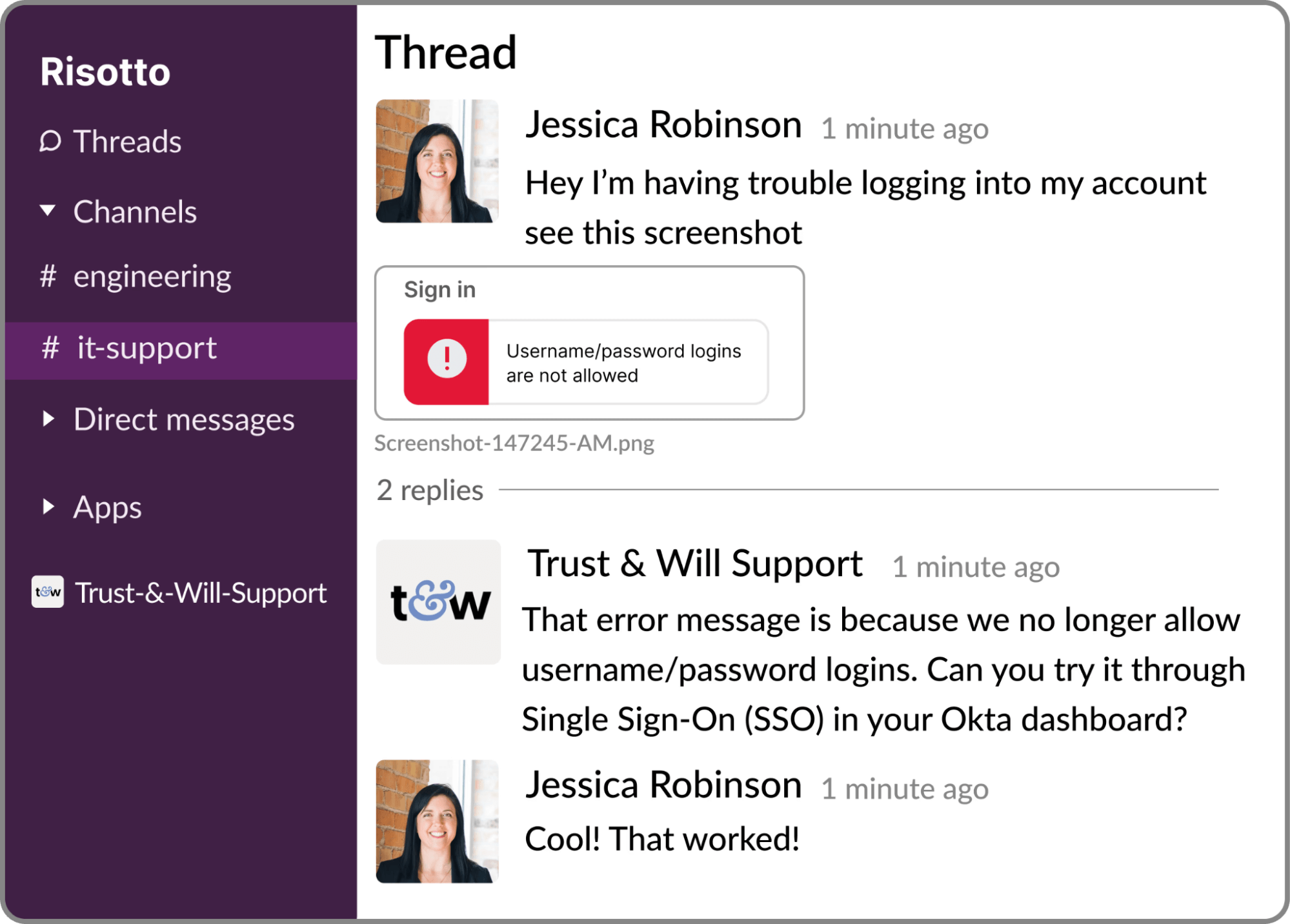
Troubleshooting often takes more than one exchange. Agentic AI can ask follow-up questions, retain context from earlier messages and try another approach when the first solution doesn’t work.
It can also interpret screenshots shared by the employee. Combined with context such as their device, operating system, and previous support history, this gives the AI more information to diagnose the issue accurately.
Employees can show the AI what they are seeing instead of having to diagnose the issue themselves. This reduces back-and-forth and gives IT more context if the ticket needs to be escalated.
4. Support the investigation of more complex issues
Some tickets are too complex to be auto-solved. In these cases, agentic AI can work alongside the specialist handling the issue rather than trying to resolve it autonomously.
It can gather relevant context, search company knowledge, and propose a resolution plan to give the engineer a stronger starting point. This reduces the amount of groundwork required before they can begin applying their own expertise to the problem.
More advanced AI assistants like Risotto can also draw connections between information held across support systems, such as previous tickets and wider organizational patterns, to support deeper investigation.
5. Identify and create new automations
Agentic AI can analyze past ticket trends, surface high-volume request categories, and recommend what IT should automate next. This helps teams prioritize the workflows that are likely to save the most time.
Once IT chooses an opportunity, the team can describe the workflow it needs in natural language. The AI can then create the runbook and the API actions required to carry it out in a connected system. Each action is reviewed and approved before the automation goes live.
For example, an HR specialist could ask it to build a workflow that retrieves an employee’s leave balance and submits PTO requests on their behalf through an HR platform. The assistant creates the workflow steps and the actions needed to use that platform’s API.
6. Learn from past support interactions
Agentic AI can also draw on previous support interactions rather than relying only on formal documentation. Past resolved tickets and support conversations can provide useful context for answering new requests, while resolutions provided by human specialists can improve how similar issues are handled in future.
Some systems can also retain useful information about individual employees, making future support more relevant to their context and reducing the need to collect the same details repeatedly.
7. Turn resolved tickets into reusable knowledge
A newly solved issue often contains information that doesn’t yet exist in the company knowledge base. Agentic AI can capture that information directly from the completed support conversation and turn it into reusable documentation.
Once a ticket has been resolved, the AI can scan the thread, identify the new information, and generate a knowledge base article explaining the solution. The next time someone asks the same question, that answer is already available to the support system.
Documentation therefore becomes a by-product of solving new problems rather than another task someone has to remember to complete later.
8. Automate governance and compliance workflows
Agentic AI can also support proactive IT processes, such as access reviews and approval campaigns. It can contact employees or managers when they need to review access, provide approval, or complete another required task, then track their responses as part of the workflow.
For access reviews, it can bring together information such as who received access, who approved it, and the ticket associated with the decision. Because the actions taken during each access workflow are logged, IT can retrieve or export that information when preparing for reviews and audits.
What are the benefits of agentic AI in ITSM?
Agentic AI reduces the amount of IT support work that has to be handled manually. It can auto-solve repetitive Tier-1 requests, help specialists move faster on more complex issues, and give employees a quicker path to resolution. Here are some of the biggest benefits of leveraging agentic AI in ITSM.
Dramatic reduction in Mean Time to Resolution (MTTR)
Agentic AI can significantly reduce MTTR by resolving routine requests as they come in and helping IT specialists move faster on more complex issues.
That faster path from request to action can have a major impact on resolution times.Using Risotto, Gusto, AI-handled tickets average 5 hours to resolution compared with 35 hours for human-handled tickets. ThoughtSpot reduced average resolution time from 31 hours to 6.5 hours.
Lower IT support costs
When more support work is resolved automatically and engineers spend less time processing routine requests, each person on the team can support more employees.
For example, through Risotto, Gusto is now handling twice the ticket volume with the same lean team. This is where IT automation ROI becomes clear: support capacity can grow without headcount having to increase at the same rate as demand.
Higher IT self-service adoption
With traditional self-service, employees have to find the right portal, choose the right request type, search through documentation, or rephrase their question until a chatbot understands it. When that still doesn’t solve the issue, they end up escalating to IT anyway.
Agentic AI removes much of that frictioncreating a smoother ITSM experience. Employees can describe what they need in plain language, in the tools they already use, and the AI can take the next steps toward resolution.
When self-service is easier than asking IT directly, employees have a reason to use it.
Free up IT teams for more strategic work
Employees rarely want to search a portal or work through several chatbot prompts to get help. As one IT leader put it, “Employees don’t search, they just ask.” When self-service takes longer than sending a Slack message, people bypass it.
Up to 25% of requests arrive as private messages to individual IT staff. Those requests never enter the formal support process.
Agentic AI lets employees ask for help in Slack or Teams using natural language. They do not need to find the right portal or search the knowledge base.
The AI can understand the request, collect any missing information and take the approved action needed to resolve it. This makes self-service easier than contacting IT directly while keeping more requests visible and recorded in the service desk.
Bring agentic AI to your service desk with Risotto
Traditional AI chatbots may answer a question or send a ticket to the right queue, but agentic AI takes responsibility for what happens next.
These tools reason through the request, act in connected systems, and close the loop. For IT teams, that means common Tier-1 work, such as access requests, password resets, and “how do I” questions, can be handled as it arrives, which leaves specialists with more time for strategic work.
Risotto brings these capabilities into the tools and systems your team already uses.The platform sits on top of the ticketing system you already use, with bi-directional sync, so there’s no need to replace your existing stack.
It works in Slack or Teams, assigns itself as the first responder, and opens a ticket as soon as an employee asks for help. From there, it can hold the conversation and take approved action. And if a specialist needs to take over, they receive the original request, the conversation, and any troubleshooting already completed, so they don’t have to start from scratch.
When a ticket is escalated, Risotto can learn from how the IT specialist resolves it and use that knowledge to handle similar requests in future. Resolved threads can also be turned into knowledge base articles. And Risotto’s Assistant supports more complex investigations and helps teams create new automations using natural-language instructions.
The impact is clear. Gusto now auto-resolves 55% of tickets on average and handles twice the ticket volume with the same lean team. And after Vidyard layered Risotto onto Jira, it automated 80% of Tier-1 requests in the first month and reduced Tier-1 resolution time by 60%.
Frequently asked questions about agentic AI in ITSM
What is agentic AI?
Agentic AI can plan and complete multi-step tasks on its own. It interprets what someone needs, then works through the required steps in connected systems while checking its own progress. In IT support, that means it can fully resolve a request, like granting software access, from the first message to the closed ticket.
What is the difference between agentic AI and a chatbot in IT support?
A chatbot in IT support answers questions and routes tickets to the right queue. Agentic AI goes further and resolves them. It interprets the request in natural language and selects the configured workflow, then takes approved action across connected tools. IT steps in only when the issue needs specialist judgment.
What types of IT tickets can agentic AI resolve?
Agentic AI is best suited to high-volume Tier-1 tickets with a clear resolution path. Typical examples include password and MFA resets, software access requests, group membership changes, distribution list updates, device actions such as retrieving a FileVault recovery key, and how-do-I questions answered from company documentation. Complex Tier-2 issues still need a specialist, though the AI can gather context and propose a resolution plan to speed up the investigation.
Can agentic AI work with existing ITSM tools?
Yes, most agentic AI platforms are built to sit on top of an existing ITSM stack. Risotto, for example, layers onto Jira, Freshservice, ServiceNow, and Zendesk with bi-directional sync, so tickets stay in the existing system of record while the AI handles the conversation and resolution.
Liked the article? Share on:
On this page
Ready to see agentic AI on your own service desk? Explore how Risotto auto-solves Tier 1 support where your team already works.


See more recent articles



Want faster solutions and happier employees?
Access that's easy to ask for and impossible to get wrong.
Ensure Legal never answers another "do we need an NDA for this?"
Every policy question is stealing time from the work Finance was hired to do.
Turn Slack requests into action items instead of engineering interruptions.
The biggest deal risk might be an unanswered internal question.
Run a united support system that your employees can depend on.
Build the automations you’ve been planning on for months.
The bottleneck isn't your team. It's the groundwork before they can actually help.
Get support data that your team can talk to.
Jump on a call to understand:
Risotto handles repetitive support requests across tools and teams, so IT gets back to solving real problems, not rerunning the same ones.
.svg)
%20(1).webp)
See what makes the Iru integration a 10/10 for our clients.