%20(1).svg)
What is ITSM experience? How to design an IT service desk that employees actually use
Design an IT service desk employees actually want to use. This guide shows how to remove friction from the support journey and automate routine requests without replacing your existing ITSM.


Employees rarely think about your IT service management (ITSM) setup until they need help. When they do, they notice how easy or difficult it is to get an issue resolved.
Having to open a service portal, choose the right request type, and fill in a form is much harder than a quick DM to IT. Employees take the path of least resistance, even when that means working around the support process altogether.
That creates a frustrating experience for employees and makes support harder for IT to manage. Tickets get scattered across channels, while routine Tier-1 requests pull IT away from bigger projects. Even simple access requests can sit waiting for approval for days.
A better ITSM experience gives employees a faster, easier route to resolution. This guide explains what that looks like, which friction points to remove, and which metrics show whether the experience is improving. We’ll also show you how to redesign the service desk around the employee experience without replacing the ITSM platform you already use.
TL;DR
- ITSM experience is how employees experience internal IT support, from asking for help through to resolution.
- A good experience makes support easy to access and quick to resolve, ideally in Slack or Teams rather than a separate portal.
- Common friction includes long forms, slow approvals, poor visibility, and requests that arrive without enough context.
- Automation can take routine Tier-1 work off IT’s plate, including software access and password or MFA resets.
- Track auto-solve rate, response and resolution times, reopen rate, and employee sentiment to see whether the experience is improving.
- You don’t need to replace your ITSM. A chat-native layer like Risotto can work alongside your existing platform, which remains the system of record.
What is ITSM experience?
ITSM experience is how employees experience internal IT support, from the moment they ask for help up until the issue is resolved. It includes how easy support is to access, how much effort the employee has to put in, how quickly the request is resolved, and how clearly they’re kept informed.
Slow resolution, unnecessary effort, or poor communication can leave people frustrated and make it harder for them to get work done. A smoother experience improves employee satisfaction while helping IT deliver support in a more consistent, manageable way.
Why ITSM experience isn't a portal problem
Organizations have tried to improve the support experience for employees. But too much of that effort has focused on the service portal itself, with teams refreshing the interface, reorganizing the service catalog, or making forms easier to navigate.
Those improvements can make submitting a request less painful, but they don’t fix friction further down the support process. An employee can fill out a clean form and still wait days for an access approval or get pulled into a back-and-forth because IT needs more information. They might also have no idea what’s happening while the ticket sits in a queue.
Moving support into Slack doesn’t automatically solve that problem either. If a Slack bot simply redirects employees back to a catalog item or portal form, they’re still dealing with the same underlying friction. A chat-native experience should let employees explain what they need in the conversation and move the request forward from there.
That helps explain why employees often work around the portal altogether. One IT lead we spoke to described their portal as ‘early 2000s HTML technology’ with a long list of forms employees didn’t want to submit. Another described support as a fragmented funnel across the portal, Slack channels, and DMs, with help requests going unrecorded.
Improving the ITSM experience means looking at the full journey from request to resolution. The portal is one part of that journey. What matters just as much is how much effort the employee has to put in after submitting a request, how quickly it gets resolved, and whether they’re kept informed along the way.
What breaks the employee IT service management experience?
A poor ITSM experience is usually caused by delays and extra steps that show up again and again in routine support requests. These are some of the biggest friction points:
- Simple requests require too much intake. An employee may have to go into a separate platform and fill in a long form to do something as simple as a password reset.
- Access requests sit waiting for manual approval. Access requests can account for 50% to 80% of ticket volume at organizations we’ve spoken too. Yet the process often depends on IT chasing a manager for approval over email before access can be granted. One IT team had around 60 access requests sitting open at any given time.
- IT has to chase employees for missing information. Vague requests give IT teams very little to work with. Before troubleshooting can begin, they may need to get more information from an employee. That back-and-forth delays the resolution and creates more work for both sides.
- Outdated knowledge leads employees down the wrong path. An out-of-date knowledge base article might point to a process that has changed or give instructions that no longer work. The (now frustrated) employee ends up contacting IT anyway.
- Requests get lost across different support channels. When employees ask for help outside the official support process, the request may never become a ticket. That makes it easier for work to be missed and harder to keep an accurate record of IT’s workload.
- Routine Tier-1 requests wait for a person when they could be automated. Password and MFA resets can often be resolved automatically. Handling them manually slows employees down and takes IT away from more complex work.
4 building blocks of a zero-friction ITSM experience
Creating a good ITSM experience means designing support around how employees actually ask for help, then removing friction all the way through to resolution. Employees should be able to get support without navigating unnecessary steps, while IT keeps the control and visibility it needs to manage requests efficiently.
Here are the building blocks of a better employee IT support experience.
1. Meet employees where they already work
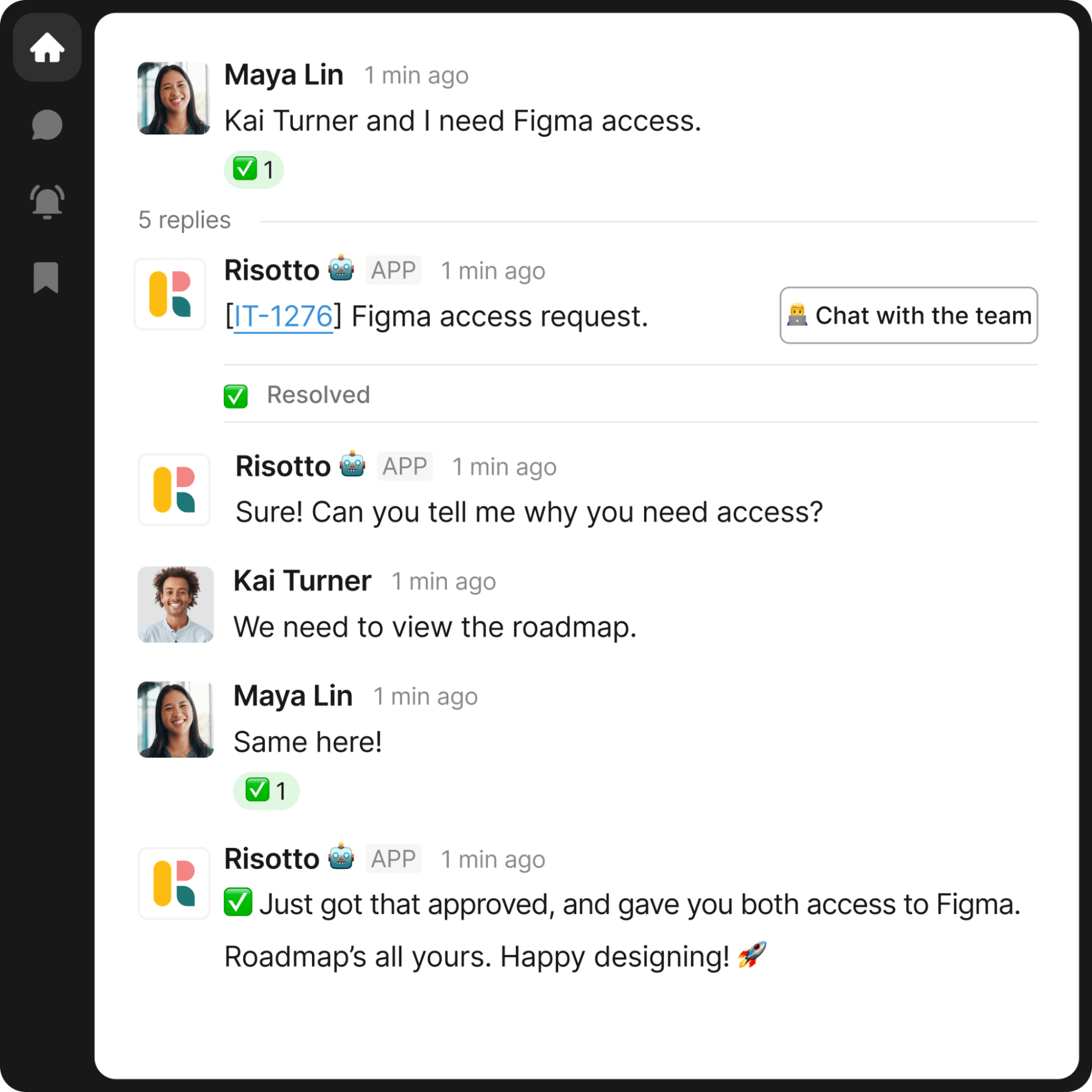
Slack-native ITSM tools enable employees to send support requests without leaving the tool they already use throughout the day. The request is still captured in the ticketing system behind the scenes, so IT doesn’t lose visibility or control.
Risotto follows this model. Requests raised in Slack sync bi-directionally with an existing ticketing platform, so employees stay in Slack while IT agents continue working from Jira or another system of record.
That gives employees an easier way to get support without forcing IT to replace the tools and workflows it already relies on.
2. Cut the mandatory forms
Employees shouldn’t have to fill out a long form for every request. For something simple like software access or a password reset, that creates extra work before IT can even start helping.
With conversational ticketing, employees can explain what they need in plain language. The system can then ask for any missing information during the conversation, rather than requiring every detail upfront.
3. Auto-resolve routine requests that don’t need a human
As we mentioned above, many Tier-1 requests follow predictable steps and can be automated end to end.
Take software access, for example. An employee asks for Notion access in a Slack IT help channel. IT help desk Risotto opens a ticket and checks the company’s access rules. If manager approval is required, it requests it in Slack. Once approved, access is granted through the identity provider. Time-limited access can also be applied automatically, with each action logged before the ticket is closed.
AI ticketing automation can also handle password and MFA resets. And more complex requests can be passed to IT with the relevant context already collected.
4. Track employee sentiment alongside service performance
SLAs tell you whether the service desk is meeting agreed service targets, such as response and resolution times. To understand the employee experience, you also need to ask employees how the support interaction went.
A request can meet its SLA and still be frustrating. The employee may have had to chase IT for updates, repeat information, or reopen the request because the original fix didn’t work.
Collecting feedback through a CSAT survey after a request is resolved gives IT direct feedback on the employee experience. Track that alongside your service desk metrics to see whether better service performance is translating into a better experience for employees.
Give employees faster access to IT support, even when your team isn’t online. See Risotto in action
How to measure the ITSM experience
Ticket volume and SLA compliance can show how the service desk is performing operationally. But they don’t tell you the whole story. To understand the employee experience, choose help desk KPIs that show how quickly and effortlessly requests are resolved, how much support work still needs an IT agent, and whether the employee’s problem stays solved.
Look at the following ITSM metrics together rather than in isolation. For example, a strong auto-solve rate matters more when those requests are also resolved quickly and stay resolved.
Risotto customer data shows the difference automation can make to resolution time. ThoughtSpot reduced average resolution time from 31 hours for human-handled tickets to 6.5 hours for AI-handled tickets. And at Gusto, automated requests averaged five hours compared with 35 hours for requests handled by a person.
How to redesign your service desk for a better employee experience
You don’t need to replace your ITSM platform to improve the employee experience. Start with a small set of common requests, make those easier to resolve, then expand once you can see what’s working. Here’s how to roll that out:
- Start with the requests creating the most repetitive work. Review recent tickets to find high-volume requests that are handled in a similar way each time. Software access or password resets are often a good place to start because many of the steps can be automated.
- Update the documentation used to resolve those requests. Before you automate anything, make sure the relevant knowledge base articles and internal instructions are accurate. Outdated guidance can lead to incorrect answers or failed resolutions, so fix any gaps first.
- Move those Tier-1 requests into chat. Let employees ask for help in Slack or Teams instead of sending them to a separate portal. A chat-based support layer can capture the request in your existing ITSM, which remains the system of record.
- Remove unnecessary forms. If the required information can be collected conversationally, don’t ask employees to provide everything upfront. Follow-up questions can collect the details needed to resolve the request as the conversation progresses.
- Test the new experience alongside your existing service desk. Start with one team or a small group of request types. Employees can use the new chat-based route while IT agents continue working in their existing ticketing platform.
- Measure the results before expanding. Check whether requests are being resolved faster and whether fewer need an IT agent. Employee feedback can then show whether the experience has improved. If the results are strong, move the next group of repetitive requests into the same model.
This phased approach also makes the business case easier to build. You can show leadership what changed before requesting to roll out the model across your organization.
Improving the ITSM experience means removing friction
The strongest ITSM experience is one employees barely have to think about. They ask for help where they’re already working. Routine requests are auto-solved immediately. Approvals happen without days of chasing IT. And when a request needs human judgment, IT can step in.
Risotto is built around that model. It sits on top of the ticketing platform you already use, turns Slack or Teams into the front door for IT tickets, and auto-solves repeatable Tier-1 work while your ITSM remains the system of record.
It can also extend the same support model beyond IT, giving teams such as HR a structured way to handle requests like onboarding or PTO questions through the same employee-facing support funnel.
Jose Izquierdo, Gusto’s Head of AIT Operations, says, “We doubled our resolution rate on day one, and it hasn’t dropped since.” And Hazel Health more than quadrupled its automated resolution rate after switching from its previous assistant to Risotto.
If you want to give employees an easier way to get help without replacing the systems your IT team already relies on, Risotto can help you do both.
Liked the article? Share on:
On this page
Discover how Risotto removes friction from IT support without ripping out your existing ticketing system





Want faster solutions and happier employees?
Access that's easy to ask for and impossible to get wrong.
Ensure Legal never answers another "do we need an NDA for this?"
Every policy question is stealing time from the work Finance was hired to do.
Turn Slack requests into action items instead of engineering interruptions.
The biggest deal risk might be an unanswered internal question.
Run a united support system that your employees can depend on.
Build the automations you’ve been planning on for months.
The bottleneck isn't your team. It's the groundwork before they can actually help.
Get support data that your team can talk to.
Jump on a call to understand:
Risotto handles repetitive support requests across tools and teams, so IT gets back to solving real problems, not rerunning the same ones.
.svg)
%20(1).webp)
See what makes the Iru integration a 10/10 for our clients.