%20(1).svg)
Jira Service Management AI: A practical guide for IT teams
Jira's AI answers tickets but rarely resolves them. Here's what Rovo and the Virtual Service Agent handle, where they stop, and what to layer on top.


Jira Service Management AI is primarily built to provide an answer. It summarizes a ticket, suggests a reply, and surfaces the right knowledge base article. But answering is not the same as resolving, and the gap between the two is where lean IT teams still lose hours.
Jira's AI features, delivered through Rovo and Atlassian Intelligence, span agent productivity, employee self-service, and incident ops, all at different levels of maturity.
Knowing what each layer does is the difference between adding real automation and paying more for a tool that doesn’t actually save your team time.
This guide lays out everywhere AI shows up in JSM, what each layer is genuinely good at, where teams hit a ceiling, and how to decide between leaning on JSM’s retrofitted AI capabilities and adding an augmentation layer on top.
TL;DR
- Jira Service Management AI, delivered through Rovo and Atlassian Intelligence, is not one feature but three layers: built for your agents, your employees, and incident response teams.
- The agent productivity layer triages, summarizes tickets, drafts replies, and supports plain-language automation building.
- Employee-facing self-service, led by the Virtual Service Agent, answers well from your knowledge base but stops short of executing the action end to end.
- Beyond that, Jira’s bolted-on AI meters cost past 1,000 conversations a month, needs ongoing setup and upkeep, reads only Atlassian-hosted knowledge, and can return inconsistent one-shot answers.
- The fix is augmentation: keep JSM as your system of record and add an AI-native layer like Risotto that auto-solves Tier-1 end to end in Slack and Teams.
The three layers of AI in Jira Service Management
Everything labeled JSM AI has three layers, separated by who each one serves: your agents, your employees, and teams running JSM for incident response. They differ in capabilities and in how easily they switch on, so each is worth weighing on its own before you decide where to rely on JSM and where to add a tool on top.
Agent-side AI: productivity for your IT team
The first layer is built for your agents. It helps to speed up the team already resolving tickets in Jira and keeps a human in the loop on every action, pairing two Rovo agents with a set of embedded AI features.
AI triage reads the queue and recommends the right request type and fields, so an agent can bulk-categorize a pile of generic tickets in a few clicks rather than one by one. And the Service Triage Assistant, one of JSM's out-of-the-box Rovo agents, sets priority, categorizes requests, and flags SLA escalations. Both organize the queue for the agent who manages it.
Once a ticket is open, the Draft replies feature suggests responses from similar past tickets, while the Service Request Helper, the second Rovo agent, composes replies and recommends next steps.
Two more embedded features complete the agent-side AI: plain-language automation building, where AI drafts an automation rule from a described trigger and action, and AI-assisted authoring, which drafts knowledge base articles from resolved tickets and suggests topics from recent issues.
These features make your IT team faster, but they aren't able to resolve tickets independently.
Employee-side AI: self-service and auto-resolution
The second layer is employee facing. Jira's Virtual Service Agent answers common questions from your linked knowledge base and solves the requests it can handle before they reach an agent.
With intent flows, a known request type can trigger a set response or a simple follow-up question rather than a ticket. And conversational ticketing works through Jira in Slack and Microsoft Teams, so employees can ask where they already work instead of logging into a separate portal.
It’s strong at answering from an article, but gets thinner once action actually needs to be taken to address a request.
Incident and ops AI: Rovo Ops
The third layer only matters if you run JSM for incident response. Rovo's Ops Guide agent brings AI into that workflow in a few practical ways:
- Groups related alerts to reduce the noise for responders
- Pulls historical context and recommended actions from past incidents so nobody starts from a blank page
- Drafts the incident timeline and the post-incident review (PIR) once things settle.
What JSM's built-in AI is genuinely good at
JSM’s AI agent productivity layer, delivered through Rovo, is its real strength. Triage, summarization, draft replies, and plain-language automation building are useful and already accessible to anyone working a Jira ticket queue.
These features can condense a long ticket thread into a few lines, propose a first-draft reply from how similar tickets were handled, and quickly turn a described workflow into a working automation rule.
Because Atlassian bundles these features into its paid Cloud plans and switches them on by default, a team already trained on Jira picks them up without buying a new tool or training people on another interface. They appear inside the workflow agents already use, so there’s no context switching and no second system to learn.
The catch is that all of it runs on your knowledge. The Virtual Service Agent is only ever as good as the knowledge base underneath it, so these features perform well when your Confluence and JSM documentation is clean, current, and well-structured. But cracks start to show up as documentation hygiene slips, which can be a real limitation.
Where teams hit a ceiling with JSM bolt-on AI features
None of the limits below is a reason to migrate from your existing Jira ITSM setup.. But they may motivate you to use JSM as your system of record and add an AI layer on top to cover what built-in tooling can’t achieve.
Plan gating and cost
The AI that actually resolves employee requests, the Virtual Service Agent, sits on Premium and Enterprise plans. Each includes 1,000 assisted conversations a month, and every conversation past that runs $0.30 (for reference, an assisted conversation is any exchange where the AI matches a request to a knowledge base article or resolves it automatically).
For a high-volume help desk, cost scales with the exact thing you were trying to cut: ticket count. Rather than dropping JSM, though, you can take repetitive Tier-1 conversions outside of JSM so volume stops turning straight into spend.
Setup and upkeep outrun the payoff
Teams tell us the Virtual Service Agent takes too long to build, needs constant tweaking to stay useful, and carries real manual overhead in managing intents. So the time it saves gets eaten by the time it takes to maintain.
Configuration-first tools change that math. Risotto is live in hours to weeks, not a months-long project. And it builds and adjusts runbooks without manually managing an intent library, so value shows up before the upkeep does.
Limited to working with Confluence
Jira’s Virtual Service Agent answers only from knowledge that Atlassian hosts: Confluence or JSM's own knowledge base. If your documentation lives in Notion, Google Drive, or Slack threads, JSM’s built-in AI can't reach it, so answers are only as complete as what you have kept in Confluence.
However, an AI ITSM augmentation layer like Risotto can index those other sources too, simultaneously pulling from Confluence, Notion, Google Drive, Slack, and more. You get what’s in Confluence plus what’s scattered everywhere else, cited back to the source.
Responses can be unreliable
Consistency is another place teams hit a wall. Customers often tell us that Rovo returns one-shot answers rather than working a problem through. That reliability wobbles enough to erode trust, which is bad news for a support tool employees are supposed to lean on.
Risotto, on the other hand, is built for multi-step troubleshooting rather than a single reply, so employees get a resolution they can count on instead of a best guess they have to double-check.
Answers versus end-to-end execution
JSM is good at surfacing an answer, but giving a response isn’t the same as completing the action. And Rovo can’t complete approval workflows, time-based access requests, password/MFA resets end-to-end like a native AI ITSM tool like Risotto can.
Take access requests, for example: at one company we spoke with, these comprised 80% of all tickets, and the majority were still handled manually. So while Rovo can point someone to the article on how to request app access, human intervention is still required, which slows down the process.
Key takeaway: This is the gap teams close by layering AI-native ITSM on top of JSM. One healthtech IT leader we spoke with described Jira Assist deflection sitting at 3-5%, then jumping to over 20% after adding Risotto.
How to decide between Jira’s retrofitted AI or an augmentation layer
The choice of leaning on JSM's Rovo and Virtual Service Agent on their own or adding an auto-resolution layer on top comes down to two things: how much end-to-end resolution you need, and where you need it to happen.
Jira’s bolt-on AI is generally the right call when your priority is agent productivity on a well-maintained knowledge base. An augmentation layer makes sense when you need high end-to-end auto-solve for Tier-1 issues handled in Slack or Teams.
For a large share of Jira-native teams, keeping JSM as the system of record and adding the layer that resolves what built-in AI can’t makes the most sense.
Add AI auto-resolution on top of JSM with Risotto
Risotto’s AI-native ITSM platform works with JSM to resolve a high share of Tier-1 end to end, in Slack and Teams, while JSM remains your system of record.
There’s no migration and no rip-and-replace: you keep the queues, SLAs, approvals, and audits you already run while adding an AI teammate that closes requests instead of pointing at the answer.
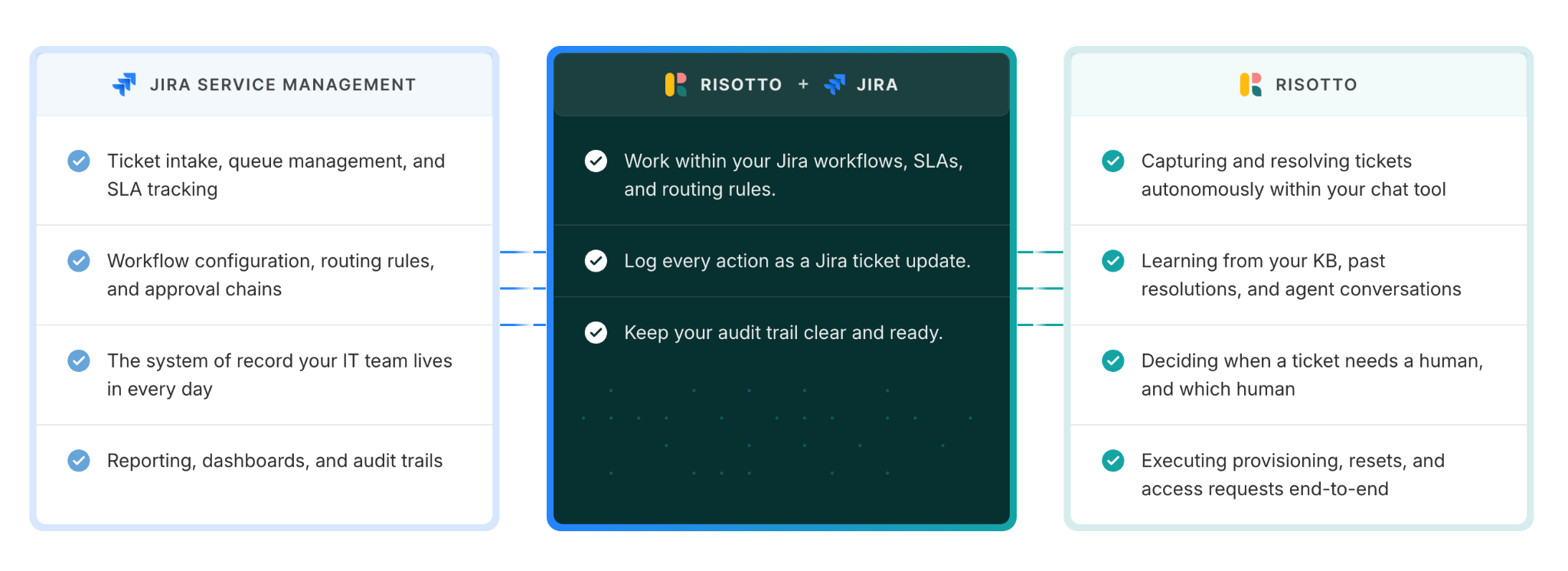
Here’s how it sits on top of JSM:
- Zero-disruption augmentation. Risotto runs as an AI intake and resolution layer on top of JSM, so you add auto-resolution without migrating your system or creating a second admin console.
- AI as your Tier 1 responder. Risotto is assigned as the first responder inside Jira and works the request autonomously, resolving it from indexed knowledge or an automated runbook before anything escalates to a person.
- End-to-end auto-resolution. Risotto completes the action. For example, it can run multi-step troubleshooting or grant software access through your identity provider to close the request start to finish, all in the chat where the employee asked.
- Continuous learning from every ticket. Risotto turns a solved Slack conversation into a knowledge base article, then reviews escalations to draft the runbooks that auto-solve those same requests next time.
- Bi-directional real-time sync. Every request someone starts in Slack or Teams creates a trackable ticket in Jira, and titles, categorizations, comments, and status updates automatically stay in sync between the two.
- Flexible agent interface. Your team works wherever they prefer, replying straight from Jira or from dedicated Slack agent channels, and internal notes stay private in Slack where employees can’t see them.
- Universal ticket ingestion. Risotto picks up and actions requests no matter where they start, including email and the standard Jira portal, so nothing falls outside the funnel.
- Native metric tracking. Because resolutions are logged to the Risotto user, you can report your auto-solve rate directly inside the Jira dashboards you already use, with no separate analytics tool.
Risotto fills in the gaps that built-in tooling leaves behind, resolving access requests, assisting with troubleshooting, and resetting passwords without the need for agent intervention. When a human does need to step in, context-aware routing gets them up to speed instantly.
After online video platform Vidyard layered Risotto onto JIra, they saw 60% faster Tier-1 ticket resolution and were able to automate 80% of these requests in the first month. Average resolution time dropped from 4 to 6 hours down to about 2, and Vidyard’s lean IT team can now keep up with a much higher volume of requests without burning out.
It’s not a question of Risotto vs. Jira, and you don’t have to leave JSM to get real auto-resolution. With Risotto, you layer it on.
Frequently asked questions about Jira Service Management AI
Does Jira Service Management have AI?
Yes. JSM includes AI through Atlassian Intelligence and Rovo, available on paid Cloud plans (Standard, Premium, and Enterprise). It covers agent productivity like triage, ticket summaries, draft replies, and plain-language automation building; employee self-service via the Virtual Service Agent; and incident operations.
Many teams pair this with an augmentation layer to resolve Tier-1 requests end to end, which the Virtual Service Agent mostly answers rather than resolves.
Is there an AI tool for Jira?
Jira has both retrofitted and third-party AI. Built-in Rovo and Atlassian Intelligence add AI across Jira Software and Jira Service Management. AI IT support tools like Risotto sit on top of JSM to auto-solve Tier-1 requests end to end in Slack and Teams while Jira remains the system of record.
How is AI used in Service Management?
AI in JSM handles three jobs: speeding up agents, serving employees directly, and supporting incident response. On the agent side it triages queues, summarizes tickets, and drafts replies. And on the employee side it answers common questions and resolves routine requests.
And when you layer IT automation software like Risotto onto JSM, you can go beyond answering to execute the action itself, like provisioning access or resetting passwords, so a request closes without a person touching it. That end-to-end auto-solve is where the biggest time savings sit.
What is the chatbot for Jira Service Management?
JSM's chatbot is the Virtual Service Agent, which answers employee questions from your linked knowledge base and handles routine intent flows inside the portal, Slack, and Teams.
It’s included on Premium and Enterprise plans, with 1,000 assisted conversations a month before usage-based charges apply. It’s strong at surfacing answers, but for requests that need an action taken, like access grants or password resets, teams often add a resolution layer like Risotto on top.
What is JSM used for?
Teams use Jira Service Management for receiving, tracking, and addressing employee and customer requests. Teams use it for service requests, incident management, change management, problem management, and asset and configuration management.
It’s most common in IT, but the same request-and-fulfillment model extends to HR, legal, and beyond. Because it builds on the Jira platform, it fits teams already working in Jira.
How much does a JSM agent cost?
JSM is priced per agent, not per user, so you only pay for the people who work tickets while employees who submit requests are free. As of 2026, JSM is free for up to 3 agents, with the Standard plan starting around $20/month per agent, Premium around $51/month per agent, and custom quotes for Enterprise.
The Virtual Service Agent that resolves employee requests is gated to Premium and Enterprise, so built-in employee-facing AI starts at the Premium tier.
Liked the article? Share on:
On this page
Try Risotto for free for 30 days. Commit only when you see the value.





Want faster solutions and happier employees?
Access that's easy to ask for and impossible to get wrong.
Ensure Legal never answers another "do we need an NDA for this?"
Every policy question is stealing time from the work Finance was hired to do.
Turn Slack requests into action items instead of engineering interruptions.
The biggest deal risk might be an unanswered internal question.
Run a united support system that your employees can depend on.
Build the automations you’ve been planning on for months.
The bottleneck isn't your team. It's the groundwork before they can actually help.
Get support data that your team can talk to.
Jump on a call to understand:
Risotto handles repetitive support requests across tools and teams, so IT gets back to solving real problems, not rerunning the same ones.
.svg)
%20(1).webp)
See what makes the Iru integration a 10/10 for our clients.