%20(1).svg)
Jira Service Management integrations: Best ITSM tools
Jira Service Management can cover the core service desk, but most teams still need extra tools around it. This guide shows which integrations are worth adding, based on where your current JSM setup is falling short.


Jira Service Management (JSM) is Atlassian’s ITSM platform for managing support work. IT teams use it to track tickets, coordinate incidents, manage changes, enforce SLAs, and report on service performance.
Once JSM is in place, the gaps tend to show up around the edges. For some teams, routine Tier 1 requests still require too much manual work. For others, the gap is endpoint management, access governance, on-call response, or reporting.
This guide covers the integrations that extend JSM in those areas, what each one adds, and how they fit into your existing setup without disrupting the Jira workflows you already rely on.
TL;DR
- Jira Service Management already covers the core ITSM workflow, but teams may still need extra capabilities around intake, resolution, access, reporting, endpoint management, or on-call response.
- The best integration depends on where your current setup is falling short. Start by identifying the gap before adding another tool.
- Risotto is best suited to JSM teams that want to auto-solve more Tier 1 requests. It handles intake, troubleshooting, access workflows, and escalation while keeping Jira as the system of record.
- Jamf Pro adds Apple device management, PagerDuty adds dedicated on-call and incident response, and SailPoint adds identity governance and access reviews.
- These tools can extend JSM without forcing a migration or rebuild. Most connect through native integrations, APIs, or webhooks while your existing Jira workflows stay in place.
What Jira Service Management already covers
If you’re already running JSM, you likely use it for some or all of the following:
- Service request management and a customer portal: Employees can submit requests through the portal. JSM records each one as a ticket that IT can triage, assign, and track through resolution.
- Incident management: Teams can record, prioritize, and coordinate the response to service disruptions.
- Problem and change management: Teams can investigate recurring incidents. For planned changes, JSM supports risk assessment, approvals, and implementation tracking.
- Asset and configuration management: the Assets feature keeps records of hardware and software and links them to Jira tickets, so agents can see which device or application a request relates to.
- Knowledge management via Confluence: Teams can connect support documentation to JSM so employees and agents can find answers to common questions.
- SLAs, queues, escalation rules, and reporting: JSM helps teams prioritize incoming work, track service targets, escalate requests when necessary, and report on performance.
- Native automation rules: Teams can automate routine Jira actions, such as assigning tickets or updating fields when set conditions are met.
- The Virtual Service Agent: JSM’s employee-facing AI can answer common questions, collect request details, route employees to the right request type, and run configured conversation flows.
That’s a strong foundation, which is why adding to an existing JSM setup often makes more sense than replacing it. The biggest gaps in JSM tend to be in intake and resolution. JSM manages tickets well once they’re in the system, but teams can still struggle to capture and triage requests quickly and auto-resolve routine issues without an IT engineer stepping in.
The four layers of a Jira ITSM stack
JSM may sit at the center of your ITSM setup, but it can’t handle every part of the support process on its own. Integrations can extend it to capture requests, resolve them, manage access, or give IT better visibility into performance.
Looking at these jobs as separate layers helps you work out where your current setup falls short before you add another tool. Here are four layers to look at when diagnosing gaps in your setup.
Intake and triage: where requests start and how they get sorted
Start with how employees ask for help. If requests still depend heavily on a portal, employees will bypass it and share their issue in Slack or Teams instead. Those requests may never become JSM tickets, which means they’re missing from your ticket volume and reporting.
Even when employees use the portal, the service catalog can create extra triage work if request types aren’t easy to distinguish. Employees may choose the closest-looking option, leaving IT to interpret the request and re-categorize the ticket before work can begin.
A front door in Slack or Teams lets employees raise requests where they work. An agentic AI layer in your chat interface can understand what the employee needs, route the request to the right team, and create the JSM ticket with the conversation already attached.
Because the request is understood and routed as soon as it’s submitted, triage happens immediately. IT doesn’t have to wait for someone to open the ticket, work out what type of request it is, and decide who should handle it.
Identity and access: one of the highest-volume ticket categories
Software access is often a major source of Tier 1 IT requests. JSM can capture and track the request, but granting, changing, or removing access usually happens in an identity provider or identity governance platform.
These systems control who can access which applications and resources. They can apply role-based access rules, collect the required approval, grant access, and revoke it automatically when a temporary grant expires. They also keep a record of what was approved and changed for audit purposes.
If a large share of your queue is made up of provisioning work, automating access request management removes much of the manual work involved in resolving those tickets.
Resolution: what closes the ticket
If requests reach the right queue but IT still has to complete most of them manually, the bottleneck is resolution.
An AI resolution layer handles routine support requests before they need a human agent. It can work through a request from start to finish. For some requests, that means troubleshooting across several messages or answering from company knowledge. For others, it can carry out an approved action in another system.
For knowledge-based requests, it can pull from sources like Confluence, Notion, Google Drive and Slack history, then cite where the answer came from. More involved requests can follow predefined runbooks until the issue is resolved or needs to be escalated.
Visibility: reporting beyond the native dashboards
Sometimes the gap is reporting. JSM already provides native reports and dashboards, but teams may need more specific ways to understand where automation is working and where support still depends on IT.
For example, teams may want to compare AI-resolved and human-resolved requests, including differences in time to resolution across departments. They can also analyze escalated tickets to identify high-volume request types that could be turned into new runbooks or automated workflows.
Once you know what’s missing, it becomes much easier to choose an integration that fills a genuine gap. These four layers are a useful starting point for diagnosing where your JSM setup is falling short, but they’re not the only capabilities you might add.
Best Jira Service Management ITSM integrations
Once you know where your JSM setup is falling short, the next step is choosing an integration that addresses that gap.
The tools below extend JSM at different steps in the process, from intake and resolution to endpoint management, on-call response and access governance, while keeping Jira as the system of record.
1. Risotto: AI resolution and Slack-native intake
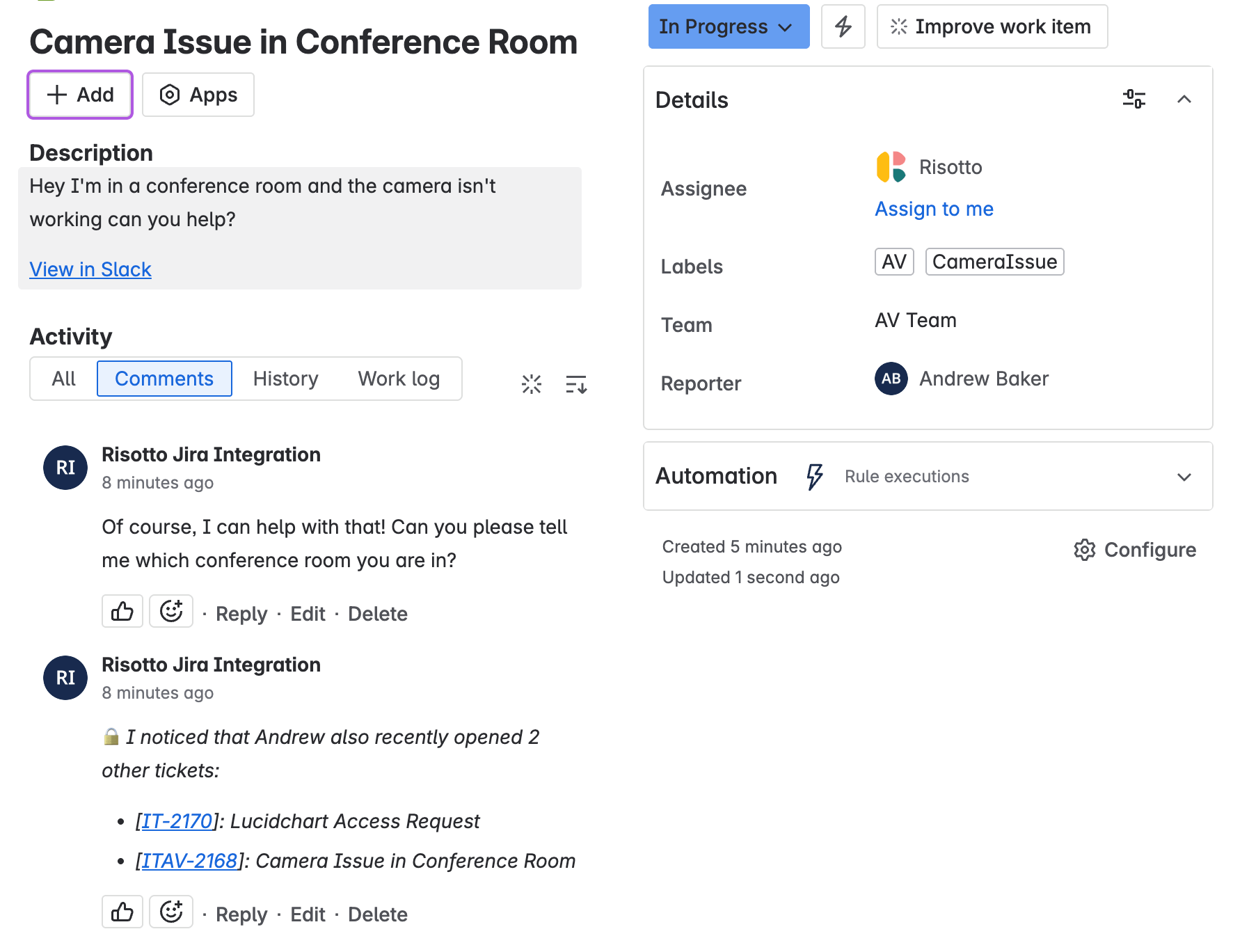
Risotto is an AI-native ITSM agent that handles Tier 1 ticket automation for teams using JSM. It auto-solves supported requests using company knowledge, automated runbooks, and connected systems without an IT engineer needing to step in.
Employees can ask for help through Slack or Teams, where Risotto identifies the request, creates and categorizes the JSM ticket, and starts working on it immediately. It can also pick up tickets that were created directly in Jira, so teams don’t have to move all intake into chat.
For example, Risotto can take a software access request through the required approval flow and provision access through an identity provider such as Okta. If a request can’t be auto-solved, it escalates the ticket with the conversation and work already completed attached.
Risotto integrates with Jira through bi-directional, real-time sync. Tickets, comments, categorizations, and status changes stay aligned. Meanwhile,IT continues using JSM for its existing request types, SLA tracking, and reporting. Auto-solved tickets are also recorded in Jira, so teams can measure Risotto’s automation rate from the reporting they already use.
And setup is fast. ThoughtSpot connected Risotto with Jira, Slack, and Okta in under a week. At Fundrise, the internal IT team had Risotto operational within an hour. A comparable configuration with its previous vendor had taken months.
Key features:
- Conversational intake in Slack and Teams
- Automatic ticket creation, intent-based categorization, and routing
- Bi-directional JSM sync
- Cited answers from Confluence, Notion, Google Drive, and Slack history
- No-code runbooks for repeatable Tier-1 workflows
- Software access provisioning with approvals and time-based access
Pricing: Startup plans cost $1,250/month, billed annually, for companies with fewer than 200 employees. Enterprise pricing is custom.
Best for: JSM teams that want to raise their auto-solve rate and reduce the amount of repetitive Tier-1 work reaching IT while keeping Jira as their main ticketing system.
Add AI-powered resolution to your Jira Service Management setup and auto-solve more Tier-1 requests. Book a demo.
2. Jamf Pro: Endpoint management
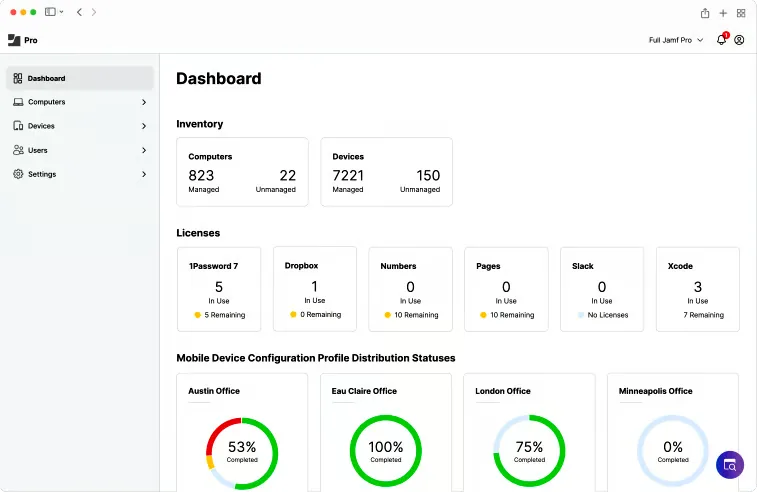
Jamf Pro adds Apple device management to JSM. IT teams use Jamf to enroll and configure Apple devices, deploy software, apply security settings, and push updates remotely. JSM continues to handle the support ticket, while Jamf manages the devices.
The integration syncs device inventory from Jamf into JSM Assets. This gives Jira access to device details such as the serial number, model, operating system, installed software, and assigned user.
An IT agent investigating a device issue can therefore see the relevant endpoint information alongside the Jira ticket instead of switching to Jamf to look it up.
Setup depends on how your JSM environment is hosted. For JSM Cloud, Atlassian’s native Jamf connection uses Data Manager, which is available on Premium and Enterprise plans. JSM Cloud users can also install a Jamf importer from the Atlassian Marketplace to sync device data into Assets. JSM Data Center has its own Jamf integration.
Key features:
- Zero-touch deployment for Apple devices
- Automatic inventory of device hardware and installed software
- Remote app installation and software updates
- Security configurations based on industry benchmarks
- Remote commands to change device settings without user interaction
Pricing: Jamf for Mac costs $12.50 per macOS device per month, while Jamf for Mobile costs $5.75 per mobile device per month. Both are billed annually and require a 25-device minimum. A 14-day free trial is available.
Best for: IT teams using JSM that need stronger Apple device management, including deployment, software updates, and security controls, while keeping device inventory available inside Jira for support and troubleshooting.
3.PagerDuty: Alerting and on-call tool
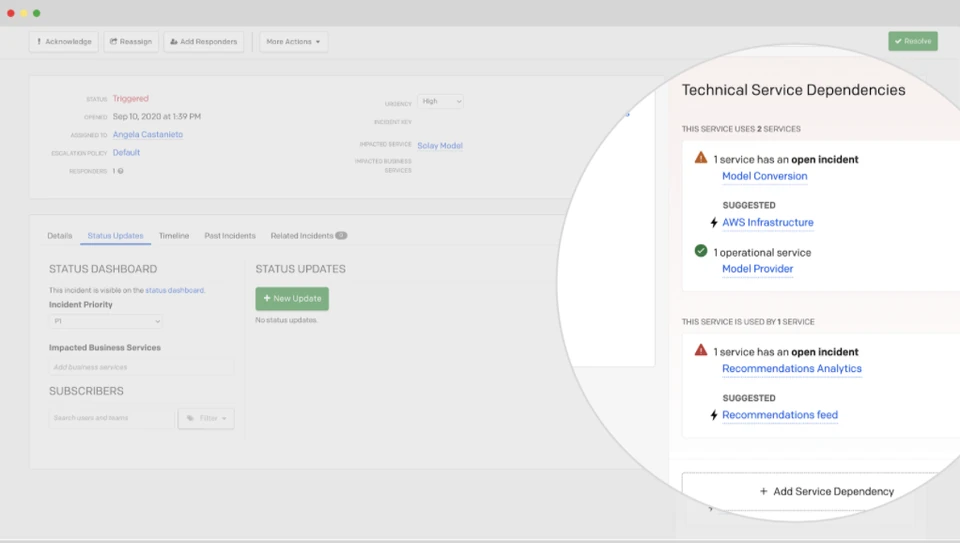
PagerDuty helps IT and operations teams respond when monitoring tools detect problems such as an application outage or infrastructure failure. It identifies who’s on call, alerts that person, and follows an escalation path if they don’t respond.
When connected to JSM, a PagerDuty incident can automatically create a Jira issue with the incident details. Status, notes and priority stays synchronized between both systems. Jira issues can also trigger PagerDuty incidents when they meet rules you define. This means responders can handle the incident in PagerDuty while Jira stays updated automatically.
PagerDuty is particularly useful when alerts come from several monitoring systems or different services need different on-call and escalation rules. JSM already includes alerting and on-call capabilities, though, so some functionality may overlap.
Setup requires someone with admin permissions in Jira to install the PagerDuty app, connect the relevant JSM project to a PagerDuty service, and choose which fields and statuses should sync.
Key features:
- On-call schedules that determine who gets alerted
- Escalation rules that contact another responder if the first doesn’t respond
- Automatic Jira issue creation from PagerDuty incidents
- Two-way sync of incident status and notes with JSM
- AIOps that groups related alerts to reduce duplicate notifications
Pricing: PagerDuty Professional costs $21 per user per month, while Business costs $41. The Jira Cloud integration is available on Professional and higher plans.
Best for: Organizations that want PagerDuty to get the right engineer involved when a service goes down, while Jira remains the place where incidents and follow-up work are recorded. The integration removes the need to manually create tickets or copy updates between the two systems.
4. SailPoint: Identity governance and access review
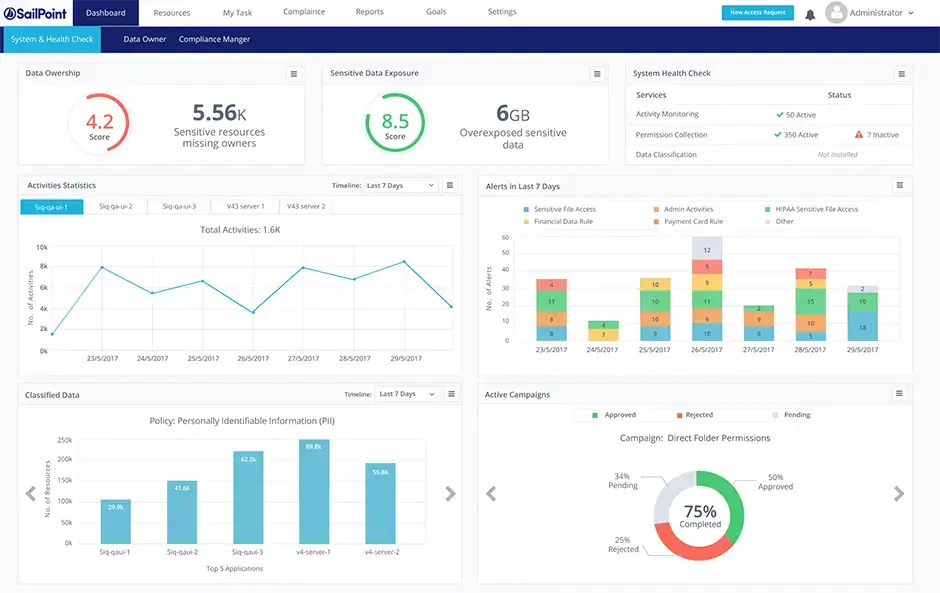
SailPoint is an identity governance platform that helps security and compliance teams decide who should have access to company systems. If SailPoint identifies an access change that can’t be completed automatically, it can create a JSM ticket with the details IT needs to make the change. Jira then synchronizes the ticket status back to SailPoint.
SailPoint is particularly useful for organizations with large workforces and access spread across many applications, where reviewing permissions manually becomes difficult to manage. The downside is that Sailpoint’s average implementation time is seven months, as the platform first needs connections to the systems being governed and their user and permission data.
Key features:
- Managers can review who has access to an application and approve or remove that access
- Flags combinations of permissions that could create a security or compliance risk
- Role-based access that updates permissions when an employee changes roles
- Audit reports showing who reviewed access and what they decided
- AI recommendations that flag permissions that may no longer be appropriate
Pricing: SailPoint doesn’t publish pricing publicly. You’ll need to contact its sales team for a custom quote.
Best for: Organizations that need time-sensitive access changes to follow the same SLA and escalation process as other IT work. Connecting SailPoint to JSM lets teams track manual provisioning requests through to completion without losing SailPoint’s governance controls.
How these integrations fit into your existing JSM setup
Adding an integration doesn’t necessarily mean changing the Jira processes you already have in place. Depending on the tool, it connects through a native connector, API, or webhook, while JSM remains the system of record.
For example, a support request sent in Slack can be classified and turned into a JSM ticket automatically. An AI resolution layer can auto-resolve the request in the thread or pass it to IT with the conversation and work already completed. Updates then sync back to Jira.
Other integrations work in a similar way. An MDM tool can pass device data into JSM, while alerting and identity tools can sync relevant updates back to the ticket or record.
If JSM is already set up, adding a pre-built integration usually won’t require an implementation partner. Partner support is more relevant when you’re migrating platforms, redesigning ITIL processes, building custom workflows, or heavily reconfiguring Jira.
Add an AI resolution layer to JSM with Risotto
JSM already handles the core ITSM workflow, so the right integration depends on what your existing setup is missing. That might be better endpoint management, stronger access governance, more advanced reporting, or faster incident response.
If your biggest gap is repetitive Tier-1 IT support requests, Risotto adds an AI-native automation layer to the JSM setup you already have. It can understand incoming requests, troubleshoot issues using company knowledge and runbooks, and take approved actions in connected systems. When a request needs a human, it escalates with the full conversation, relevant context, and any troubleshooting already attempted.
Risotto customers are using this approach to automate substantial volumes of support work.Ironclad automated around 90% of access-related IT requests, including workflows across 40–50 applications.
Thinkific reached a 46% resolution rate across departments and an 86% auto-solve rate for Engineering after consolidating requests from Slack, Atlassian, and Asana into one support flow, so tickets could be captured, routed, and resolved more consistently.
JSM can remain your system of record while Risotto handles more repetitive requests before they reach an IT engineer. Teams can increase auto-solve without migrating away from Jira or rebuilding the workflows they already use.
Liked the article? Share on:
On this page
Find out how much of your JSM ticket volume Risotto can auto-solve.





Want faster solutions and happier employees?
Access that's easy to ask for and impossible to get wrong.
Ensure Legal never answers another "do we need an NDA for this?"
Every policy question is stealing time from the work Finance was hired to do.
Turn Slack requests into action items instead of engineering interruptions.
The biggest deal risk might be an unanswered internal question.
Run a united support system that your employees can depend on.
Build the automations you’ve been planning on for months.
The bottleneck isn't your team. It's the groundwork before they can actually help.
Get support data that your team can talk to.
Jump on a call to understand:
Risotto handles repetitive support requests across tools and teams, so IT gets back to solving real problems, not rerunning the same ones.
.svg)
%20(1).webp)
See what makes the Iru integration a 10/10 for our clients.